Microsoft Work IQ API — Day-1 Hands-On Walkthrough
↗ a follow-along guide to the Work IQ API GA — admin enablement, the user install, and three real demos, all walked end-to-end on a lab tenant
On this page
Microsoft’s Work IQ API goes generally available on 16 June 2026. Ahead of GA, I walked through every part of it on a lab tenant — both halves. The admin half (one URL + one workaround for the famous AADSTS650052 trap). The user half (four install paths to choose from + the EULA). And three real walkthroughs against a synthetic Project Adventure dataset so you can see what good looks like before you build. This post is the plain-English version of what I learned, structured so any team can follow along on their own tenant.
If you’ve been reading the announcement headlines and wondering “is this another Microsoft Graph?” — the short answer is no, it’s a different shape of API. The long answer is the rest of this post.
I also built two tiny working samples you can fork on Day 1 — a morning brief generator (Node script) and an embeddable web-app (Express + browser UI). Both call Work IQ directly via the A2A protocol. Links + full walkthrough later in this post.
Part of the Build Your Own Agents guide — Work IQ is the workplace-intelligence layer agent builders can use to ground their applications in Microsoft 365 context.
Quick Links
- The Translator Analogy — What Work IQ Actually Is
- When to Reach for Work IQ vs Microsoft Graph
- What Microsoft Announced, In 12 Plain Words
- The Four Components of Work IQ
- The 10 Verbs — A Jeweller’s Screwdriver, Not An IKEA Box
- Setup — The Admin Journey (One URL + One Workaround)
- Setup — The User Journey (Pick An Install Path)
- Build Something With It — Two Samples + The Repo
- What It Costs — Copilot Credits Explained
- What Changes When This Lands — Outlook, Scout, Custom Apps
- The Honest Limitations
- Top 5 Errors You’ll Hit (And What To Do)
- Where To Go Next
The Translator Analogy — What Work IQ Actually Is
Imagine you’re a manager in a multilingual company.
Microsoft Graph is the raw transcript service — it hands you every email, calendar event, file, and chat exactly as written. If you want to know who’s the right person to ask about the Q3 deck, you have to read the transcripts yourself, work out who keeps replying to whom, and build a mental picture of who’s actually involved.
Work IQ is the translator who’s been sitting in every meeting for the last two years. You ask “who’s the right person for the Q3 deck?” and you get a person, not a transcript. The translator already understands who collaborates with whom, what Q3 deck means in this tenant, and which meeting was the one where the customer pushed back.
Both layers exist. Both are useful. They do different jobs.
That shape difference is why Microsoft is pitching Work IQ as the recommended foundation for new agent applications on M365 data. Agents are not browser users. They don’t want a paginated list of 500 messages; they want the meaning. Work IQ packages the meaning server-side, before the answer leaves the building.
When to Reach for Work IQ vs Microsoft Graph
The honest follow-up to the translator analogy: “so do I throw Graph away?” No. Pick whichever fits the job in front of you.
| Scenario | Work IQ | Microsoft Graph | Why |
|---|---|---|---|
| Agent answering an end-user question over their M365 content | ✅ | — | Server-side context packaging + delegated auth = built for this |
| Building a Copilot-style “what changed on Project Adventure this week?” surface | ✅ | — | Chat + Context APIs do the orchestration for you |
| Scheduled nightly export of mailbox / SharePoint / Teams data | — | ✅ | Work IQ has no app-only auth — Graph batch jobs are right tool |
| Sending mail / creating events on a user’s behalf inside an agent flow | ✅ | ✅ | Both work; Work IQ Tools (do_action /me/sendMail) keeps your agent on one API surface |
| Running an unattended back-office automation as a service principal | — | ✅ | Application-only auth not supported on Work IQ |
| Building a Teams bot that responds when a user @-mentions it | ✅ | — | The agent always has a signed-in user context, so Work IQ fits |
| Pulling Power BI datasets / Intune device records / Defender alerts | — | ✅ | Outside the M365-content scope Work IQ covers today |
| Migrating an existing Graph-based assistant to take advantage of Copilot’s reasoning | ✅ (Chat + Context) | ✅ (keep your Graph plumbing) | Hybrid is normal — most teams will run both for a long time |
The pattern: if your agent runs as a signed-in user reasoning over M365 content, start with Work IQ. If your code runs as a service (batch, background, unattended) or touches non-M365 data, stay on Graph. The two are designed to coexist.
What Microsoft Announced, In 12 Plain Words
Microsoft’s announcement, paraphrased: “a workplace intelligence layer that gives agents a real understanding of everything happening across your business — context, relationships, and patterns — so agents can deliver faster, more accurate, more secure responses than connector-only approaches.”
That’s 30 enterprise words. The 12-word version: “the brain that’s behind Copilot is now its own API for your agents.”
That’s the whole thing. Everything else — the four components, the 10 verbs, the three protocols, the Copilot Credits billing — is implementation detail of that single idea.
Microsoft’s pitch comes with four quantitative claims, all from their own internal testing:
| Claim | What Microsoft says |
|---|---|
| Data footprint | Average Fortune 500 tenant has 600+ TB of data Work IQ continuously understands |
| Speed | 2× faster than traditional APIs in coding harnesses (Microsoft’s benchmark phrasing: “run time per second” — roughly throughput / tokens-per-second) |
| Efficiency | 80% fewer tokens used vs traditional APIs in coding harnesses |
| Scale | Architected for the high-frequency continuous traffic agents generate, not human-app patterns |
These are Microsoft’s published numbers. I’m planning to measure them directionally on my own tenant — the same question asked via workiq ask versus the equivalent raw-Graph chain, with token counts captured on both sides — and update this post with what I see. The architectural reason the gains are plausible is solid: server-side context packaging beats client-side stitching every time, and that’s exactly what Work IQ does.
The Four Components of Work IQ
Work IQ has four parts. Microsoft sometimes calls them “components”, sometimes “domains”, sometimes “layers” — same thing.
| Component | What it gives you | When you’d use it |
|---|---|---|
| Chat | Programmatic access to the full M365 Copilot reasoning stack — the answer Copilot would give a user, with citations | Your agent needs an answer, not raw data — same as if a user asked Copilot directly |
| Context | Same source content Copilot would aggregate for an answer — but returned as agent-ready context blocks, not a synthesized response | Your agent has its own reasoning logic and just wants the grounded context to think with |
| Tools | 10 generic verbs against resource paths (Entity tools via Microsoft Graph; Copilot tools invoke M365 Copilot; Schema tools introspect Work IQ’s own path registry) | Your agent needs to do things — send mail, create events, upload files — not just read |
| Workspaces | Per-agent durable scratch space inside the tenant trust boundary | Long-running agents (Microsoft Scout, or any custom agent that needs memory between calls) that need to stash intermediate state without leaking it outside the tenant |
Most early Work IQ integrations will combine Context + Tools. Chat is the heaviest call (it does all the reasoning Copilot would). Workspaces is mostly relevant for larger orgs running long-lived agents — only matters if your agent runs longer than a single request/response.
If you want a one-glance picture of how the four components, three protocols, and your code fit together:
flowchart TD
    A["Your agent code"] --> B["Pick a protocol
A2A · MCP · REST"]
    B --> C["Work IQ"]
    C --> D["Chat
Copilot answer + citations"]
    C --> E["Context
Grounding blocks"]
    C --> F["Tools
10 generic verbs"]
    C --> G["Workspaces
Per-agent scratch"]
You pick a protocol, call one or more of the four components, and Work IQ does the orchestration into Graph or Copilot for you. Your code never has to wire those parts together itself.
The 10 Verbs — A Jeweller’s Screwdriver, Not An IKEA Box
This is the part of Work IQ that took me longest to get my head around — and the part where the design principle pays off.
Microsoft did not ship 100 specific verbs (sendMail, createEvent, getMessages, uploadFile, …). They shipped 10 generic verbs that compose against resource paths. A jeweller’s screwdriver: a small set of bits that fit a huge variety of screws — not the IKEA box where every part has its own dedicated tool.
The 10, organised by category:
| Category | Verbs | What they do |
|---|---|---|
| Entity tools | fetch · create_entity · update_entity · delete_entity · do_action · call_function | CRUD operations and actions on M365 resources via Microsoft Graph |
| Copilot tools | ask · list_agents | Invoke M365 Copilot for natural-language reasoning · discover available agents |
| Schema tools | get_schema · search_paths | Runtime introspection — discover available paths and retrieve OpenAPI schemas on demand |
The design principle Microsoft repeats every chance they get: fewer tools, more paths. When a new workload ships — say, Loop pages — Microsoft doesn’t need to add a getLoopPage verb. They can add a /me/loopPages resource path. Your agent calls fetch /me/loopPages. The tool surface is designed to stay small while the path catalogue grows.
Two consequences of this design that matter for builders:
- Agent prompts get a lot shorter. Instead of teaching the model that
sendMailexists, thatreplyToMessageexists, thatforwardMessageexists — you teach it thatdo_actionexists and that it can hit/me/sendMail,/me/messages/{id}/reply, and/me/messages/{id}/forward. The action verbs become resource paths in the prompt, not tools in the registry. - Schema discovery is runtime, not bundled. Your agent doesn’t pre-load thousands of OpenAPI type definitions. It calls
search_pathsto find what’s available, thenget_schemaon the specific path it wants. This trades a bit of latency for a huge drop in context tokens — which is exactly where Microsoft’s “80% fewer tokens” claim comes from.
A handful of real invocations to make it concrete:
fetch /me/messages                              → read my emails
do_action /me/sendMail                          → send an email
create_entity /me/events                        → create a calendar event
fetch /me/chats/{id}/messages                   → read Teams chat messages
call_function /search/query                     → semantic search across the tenant
ask "What deals closed this quarter?"           → invoke Copilot reasoning
list_agents                                     → discover available agents
get_schema /me/events                           → OpenAPI for the calendar resource
Setup — The Admin Journey (One URL + One Workaround)
This is the part the IT admin does once for the whole tenant. If you’re not the admin, send this section to whoever is — they need 15 minutes.
Before you begin (admin prereqs) — these are the things the section below assumes you have. If any of them are missing, that’s the first thing to fix:
| Prereq | How to check / get it |
|---|---|
| An admin role — one of: Global Admin, Cloud Application Admin, Application Admin, or Privileged Role Administrator | entra.microsoft.com → Identity → Roles & admins → search for your own account |
| A usage-based billing plan set up in Copilot Studio (Azure subscription + resource group assigned), with the user assigned to the plan | Microsoft’s Enable Work IQ guide lists this as a prerequisite — Work IQ API calls are metered in Copilot Credits, so a billing plan has to exist before anyone can call it |
| Licensing for the surface you plan to use | There is no separate Work IQ API SKU, and reaching Work IQ over A2A / REST / MCP is usage-billed rather than gated on a per-user Copilot licence. Any per-user entitlement question is about the specific connector-backed tools your agent calls, not the API itself — so check the tools, not the transport |
| Your tenant ID (a GUID — for the consent URL) | entra.microsoft.com → Overview · or PowerShell: (Get-AzContext).Tenant.Id |
PowerShell 7+ (pwsh), if you hit the AADSTS650052 workaround in Step 2.5 | pwsh -v should print 7.x. If missing, install from aka.ms/powershell |
| Git (only if you’ll clone the microsoft/work-iq repo in Step 2.5) | git --version — if missing, install Git or just download the script directly from the repo’s web UI |
| A browser that allows Microsoft pop-up sign-ins | Default browsers all work. If your org uses a strict CA policy that blocks pop-ups from PowerShell, see Step 2.5’s -UseDeviceCode option |
The whole admin journey, end to end:
- Set up a usage-based billing plan and assign the user to it (Work IQ is metered in Copilot Credits)
- Click one URL to grant tenant-wide consent
- (If needed) run one PowerShell script to unblock a known consent error
- Confirm in Entra that the Work IQ CLI app is registered
That’s it. Once those steps are done, users assigned to the billing plan can install the CLI and start querying.
Admin Step 1 — Set up billing, then confirm licensing
This is the part that changed most between preview and GA.
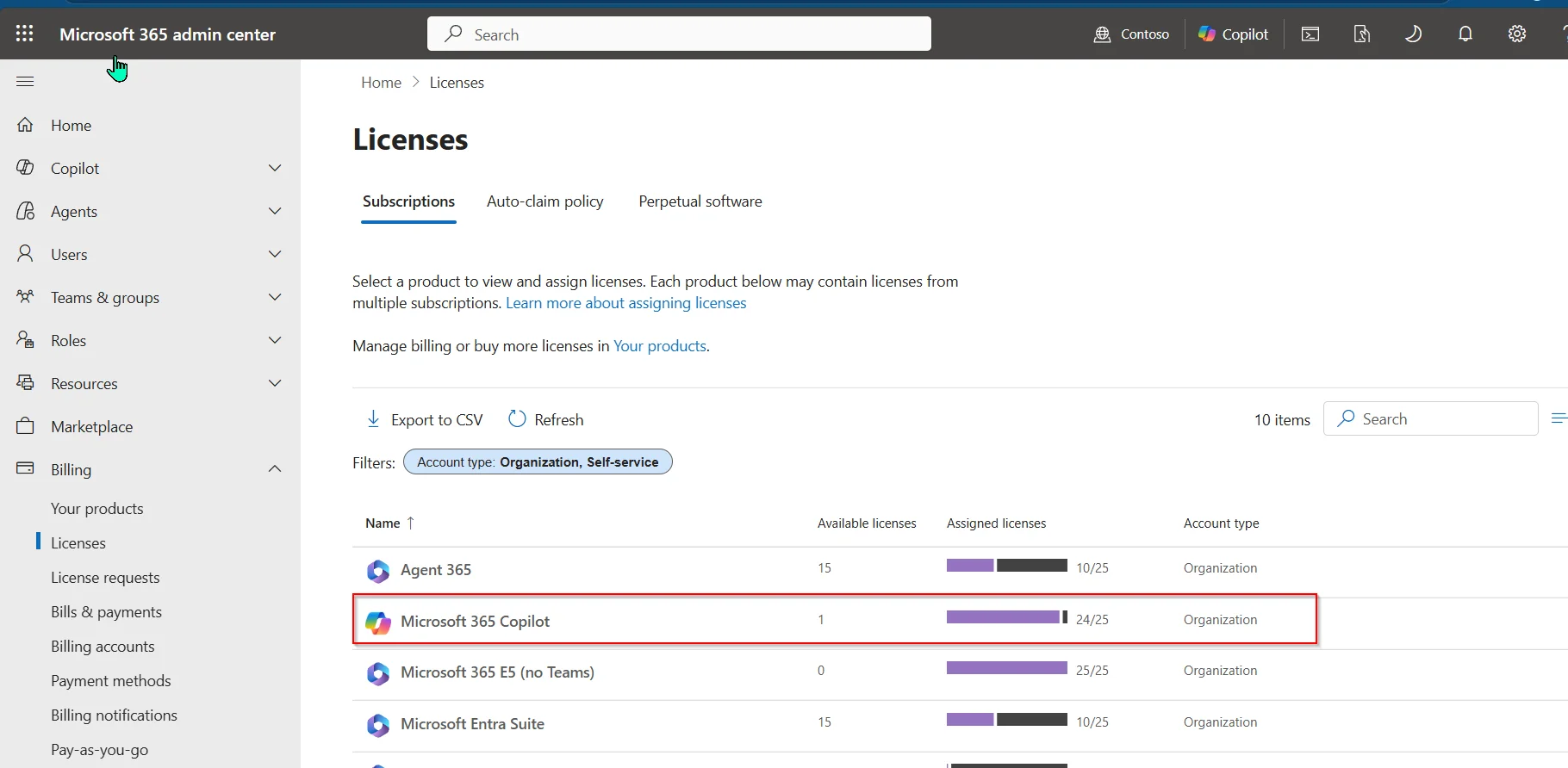
Billing comes first. Work IQ API calls are metered in Copilot Credits, so before anyone can call the API your tenant needs a usage-based billing plan set up in Copilot Studio (with an Azure subscription and resource group assigned), and the user has to be assigned to that plan. Microsoft lists this as a prerequisite in Enable your tenant for Work IQ. No billing plan, no calls — this is the step people miss.
On licensing: Microsoft’s GA licensing page says there is no separate Work IQ API subscription, SKU, or per-user licence for the API charge itself. Learn now describes reaching Work IQ over A2A, REST or MCP as usage-billed, and says that path doesn’t use connector licensing. So the question to answer before rollout isn’t “does our protocol need Copilot licences” — it’s “which of the tools our agent actually calls are connector-backed, and what do those need.” Check the entitlement on the tools, not on the transport.
If some of the tools your agent calls do require Copilot licences, assign them first and allow for propagation. Some tenants can take up to 24 hours before the entitlement is visible everywhere.
Admin Step 2 — Click the consent URL
Open this URL in your browser, replacing the tenant ID with yours:
https://login.microsoftonline.com/{your-tenant-id}/adminconsent?client_id=ba081686-5d24-4bc6-a0d6-d034ecffed87
Sign in as a Global Admin (or Cloud Application Admin, Application Admin, or Privileged Role Admin), click Accept, and you’ve granted tenant-wide consent for the seven delegated Graph permissions Work IQ uses:
| Permission | What it reads |
|---|---|
Sites.Read.All | Items in all SharePoint site collections |
Mail.Read | User mail |
People.Read.All | Users’ relevant-people lists |
OnlineMeetingTranscript.Read.All | Online meeting transcripts |
Chat.Read | User chat messages |
ChannelMessage.Read.All | All Teams channel messages |
ExternalItem.Read.All | External items (Copilot connectors) |
do_action / create_entity Tools — requires the end user’s own delegated permissions at call time and is denied by default until your tenant policy explicitly permits those mutations. The admin consent here doesn’t pre-authorise writes.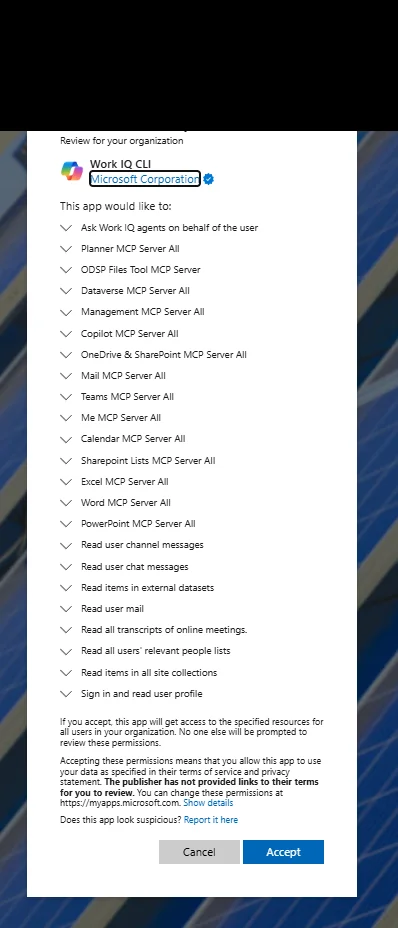

admin_consent=True in the URL bar; that's the success signal.Admin Step 2.5 — The AADSTS650052 trap
Some tenants will see this when clicking the URL above:
AADSTS650052: The app needs access to a service that
your organization has not subscribed to or enabled.
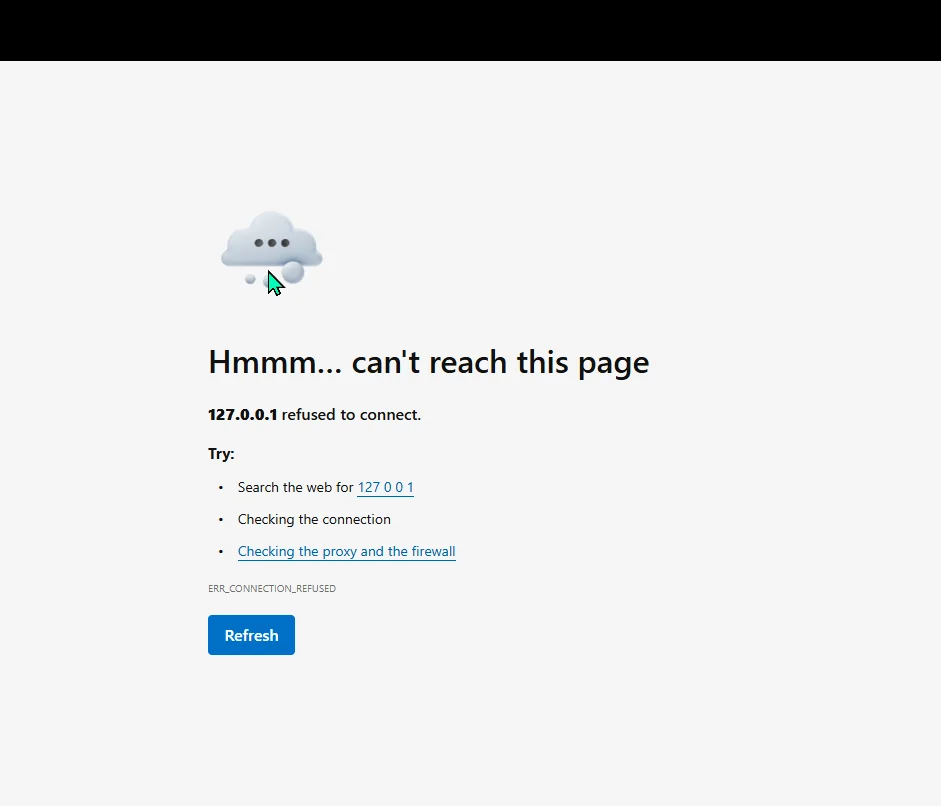
This is not your fault. The Work IQ Tools MCP Server resource (and a few related ones — Mail, Calendar, Teams, OneDrive, SharePoint, Word, Admin, Me, M365 Copilot) doesn’t have a service principal auto-provisioned in your tenant. The consent flow assumes they do and stops.
The fix is one PowerShell script:
# Clone the repo first (or download the scripts/ folder)
git clone https://github.com/microsoft/work-iq.git
cd work-iq

# Optional first — read-only check for what's missing
.\scripts\Verify-WorkIQTenant.ps1

# Then the fix — provisions the missing SPs and grants consent
.\scripts\Enable-WorkIQToolsForTenant.ps1
Before you run it, two things you need to know about the script (it’s well-behaved but does talk to your tenant in a few non-obvious ways):
| What happens | What you need |
|---|---|
Auto-installs the Microsoft.Graph PowerShell modules from PSGallery if missing | Say Yes to the PSGallery trust prompt the first time |
Runs Connect-MgGraph partway through with scopes Application.ReadWrite.All + DelegatedPermissionGrant.ReadWrite.All | A browser pop-up appears for admin sign-in. Sign in as a tenant admin |
| Requires one of: Global Admin, Cloud Application Admin, or Application Admin | Sign in with an account that holds one of these roles |
| Auto-disconnects from Graph when done | Nothing — clean exit |
If you’re on a server / headless box / SSH session where a browser pop won’t work, pass -UseDeviceCode and the script gives you a https://microsoft.com/devicelogin code to enter on any device:
.\scripts\Enable-WorkIQToolsForTenant.ps1 -UseDeviceCode
If your execution policy is Restricted, run with a bypass for the session only:
pwsh -ExecutionPolicy Bypass -File .\scripts\Enable-WorkIQToolsForTenant.ps1
After the script finishes, re-try the consent URL from Admin Step 2 — it’ll go through.
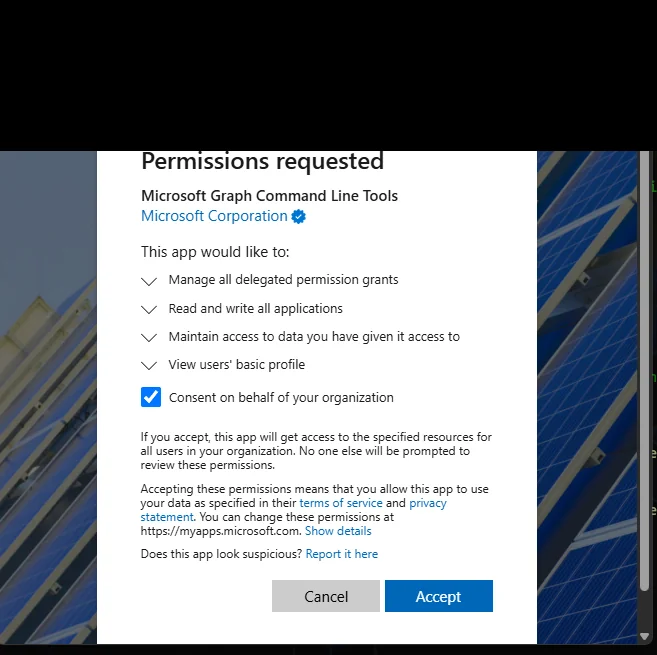
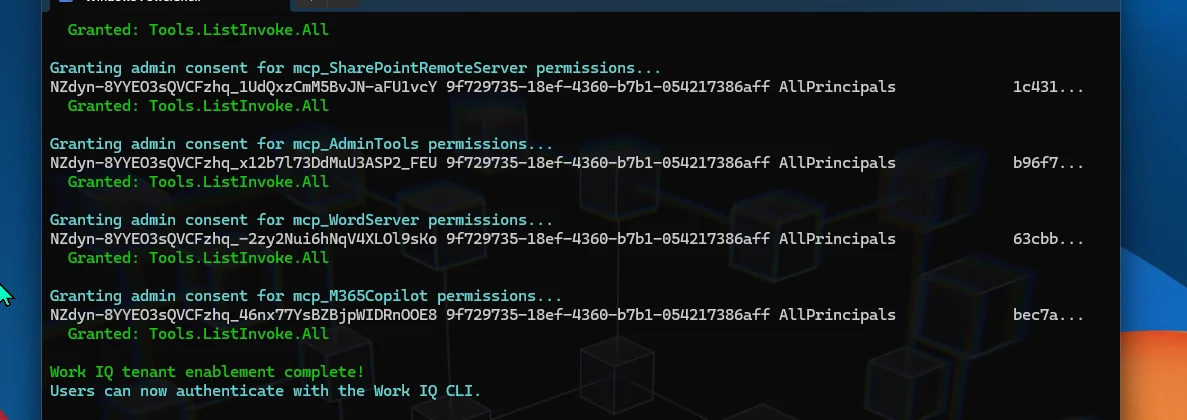
Enable-WorkIQToolsForTenant.ps1 first. It works whether your tenant needs the workaround or not. Five minutes of friction saved.
Heads up on the companion Verify script. The repo ships a read-only Verify-WorkIQTenant.ps1 next to the Enable script. Use Verify first if you want to see what is missing before changing anything. If Verify reports missing service principals or permission grants, run Enable; Enable is idempotent, so re-running it after a partial setup is safe.Admin Step 3 — Verify in Entra
After consent, head to Microsoft Entra admin centre → Identity → Applications → Enterprise applications. Filter or search for Work IQ CLI. You should see it listed with admin consent granted (the Permissions tab confirms the 7 Graph scopes). The full set of MCP-server-related SPs (Work IQ Tools, Mail, Calendar, Teams, OneDrive, SharePoint, Word, Admin, Me, M365 Copilot) should also be present in the same list — that’s how you know the Step 2.5 script (if you ran it) did its job.
To view this page you need at least Cloud Application Administrator or Application Administrator (read access). Global Admin works too.
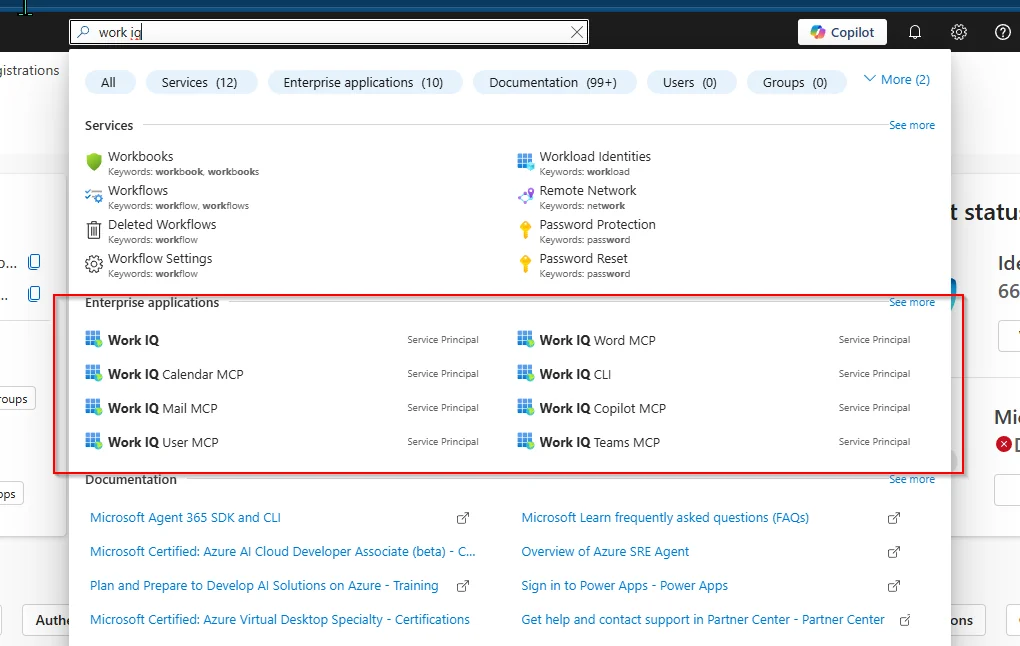
That completes the admin journey. Your users can now install + use Work IQ.
Setup — The User Journey (Pick An Install Path)
Now it’s the user’s turn. Once admin consent is done, every Copilot-licensed user installs Work IQ on their own machine in a few minutes.
Before you begin (user prereqs — the floor below is required no matter which path you pick) —
| Prereq | How to check / get it |
|---|---|
| A work account with a Microsoft 365 Copilot licence assigned | Ask your admin · features may take up to 24 hours to appear after assignment |
| Admin consent already granted for your tenant | Admin journey above must be done first · ask your admin |
| A browser that allows Microsoft sign-in pop-ups | All major browsers work; you’ll see a Microsoft sign-in page once during EULA acceptance |
Each install path below adds its own extras. Pick whichever path matches how you work.
Path A — Copilot CLI plugin (featured — fastest, lowest friction)
If you already use the GitHub Copilot CLI, this is a three-command setup.
Path A prereqs:
| Prereq | How to check / get it |
|---|---|
| GitHub Copilot subscription (Pro, Business, or Enterprise) | github.com/features/copilot |
| GitHub Copilot CLI installed | copilot --version from any terminal · install via docs.github.com/copilot/github-copilot-cli |
Then:
copilot
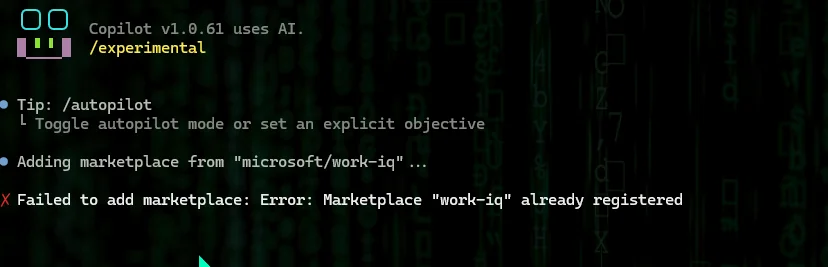
/plugin marketplace add microsoft/work-iq
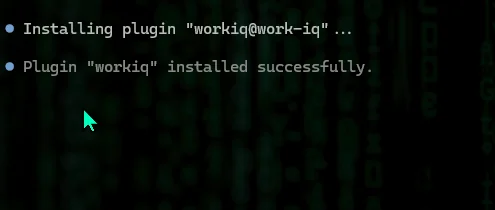
/plugin install workiq@work-iq
Restart Copilot CLI (exit then copilot again) and the workiq tool is available inside the same chat surface:
You: What are my upcoming meetings this week?
You: Summarise emails from Sarah about the budget.
You: Find documents I worked on yesterday.
Path B — VS Code one-click install (GUI-driven, no terminal-typing)
If your daily driver is VS Code (or VS Code Insiders) and you’d prefer a button to click rather than commands to type, Microsoft ships a one-click install badge in the GitHub README.
Path B prereqs:
| Prereq | How to check / get it |
|---|---|
| VS Code 1.99 or later (MCP server support arrived in spring 2026) | code --version · code.visualstudio.com |
| GitHub Copilot extension installed in VS Code | Open VS Code → Extensions sidebar → search “GitHub Copilot” → Install |
Node.js LTS (Copilot uses npx to launch the MCP server under the hood) | node --version should print 18 or higher · install from nodejs.org |
Browser allowed to open the vscode: protocol handler | First time you click the badge, the browser asks permission · click “Open” |
Click the “Install in VS Code” badge in the GitHub README — VS Code opens with an MCP install dialog pre-filled. Click Install, and Work IQ is registered as an MCP server in your VS Code workspace. Copilot Chat in VS Code can then call Work IQ as a tool.
There’s an equivalent badge for VS Code Insiders in the same README.
Path C — Autopilot / Microsoft Scout users (already installed)
If you already use Autopilot (the always-on personal agent Microsoft launched as “Scout” on 2 June 2026 and renamed to Autopilot on 25 September 2026), the Work IQ CLI is already bundled in your install. Existing installs may still show the Microsoft Scout name while the rename rolls out.
Path C prereqs:
| Prereq | How to check / get it |
|---|---|
| Autopilot (or Microsoft Scout) installed | Look for “Microsoft Scout” (or “Autopilot”) in the Windows Start menu · install via your tenant’s rollout |
| The CLI shim on PATH | Open a NEW terminal (so it picks up the installer’s PATH change) and run workiq --version |
Try this in a terminal:
workiq --version
If the version prints, the CLI is on your PATH — the app ships the same binary the standalone install does. If it’s a pre-GA build (0.4.x / 0.5.x), upgrade to the current GA release before you rely on it — Microsoft only supports GA builds. You still need to workiq accept-eula once (per account) before first use.
If workiq is not found even after an install, the bundled shim lives at %USERPROFILE%\.copilot\bin\workiq.cmd — open a new terminal (or restart your existing one) so the updated PATH takes effect.
Path D — npm global / npx (universal terminal path)
For anyone outside the Copilot CLI / VS Code / Scout world — or anyone who wants the absolute minimum dependencies — npm is the universal path.
Path D prereqs:
| Prereq | How to check / get it |
|---|---|
| Node.js LTS (version 18 or higher) | node --version — install the LTS release from nodejs.org if missing |
| npm + npx on PATH (bundled with Node.js) | npm --version and npx --version should both work |
Global-install permission (only for the npm install -g flow) | On macOS/Linux this usually needs sudo; on Windows the npm install-location is your user folder by default — no admin needed |
Then:
# Global install (persistent)
npm install -g @microsoft/workiq

# OR on-demand via npx (always pulls the latest, no install)
npx -y @microsoft/workiq mcp
Works on Windows (x64 + ARM64), Linux, macOS, and WSL. The npx form is what most MCP-aware tools (Claude Desktop, Cursor, etc.) use under the hood when you add Work IQ to their JSON config:
{
  "workiq": {
    "command": "npx",
    "args": ["-y", "@microsoft/workiq", "mcp"]
  }
}
Accepting the EULA (one-time, per user)
Whichever path you picked, before your first query you accept the EULA:
workiq accept-eula
This pops a browser for Microsoft sign-in. Use your work account — the one that has the Copilot licence assigned. Once accepted, your token is cached locally and you don’t see this flow again unless you workiq logout or your tenant invalidates the token.
What can go wrong here, and what to do:
| If you see… | Cause | Fix |
|---|---|---|
| The browser doesn’t open / nothing happens | You’re on a headless / SSH / remote session OR pop-ups are blocked | Try a workstation with a browser, or follow your terminal’s prompt for the device-code URL if it offers one |
| “AADSTS50058” or “no user signed in” | You hit Cancel on the sign-in page, or used a personal Microsoft account by mistake | Re-run workiq accept-eula and sign in with your work account |
| “User account is not yet provisioned for Work IQ” | Admin consent hasn’t been granted for your tenant yet, OR your Copilot licence is still propagating (up to 24h) | Wait 24h after licence assignment · ask your admin to verify the Admin Journey was completed |
| “License required” | You don’t have a Copilot licence | Ask your admin to assign Microsoft 365 Copilot to your account |
Your first query (the moment it clicks)
workiq --account <your-work-email> ask -q "What's on my calendar this week?" --verbose
Replace <your-work-email> with your full UPN — e.g., admin@contoso.onmicrosoft.com or j.smith@yourcompany.com. If you only have one Microsoft account on this machine, you can drop the --account flag and workiq uses the cached one.
What --verbose adds: the conversation ID and request ID. You can later use workiq debug <conversationId> to generate a shareable diagnostic link — useful when you want to compare what an agent saw across runs, or when you raise a support ticket.
Don’t know your tenant domain? Sign in to outlook.office365.com — the email address in the top-right corner is your UPN. Your tenant domain is everything after the @.
That’s the user journey. Five minutes if you’re on the Copilot CLI plugin path, ten minutes via VS Code, less than that if Scout is already on the box.
Build Something With It — Two Samples + The Repo
Asking Work IQ questions in a CLI is fine, but it’s not why the API exists. The actual point is to build things on top of it — automations, custom UIs, integrations that wire Work IQ into where your team already works.
To make that concrete, here are two small samples (~270 lines total) we shipped to a public repo as Day-1 companion code. Both deliberately stay small so you can read them end-to-end, fork, and adapt:
👉 github.com/susanthgit/aguidetocloud-workiq-samples (MIT, fork away)
Sample 1 — Morning brief generator (morning-brief/)
A 190-line Node.js script that runs once at 8am, asks Work IQ three orchestrated questions, and writes a markdown standup brief to disk:
- “Summarise everything that’s happened with Project X in the last 7 days”
- “What’s on my calendar today and tomorrow?”
- “What commitments have I made that I haven’t followed up on?”
Schedule it with Windows Task Scheduler or cron and you’ve got an auto-generated brief in your inbox every morning — built on top of Work IQ’s agent orchestration, not a single CLI question. The script makes three sequential A2A calls and stitches the results.
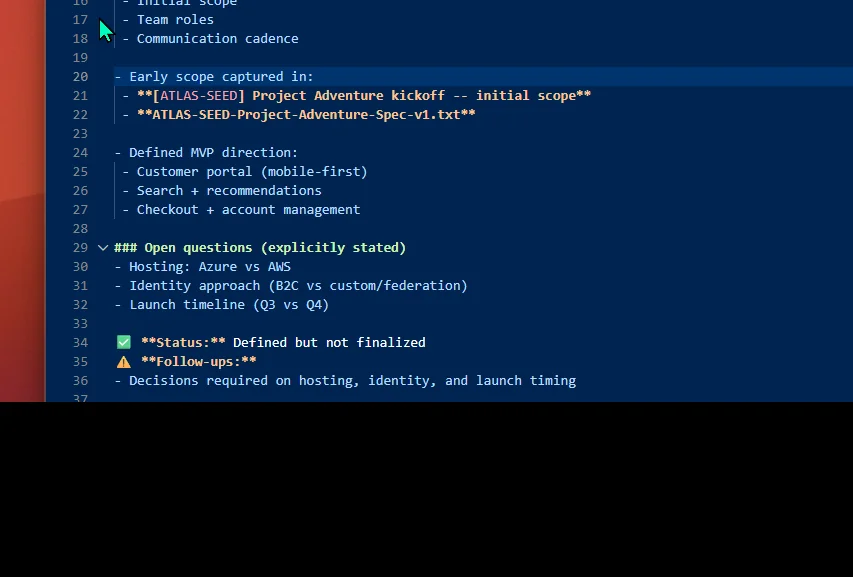
cleanForBrief() post-processor handles that — Work IQ's raw output has long Outlook/SharePoint URLs and inline citation markers that look terrible in a markdown file; the cleaner makes them readable.It’s adaptable. Pipe it into email with nodemailer. Post it to a Teams incoming webhook. Render as HTML and serve. The brief is just markdown — adapt it to your workflow.
Sample 2 — Web-app (web-app/)
A tiny Express server + single-page HTML interface (~270 lines) for asking Work IQ questions in a browser. Demonstrates the embed pattern for adding Work IQ to any internal web app.
The full UX, three screenshots:

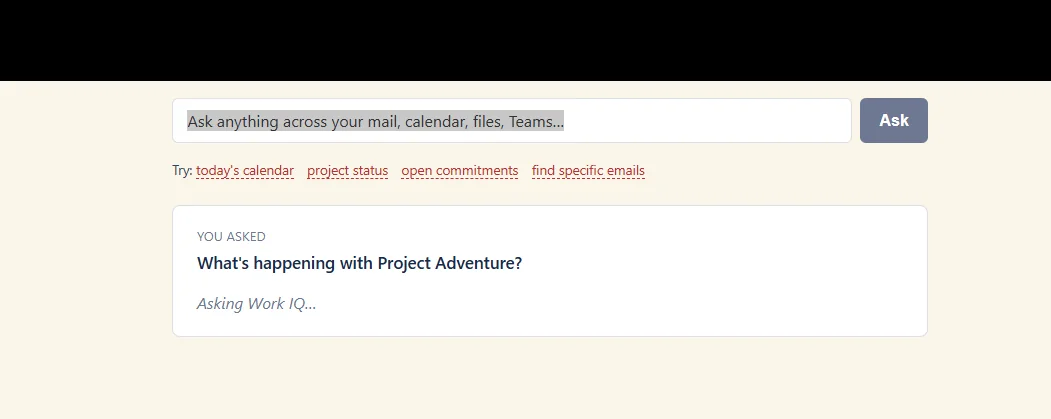
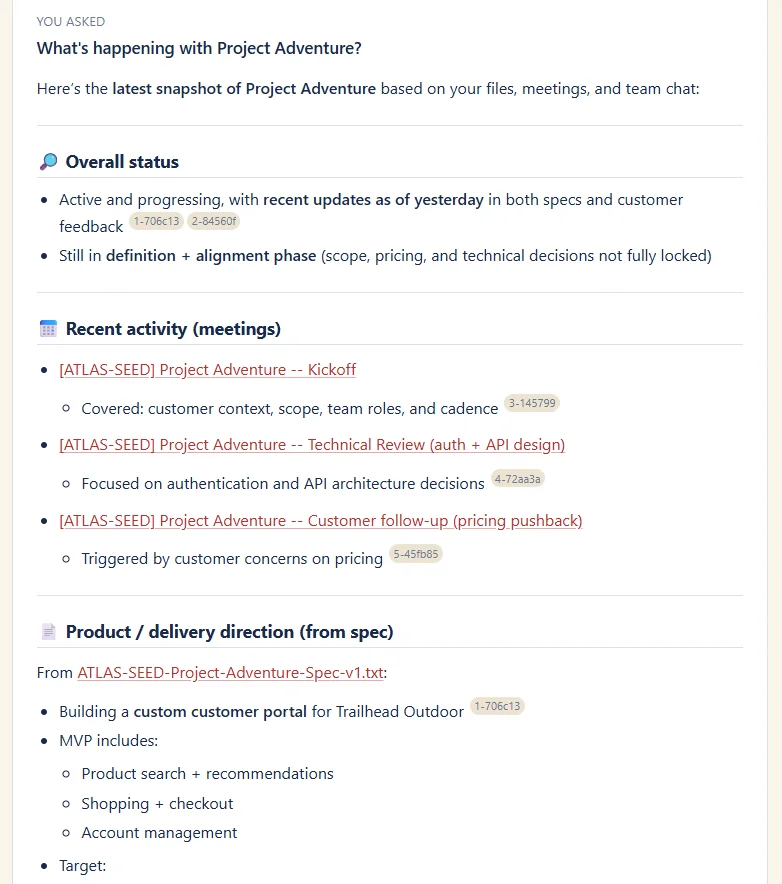
marked + DOMPurify on the response.The frontend is ~200 lines of vanilla HTML/CSS/JS — no React, no build step. Backend is ~150 lines of Express + MSAL. Multi-turn conversations work via Work IQ’s contextId (the server holds a Map of conversationId → A2A contextId across turns).
The architecture we landed on (and the false starts)
Both samples authenticate via MSAL device-code flow and call the Work IQ A2A REST endpoint directly with a bearer token. Here’s the honest history of how we got there:
| Tried | Why we dropped it |
|---|---|
workiq CLI subprocess via Node child_process.exec | CLI’s MSAL auth uses WAM (Windows Account Manager broker), which requires a windowed terminal with a parent HWND. Doesn’t work in any non-GUI shell — legacy PowerShell, SSH session, CI runner, even GitHub Copilot CLI’s embedded terminal. Sub-process inherits the same constraint. |
Work IQ MCP server (workiq mcp) as stdio subprocess + JSON-RPC | Same WAM auth issue. Also the MCP server in the version we tested didn’t pick up the --account flag or the WORKIQ_ACCOUNT env var — it defaulted to whatever account was last cached locally. On a workstation that’s been signed into multiple Microsoft accounts, that means the agent picks up the last-used tenant unless you explicitly clear the cache. Worth knowing if you’re building for multi-tenant dev workstations. |
| MSAL device-code → A2A REST (what we shipped) | Works in any terminal — device code prints a URL + code, you enter it once in any browser, refresh token cached for ~90 days. Account routing is unambiguous (the token’s UPN claim IS the auth identity). No WAM. |
The A2A endpoint lives at https://workiq.svc.cloud.microsoft/a2a/. It speaks JSON-RPC 2.0 with an A2A-Version: 1.0 header. You POST a SendMessage method with a question in the parts[].text, get back a task object with artifacts[].parts[].text containing the answer.
Microsoft Learn now documents a Work IQ REST API as well — and since this post first ran, the REST overview has quietly dropped its preview label. Treat it as a related conversational surface, not a drop-in replacement for everything above: the REST page is focused on multiturn prompts grounded in Microsoft 365 Copilot, while the A2A sample here uses the agent-to-agent JSON-RPC endpoint directly.
Open invitation
These samples are deliberately small + unopinionated. Real production runs would add: retries, structured logging, per-tenant config, secrets management, rate limiting, streaming responses, multi-user OAuth federation. None of that is here. They’re starting points.
If you build something interesting on top of these, send me a link — I’d love to feature what the community builds first.
What It Costs — Copilot Credits Explained
Work IQ API usage is billed through Copilot Credits, a consumption model. Microsoft’s GA licensing page is explicit: there is no separate Work IQ API subscription, SKU, or per-user licence for the API charge itself.
Early GA docs framed this by surface — some pages read as though REST or CLI users each needed a Microsoft 365 Copilot add-on licence. Microsoft has since clarified it (see the September update below), so treat that older per-surface framing as superseded: there’s no separate Work IQ SKU, and the protocol you call Work IQ over doesn’t itself gate on a Copilot licence.
Update, September 2026 — this has firmed up since Day 1, and in a helpful direction. Learn now describes reaching Work IQ through A2A, REST or MCP as usage-billed, and says plainly that this path doesn’t use connector licensing. The entitlement question has moved off the protocol and onto what your agent actually touches: connector-backed Microsoft 365 tools are where a per-user entitlement still matters. The wording I’d use with a customer today is “the API itself is billed by consumption and has no Work IQ SKU — check entitlements for the specific tools your agent calls, not for the protocol you call them over.”
The unit: 1 Copilot Credit = $0.01 USD (source — Microsoft Copilot Studio estimator).
The two cost components:
| Component | Pricing shape | What you pay for |
|---|---|---|
| Tools (the 10 verbs) | Fixed per call | Microsoft lists 0.1 Copilot Credits per Work IQ Tool API call. If 1 Copilot Credit = $0.01 USD, that is $0.001 per tool call. |
| Chat + Context | Variable, scenario-based | Microsoft has published illustrative per-call ranges — Light $0.20-$0.40, Medium $0.30-$0.75, Heavy $0.50-$1.50 — as a planning guide rather than a rate card. Reconfirm current figures on Microsoft’s pricing page, since the range depends on scenario complexity, grounding, retrieval and reasoning. |
The new admin-centre cost dashboard that launched with Work IQ is where this gets manageable:
- Choose prepaid or pay-as-you-go billing where available
- Track Work IQ API consumption through Copilot Credits
- Use spend controls and alerts once your tenant exposes them
- Reconcile real tenant usage against the public scenario ranges
Work IQ is the first product managed through this dashboard — Copilot Studio and others migrate in over time. If you’ve ever wished M365 admin centre had real cost controls on Copilot consumption, this is the first version of that.
→ Full walkthrough of that dashboard — spending policies, pay-as-you-go vs prepaid vs the P3 pre-purchase, admin roles, and screenshots — is in Microsoft 365 Copilot Cost Management & Billing.
The admin-centre Copilot Credits cost-management surface has now shipped and covers Work IQ — see the Cost Management & Billing guide for the full walkthrough with screenshots.
Plain-English summary on cost:
- Simple tool actions are cheap at the published 0.1-credit fixed rate.
- Query-style Chat / Context calls are where cost planning matters, because Microsoft prices them by scenario complexity.
- The honest planning posture: start with a small pilot, watch real consumption, then formalise budgets.
A worked example — 50-user pilot
Let’s make the abstract concrete. Imagine a 50-user pilot — say, your customer-success team — using a Work IQ-powered agent for a “what’s new on my accounts today?” morning brief each weekday morning. Each brief makes one light Chat / Context-style query plus two Tool API calls. Numbers below use Microsoft’s GA licensing page ranges; verify against your own admin-centre dashboard before budgeting.
| Line item | Calculation | Monthly estimate |
|---|---|---|
| Tools (fixed 0.1 cr / call) | 50 users × 1 brief × 2 tool calls × 22 working days × 0.1 cr × $0.01 | $2.20 / month |
| Chat + Context (Light scenario) | 50 × 1 brief × 22 working days × $0.20-$0.40 | $220-$440 / month |
| Subtotal Work IQ consumption | Tools + Light Chat / Context | ~$222-$442 / month |
| Microsoft 365 Copilot licences (only if the tools you call need them) | 50 × current list price | check Microsoft pricing |
| Total planning range | Work IQ consumption, plus any Copilot licences you actually need | ~$222-$442 / month + licences |
A few honest reads on these numbers:
- The fixed Tool API charge is tiny. The old pre-GA estimate of 5 credits per tool call was too high; the GA licensing page says 0.1 credits.
- Chat / Context is the lever. Keep prompts tight, ask for concise outputs, and avoid multi-turn loops unless the workflow needs them.
- Licences can still dominate — but check before you assume them. If the tools your agent calls need Microsoft 365 Copilot per user, that baseline dwarfs the Work IQ consumption on a small pilot. Microsoft’s own pricing page is the number to quote; list prices move, and they vary by region, tax and agreement.
- Cap before you scale. Set a low per-user monthly Work IQ spending limit for the first couple of weeks of the pilot. The admin-centre dashboard will tell you whether to relax or tighten before you roll out to the wider org.
What Changes When This Lands — Outlook, Scout, Custom Apps
Work IQ being a layer — not a product end-users open — means the visible changes show up in other Microsoft surfaces over time.
Microsoft Scout — the first Autopilot agent Microsoft announced on 2 June 2026 — builds context powered by Work IQ over time. Per the Scout announcement, Scout “builds context powered by Work IQ, learning how you work, what you care about, and what needs to happen next.” It’s open-source-based (OpenClaw) and lives across Teams, Outlook, OneDrive, SharePoint. When you ask Scout to “block prep time for Thursday’s customer meeting” or “flag any decisions that have been stalled for more than 5 days”, what’s happening underneath is Scout’s reasoning loop calling Work IQ’s Tools, Context, and Chat APIs in a sequence.
Custom apps built by partners and ISVs — every agent platform that supports MCP can now point a tool config at the Work IQ MCP server and gain access to any user’s M365 tenant in a structured way. That includes Claude Desktop, every IDE with MCP support, custom agent frameworks like LangGraph and AutoGen, and any product anyone builds on top of MCP. The bar to integrate is lower than it’s ever been — five lines of JSON config.
Inside the M365 chrome itself — Microsoft signals that more of Outlook’s commitments tracking, Teams’ decision-extraction, OneDrive’s smart-folder behaviour will increasingly be backed by Work IQ as a shared back-end. You won’t see Work IQ as a UI; you’ll see Outlook quietly getting smarter about what you’ve committed to.
What does NOT change — Microsoft Graph is not deprecated. Work IQ is the recommended foundation for new agent applications. For batch jobs, scheduled imports, app-only services, and existing automations that work — stay on Graph. The two coexist for the long haul.
The Honest Limitations
In the spirit of honest > charming, here’s what surprised me on Day 1.
- Delegated-only auth is a real constraint. If your existing architecture relies on app-only / unattended-agent / service-principal auth (most batch jobs, most scheduled imports), Work IQ is not for you yet. Microsoft has been clear they don’t support it. This rules out a lot of analytics, reporting, and back-office automation patterns. Use Graph for those.
- Licensing wording is still easy to misread. The API has no separate Work IQ SKU, and Microsoft has since clarified that reaching Work IQ over A2A, REST or MCP doesn’t use connector licensing. Be precise with customers: consumption billing doesn’t mean “no entitlement needed anywhere” — it means the entitlement question follows the tools your agent calls, not the protocol you call them over.
- The first call is slower than subsequent ones. Semantic-index warmup matters. Build for the warm-path numbers, but flag the cold-path latency to users in any UX where the first query is “instant” expectations.
- Agents need to be taught to use the resource-path style. The shift from
sendMail-as-tool todo_action /me/sendMail-as-resource-path is genuinely different. Your prompts and your agent system messages need updating. Don’t expect a one-line swap to work out of the box. - REST is documented now, but narrower than the full Work IQ tool surface. REST focuses on multiturn conversational answers grounded in work and web data. It does not support actions like sending emails, scheduling meetings, content generation skills, long-running tasks, or non-text responses.
Top 5 Errors You’ll Hit (And What To Do)
Save yourself the doomscroll. Five errors cover ~90% of the support questions in the first month of using Work IQ. Quick-reference here, full context lives in the relevant sections above.
| Error you’ll see | Most likely cause | First thing to try |
|---|---|---|
| AADSTS650052 — “The app needs access to a service…that your org has not subscribed to.” on the admin consent URL | The parent Work IQ service principal (fdcc1f02-fc51-4226-8753-f668596af7f7) isn’t yet provisioned in your tenant — Quick Start consent URL assumes it is | Run .\scripts\Enable-WorkIQToolsForTenant.ps1 from the microsoft/work-iq repo. Idempotent — safe to re-run. Then re-try the consent URL. (Full context: Admin Step 2.5) |
AADSTS50058 / “no user signed in” on workiq accept-eula | Cancelled the sign-in pop / signed in with a personal Microsoft account by mistake | Re-run workiq accept-eula and sign in with the work account that has the Copilot licence assigned |
WAM / “user cancelled” on workiq accept-eula inside Copilot CLI, SSH, conhost, or a CI runner | Work IQ MSAL uses WAM (Windows Account Manager), which needs a windowed terminal with a parent HWND it can attach to | Run workiq accept-eula from a regular Windows Terminal or PowerShell window first (one-time). Token caches, then any embedded terminal works |
workiq ask returns “User does not have access to Microsoft 365 Copilot” | Account is signed in correctly but doesn’t have a Copilot licence assigned | Have an admin assign a Microsoft 365 Copilot licence in admin.microsoft.com → Billing → Licenses → Microsoft 365 Copilot → Assign licenses |
Your MCP-based code picks up the wrong account even though you passed --account user@tenant | The workiq mcp server silently ignores --account and WORKIQ_ACCOUNT env var — defaults to the last-cached account in ~/.workiq/ | For multi-tenant dev workstations, isolate accounts with $env:USERPROFILE reassignment per session, OR call A2A REST directly (see the samples repo — MSAL device-code per-tenant, no MCP server) |
Two general debug tools worth knowing:
workiq ask --verbose— prints the conversation ID and request ID; pair withworkiq debug <conversationId>to generate a shareable diagnostic link Microsoft support can read.workiq logout— clears the MSAL token cache. Useful when you suspect token staleness.
Where To Go Next
Four doors:
- microsoft/work-iq on GitHub — the source for the CLI, ADMIN-INSTRUCTIONS.md, and the
Enable-WorkIQToolsForTenant.ps1script. Star it. - Work IQ overview on Microsoft Learn — canonical conceptual docs, updated frequently.
- Work IQ API overview on Microsoft Learn — protocol reference (A2A, MCP, REST) with worked request/response examples.
- Work IQ MCP overview on Microsoft Learn — the 10-verbs reference and design principles in Microsoft’s own words.
If you build something on Work IQ and want to compare notes — send me a message. I’m planning a follow-up post measuring real-tenant performance on the 80% / 2× claims, and a deeper dive on the cost-management dashboard once a couple of months of usage data is in.
Sources
- Microsoft 365 Blog — Announcing the new Work IQ APIs (2 Jun 2026)
- Microsoft 365 Blog — Introducing Microsoft Scout (2 Jun 2026)
- Microsoft Learn — Work IQ overview
- Microsoft Learn — Work IQ API overview
- Microsoft Learn — Work IQ REST API overview
- Microsoft Learn — Work IQ MCP overview
- Microsoft Learn — Work IQ CLI
- Microsoft Licensing — Work IQ GA
- microsoft/work-iq GitHub repo
- microsoft/work-iq ADMIN-INSTRUCTIONS.md
- Microsoft Copilot Studio Estimator (1 Copilot Credit = $0.01 USD anchor)
Frequently asked questions
Everything I get asked about Work IQ in the first 30 seconds of any conversation.
What is the Work IQ API? #
How is Work IQ different from Microsoft Graph? #
Do users still need a Microsoft 365 Copilot licence if Work IQ is consumption-based? #
The cleanest answer today is: Work IQ API usage is consumption-billed, and reaching it over A2A, REST or MCP doesn’t carry connector licensing.
Microsoft Licensing says there is no separate Work IQ API subscription, SKU, or per-user licence; API calls draw down Copilot Credits. Since GA, Learn has firmed this up — the A2A / REST / MCP path is usage-billed and explicitly doesn’t use connector licensing. The entitlement question has moved off the protocol and onto what your agent actually touches: connector-backed Microsoft 365 tools are where a per-user entitlement still matters.
My practical read: budget for Copilot Credits for API usage, and check the entitlement on the specific tools your agent calls rather than assuming one applies to the protocol itself.
If my agent helps 500 employees, do all 500 need a Copilot licence? #
Not necessarily — and this is the bit worth slowing down on. Work IQ still runs as a signed-in human; there’s no “just the agent” mode (no application-only auth, in Microsoft-speak). So if your agent helps 500 people, those 500 are the delegated identities the agent acts under. What they each need depends on the tools your agent calls, not on the protocol you call them over.
Where Copilot entitlements do apply, the maths gets real fast — check Microsoft’s pricing page for current list prices, since they move and vary by region, tax and agreement. Either way: pilot with 30-50 users first, watch the consumption dashboard, then scale.
Who needs to do what — admin vs end user? #
Can I just use Microsoft Scout instead of installing anything separately? #
Can my agent run without a user signed in (app-only auth)? #
How does an admin enable Work IQ for the tenant? #
Enable-WorkIQToolsForTenant.ps1 script — it provisions the missing service principals that the consent flow assumes are already in your tenant.