Microsoft Copilot Cowork — New 2026 Pricing Guide
↗ the hybrid pricing model in plain English — when per-seat works, when consumption kicks in, and how to model cost before you commit
On this page
The hub for this series — Microsoft Copilot Cowork — The Complete Guide — covers what Cowork is, how it works, and the honest take. This spoke is the pricing and cost-management reference.
Source: Microsoft 365 Blog — Copilot Cowork is now generally available
TL;DR
- Cowork needs a Microsoft 365 Copilot seat for each user — and then bills the actual Cowork work on a usage basis, paid in Copilot Credits.
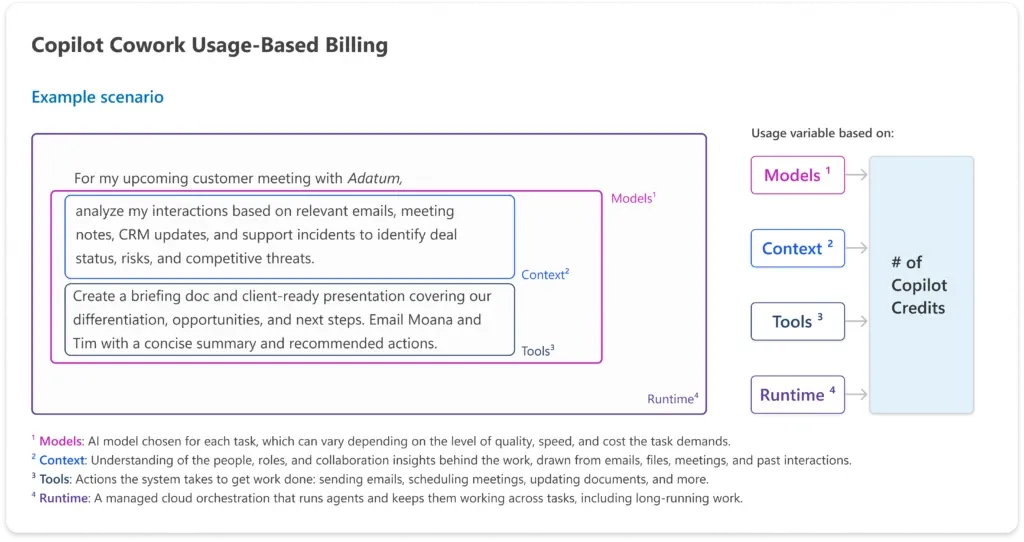
- Each task’s credit cost comes from four things: the models it runs, the context it pulls in, the tools it calls, and the runtime it needs.
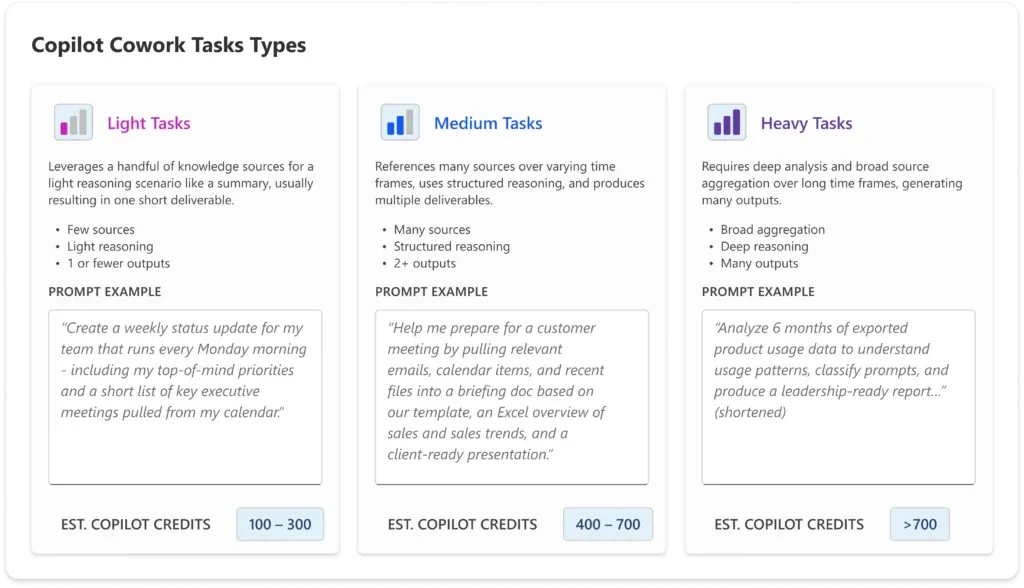
- Microsoft sorts tasks into light (≈100–300 credits), medium (≈400–700), and heavy (700+) — a quick summary is cheap; a deep multi-output report costs more.
- Two ways to pay: pay-as-you-go at $0.01 per Copilot Credit, or prepaid (P3) — commit to a volume up front for a discount.
- Admins manage it all from a Cost Management dashboard in the Microsoft 365 admin center: spending limits, alerts, and usage reporting per user, group, and tenant. Cowork is off by default.
- In Microsoft’s own testing (an internal study on the same model), Copilot Cowork came out 30–40% cheaper than running Claude Cowork through its Microsoft 365 connector — actual savings vary with usage.
The bill has two parts
Getting these two layers straight is the whole game when you’re estimating Cowork.
Part 1 — the Microsoft 365 Copilot seat (predictable, per user)
Cowork requires the Microsoft 365 Copilot User Subscription License — the same Copilot seat (listed at $30 per user per month) that powers Chat and the in-app experiences. That one seat already includes a lot:
- Copilot Chat, and Copilot in Word, Excel, PowerPoint, Outlook, and Teams
- The Work IQ context engine that grounds answers in your real work
- A multi-model system with frontier intelligence
- Pre-built agents like Researcher and Analyst, plus custom agents from Agent Builder
That’s the steady, predictable, per-user-per-month part of the bill.
Part 2 — Cowork usage (Copilot Credits)
Cowork’s heavier, multi-step work is billed on usage, denominated in Copilot Credits. This is the part that flexes with how much your team actually hands to Cowork. A team that runs a few light tasks a week barely touches it; a team running long, multi-output tasks all day will see real consumption.
What a task actually costs — the four inputs
Microsoft prices each Cowork task from four inputs:
| Input | What it means |
|---|---|
| Models | The AI model chosen for the task — higher-capability models cost more per unit of work |
| Context | Understanding the people, roles, and history behind the work, drawn from emails, files, meetings, and past interactions |
| Tools | The actions taken to get work done — sending emails, scheduling meetings, updating documents, and more |
| Runtime | The managed cloud orchestration that keeps agents working across the task, including long-running work |
Add those up and you get the number of Copilot Credits a task consumes. The intuition is simple: a quick single-step task on a light model with little context is cheap; a long, multi-tool task on a top model grounded across your whole mailbox is the expensive end.
Light, medium, heavy — what tasks really cost
Source: Microsoft 365 Blog — Copilot Cowork is now generally available
From the Frontier preview, Microsoft saw three common task shapes. The credit ranges below come from Microsoft’s GA blog — treat them as illustrative estimates, not fixed billing tiers (the actual credits a task uses will vary):
| Task type | What it looks like | Est. Copilot Credits | Roughly, at $0.01/credit (PayGo) |
|---|---|---|---|
| Light | A few sources, light reasoning, one short deliverable (e.g. a Monday status update) | 100–300 | ~$1–$3 |
| Medium | Many sources, structured reasoning, two or more outputs (e.g. a meeting-prep doc + Excel + slide) | 400–700 | ~$4–$7 |
| Heavy | Broad aggregation, deep reasoning, many outputs (e.g. classify six months of usage data into a leadership report) | 700+ | ~$7+ |
These ranges assume Anthropic Opus 4.8 (the model Microsoft used to build its estimator). A lighter model lowers the cost, and Microsoft’s upcoming Cowork 1 model is designed to handle everyday tasks at substantially lower cost.
These three sizes line up with the Snack / Meal / Feast ladder in the prompts spoke — a Snack is a light task, a Feast is a heavy one. To see real, copy-paste prompts at each size, start there.
Know your exact per-task cost — the /cost command
The ranges above are estimates. Cowork can tell you the exact number for a task you’ve actually run. When a task finishes, type /cost in the task window and Cowork replies with the precise credits it used so far:
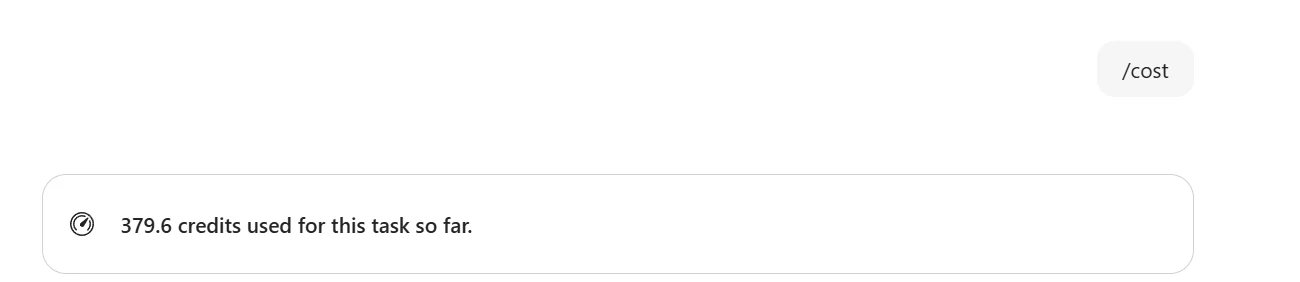
That one number is useful. Whether you’re an admin sizing a rollout or an individual making the case for your own Cowork seat, you can take a task you run regularly, see what it really costs, and project it:
- Run the task once and type
/cost— note the credits (here, 379.6). - Decide how often you’d run it in a month (say 20 times).
- Drop both numbers into the Cowork Cost Calculator — its credit-check works out the monthly cost in your currency (≈ $76 a month at $0.01 per credit, in this example).
Now you have a real, defensible figure instead of a guess — the kind of number that turns “I think this would help” into “this saves me hours for about $76 a month.”
Who runs Cowork, and how much
Source: Microsoft 365 Blog — Copilot Cowork is now generally available
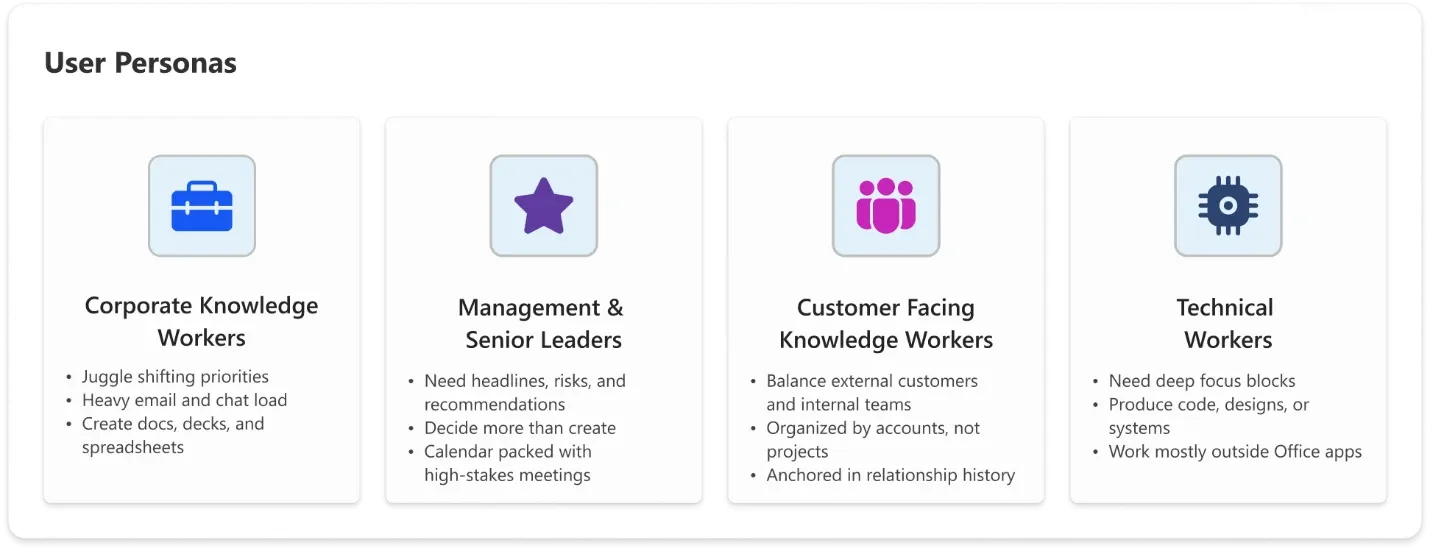
Microsoft also mapped four user personas with different usage patterns — handy when you’re estimating across a whole team rather than one task:
- Corporate knowledge workers — shifting priorities, heavy email and chat, lots of docs and decks
- Management and senior leaders — want headlines, risks, and recommendations; decide more than they create
- Customer-facing knowledge workers — balance external customers and internal teams; organised by account, anchored in relationship history
- Technical workers — need deep focus blocks; produce code, designs, or systems, often outside the Office apps
To model your own mix, use our free Cowork Cost Calculator — pick your team size and a usage level (light, balanced, or heavy) to see the monthly burn, the seat-vs-meter split, and the all-in total live, in your currency. Microsoft also publishes an official Customer Cowork Estimator spreadsheet — plug in users per persona and their expected light, medium, and heavy volumes, and it sums an estimate you can refine over time.
How you pay — pay-as-you-go or prepaid
Two billing options, both set up in the admin center:
| Option | How it works | Best for |
|---|---|---|
| Pay-as-you-go (PayGo) | Consume credits as tasks run, billed in arrears at $0.01 per Copilot Credit | Spiky or unpredictable usage, no upfront commitment |
| Prepaid (P3) | Commit to a usage volume up front in exchange for a discount | Steady, predictable usage and budget certainty |
They’re not either/or: P3 layers on top of pay-as-you-go. Your prepaid credits are consumed first, and anything beyond them automatically falls back to PayGo — so a task never just stops mid-run because the prepaid block ran out.
Grace period for Frontier customers: billing for Cowork started on 16 June 2026. Tenants that had at least one user running Cowork in the Frontier program (30 March–16 June 2026) get a grace period and won’t be billed until 1 July 2026 — time to set spending limits and allocate budgets before usage ramps.
Already paying for GitHub Copilot? Its GitHub AI Credits can’t be spent on Cowork — they’re separate products on separate meters. The one prepaid plan that covers both is the Microsoft Agent Pre-Purchase Plan. See Copilot & GitHub Pre-Purchase Plans (P3) Explained.
Models and cost
You’re not locked into one model — and the model you pick is one of the biggest cost levers:
- At GA, Cowork runs on Anthropic Opus 4.8 and Sonnet 4.6.
- In Frontier, you can also use GPT 5.5, and pick the model per task with the model picker to manage cost.
- Cowork 1, Microsoft’s own fine-tuned model, is coming in the weeks after GA — built to handle everyday tasks at substantially lower cost.
Microsoft also expects per-task costs to fall over time as models get cheaper, model-to-task matching improves, and context and tool use become more efficient.
Managing the cost — the Cost Management dashboard
Usage-based billing makes cost visibility essential. Microsoft ships a Cost Management dashboard in the Microsoft 365 admin center, organised around three jobs:
Control — decide when Cowork turns on, who gets it, and how much they can spend
- Off by default — admins choose when to enable Cowork and who gets access
- Spending limits at tenant, group, and user levels, including user-level caps inside group policies
- Customisable usage alerts — set the thresholds that matter and choose who gets notified
- User-initiated credit requests — a user who needs more credits to finish a task can request them from inside Cowork
Visibility — see what’s being used and what it costs
- Usage reporting by user, group, and feature — an Overview tab for a real-time snapshot of consumption and remaining capacity, and a Consumption tab to drill into patterns by user, group, service, or agent
- Per-task pricing in credits — users can type
/costin any task window to see the exact credits a task has used so far (see “Know your exact per-task cost” above)
Efficiency — options to keep cost down
- The PayGo vs P3 choice above
- Model choice in Frontier to manage cost-per-task
Setting it up is a guided flow: enable usage-based billing (prepaid P3, pay-as-you-go, or existing capacity), optionally connect an Azure subscription for billing at scale, define spending policies for who can consume and how much, and set hard limits so nothing runs away from you.
→ For the full cross-service picture — spending policies, the two admin centres, the P3 pre-purchase in detail, admin roles, and the P1/P2/P3 myth — see Microsoft 365 Copilot Cost Management & Billing.
So what will it actually cost us?
The honest answer: it depends on how much real work your team hands to Cowork — which is exactly why the seat-plus-usage model exists. A practical way to budget:
- Start with seats — one Microsoft 365 Copilot seat per Cowork user (the predictable part).
- Estimate usage — use the estimator with your persona mix and expected light/medium/heavy volumes.
- Cap it — set spending limits and alerts before you roll out, so the consumption layer can’t surprise you.
- Watch and tune — use the Overview and Consumption tabs to see the real cost drivers, then adjust policies and model choices.
Frequently asked questions
Do I need a Microsoft 365 Copilot licence for Cowork? Yes. The Microsoft 365 Copilot seat is required — it’s the entry point. Cowork’s actual task work is then billed on top, on a usage basis in Copilot Credits.
Why does Cowork cost extra on top of my Copilot seat? Because the two do different shapes of work. Your Copilot seat is a flat, predictable monthly fee for everyday help — Chat and Copilot inside Word, Excel, Outlook, and Teams. Cowork’s long-running, multi-step tasks use a variable amount of model, context, tools, and runtime each time, so they’re billed on what they actually use. Pay-for-what-you-use keeps one team’s heavy month out of everyone else’s flat fee.
What happens if I run out of credits in the middle of a task? Admins set the spending limits, so usage can’t quietly run away. If you need more to finish something, you can request additional credits from inside Cowork. And if your organisation prepaid (P3), those credits are used first and anything beyond them rolls to pay-as-you-go automatically — a task won’t just stop dead because the prepaid block emptied.
What’s a Copilot Credit worth? On pay-as-you-go, $0.01 per credit. So a light task (≈100–300 credits) is roughly $1–$3, and a heavy one (700+) is about $7 and up. Prepaid (P3) commits to a volume for a discount.
Can I cap what my team spends? Yes. The Cost Management dashboard lets admins set spending limits per tenant, group, and user, plus alerts — and Cowork stays off until an admin turns it on.
Pay-as-you-go or prepaid — which should I pick? PayGo suits spiky, unpredictable usage with no commitment; prepaid (P3) suits steady usage and gives budget certainty at a better effective rate.
We were in the Frontier preview — when does billing start? Billing began 16 June 2026, but Frontier tenants with Cowork usage between 30 March and 16 June get a grace period and aren’t billed until 1 July 2026.
How can I make Cowork cheaper? Pick a lighter model where it fits (and watch for Cowork 1), keep tasks scoped, and use spending limits. Microsoft also expects costs to fall over time as models and routing improve.
Microsoft’s official pricing sources
- 📖 Copilot Cowork is now generally available — the GA announcement, with the pricing model and cost-management features
- 📖 Usage-based billing and cost management for Copilot Credits — Microsoft Learn
- 📊 Customer Cowork Estimator — model your own credit usage