Microsoft Build 2026 Book of News — AI Recap
↗ my single source for everything from Build worth coming back to
On this page
Source: Microsoft Build Live — the official Build 2026 hero. Microsoft replaced this year’s Book of News with Build Live, a real-time blog.
100+ announcements. Four that actually matter, one new product reveal, and a heap of supporting moves. Here’s how to think about it without reading the other 199 blog posts about it.
📅 2026 monthly recaps: January · February · March · April · May · Build 2026 special (you are here)
TL;DR — the 4 stories that matter
If you read nothing else:
- Microsoft IQ launched as the unified intelligence layer. Work IQ (workplace), Foundry IQ (knowledge), Fabric IQ Ontology (business semantics), and the new Web IQ (live web grounding) — accessible across GitHub Copilot, Microsoft Foundry and Copilot Studio. → Read more
- Microsoft Foundry shipped the production layer for agents. Hosted Agents (GA by end of June, with hypervisor-isolated sandboxing, per-agent Entra ID, source-code deployment via
azd, built-in content safety, Voice Live + WebSocket), Microsoft Agent Framework 1.0 (GA today), Agent Control Specification (preview), Adaptive Evaluations, procedural memory, 11,000+ models in the catalogue (Fireworks AI GA, OpenAI GPT-5.5 GA tomorrow, Claude Opus 4.8 in preview), one-click publishing to Teams and Copilot next month. → Read more - Copilot Credits named the consumption meter. Agent work moves to consumption (pay-as-you-go $0.01/credit OR prepaid packs). Per-user Copilot stays for human Copilot. → Read more
- Agent 365 expanded the governance umbrella. SDK GA (free, framework-agnostic), Local Agents Public Preview (Claude Code, Copilot CLI, OpenClaw), Windows 365 for Agents (Cloud PCs for agent workloads), Microsoft 365 E7 as the bundled path. → Read more
Plus the headline product reveal: Microsoft Scout — the first agent in a new category Microsoft calls Autopilots (always-on autonomous agents with their own identity). Desktop app for Win 11+ / macOS 12+, built on OpenClaw, integrated with M365, available today through the Frontier program preview. → Read more
Below: the 4 deep stories, then a quick mental-model recap of how the pieces fit together, then key dates, then what to do Monday, then deep supporting moves (the ones I want to come back to and learn from over the next 6–12 months), and a tight list of everything else at the end.
Scope note: this is the AI / Copilot side of Build 2026. The rest of the announcements get a one-paragraph mention with an official link in the “also worth knowing” section at the end. Microsoft has replaced the traditional Book of News with Microsoft Build Live this year — that’s the real-time source for everything announced on stage. Microsoft also launched Command Line, a new technical blog about how and why they build.
How the pieces fit together (the one-line mental model)
If you remember nothing else from this post, remember this map of the Microsoft agent platform — the same six-step lifecycle Microsoft showed on stage (Jay Parikh’s Build 2026 blog):
Microsoft IQ grounds agents in your context · Microsoft Foundry builds + runs them · Agent 365 governs them · Copilot Credits meters their work · Windows Agent Runtime + Microsoft Scout + Project Solara put them in the user and device world · Frontier Tuning improves them on your data.
Everything below is a piece of that map.
Key dates — when each major announcement ships
The shape of Build 2026 in one table. Use this if you need to brief leadership on what changes when.
| What | Status | When |
|---|---|---|
| Microsoft IQ (umbrella branding) | Generally available | Today (2 Jun 2026) |
| Microsoft Agent Framework 1.0 (Python + .NET) | Generally available | Today |
| Foundry IQ knowledge bases | Generally available | Today |
| Fireworks AI on Foundry | Generally available | Today |
| Foundry Toolkit for VS Code | Generally available | Today |
| Voice Live prompt agents | Generally available | Today |
| Agent 365 Local Agents discovery (Claude Code, GitHub Copilot CLI) | Public preview | Today |
| Web IQ | Limited access | Today (waitlist) |
| Project Solara (reference designs) | Concept / early look | Today |
| Surface RTX Spark Dev Box | Coming | Later in 2026 (US) |
| Surface Laptop Ultra | Coming | Later in 2026 — see Microsoft Devices blog |
| Windows 365 Developer Configuration (Cloud PC pre-configured for devs) | Public preview | Today |
| Coreutils for Windows | Generally available | Today |
| Windows Developer Configurations + WSL comfort scripts (Homebrew/zsh/Starship on Windows) | Generally available | Today |
| Intelligent Terminal (with built-in GitHub Copilot, ACP integration) | Experimental preview | Today |
| Windows Development Skills (WinUI3 + WinApp CLI knowledge for agents) | Generally available | Today |
| WSL containers (built-in Linux containers on Windows) | Public preview | Coming soon |
| NVIDIA DGX Station for Windows (1-trillion-parameter frontier AI models locally) | Coming | Q4 2026 |
| OpenAI GPT-5.5 in Microsoft Foundry | Generally available | Tomorrow (3 Jun 2026) |
| Work IQ APIs | Generally available | June 16, 2026 |
| Hosted Agents in Foundry Agent Service | Generally available | By end of June 2026 |
| One-click publishing to Teams + M365 Copilot | Generally available | June 2026 |
| Agent 365 Local Agents — OpenClaw + OpenAI Codex coverage | Public preview | ~17 June 2026 |
| Microsoft Execution Containers (MXC) | Alpha (preview) | Today (GitHub) |
| GitHub Copilot app (agent-driven dev desktop cockpit) | Technical preview (no waitlist for Pro/Pro+/Max/Business/Enterprise) | Today (github/app) |
| Microsoft Agent Framework — file system tools, memory tools, deep research agent | Public preview | Today |
| Agent Control Specification (ACS) | Preview | Today |
| Adaptive Evaluations | Preview | Today |
| Memory in Foundry Agent Service (procedural / user / session) | Public preview | Today |
| Foundry Toolboxes | Public preview | Today |
| Routines in Foundry (scheduled agent runs) | Public preview | Today |
| Agent Optimizer | Preview coming soon | Soon |
| Microsoft Scout (first Autopilot — always-on personal agent for Win 11+ / macOS 12+) | Frontier program experimental preview | Today (learn.microsoft.com/microsoft-scout) |
All dates per Microsoft Build Live and the Microsoft Foundry Build 2026 recap. Verify against the live blog for any GA or pricing detail that’s commercially sensitive.
What this means for you on Monday
Three different reads depending on which seat you’re in.
🛡️ For IT admins
- Check what’s enabled-by-default in your tenant. Microsoft’s recent pattern (federated connectors in May was the latest example) is to ship new capabilities ON and let admins opt out. A 15-min sweep of the M365 admin centre is worth doing this week.
- Write a one-pager on agent publishing before Friday. Your colleagues will start dropping agents into Teams and Chat. Get ahead of “what’s our policy on this?”
- Activate (or deliberately don’t) Copilot Credits in the Microsoft Admin Center. Consumption-based pricing for Work IQ APIs and agent runs is OFF by default — the activation step is where you set named billing policies, scope which services and agents can spend credits, configure alerts and per-user caps. Pair this with the 5 questions to ask before turning on agent work at scale.
- Check your Agent 365 licensing position. Per the Microsoft Learn Agent 365 overview, Agent 365 itself doesn’t require specific product prerequisites to enable — but Microsoft recommends Entra P1/P2/Suite + Purview DLP to get the full benefit, and the cleanest path is Microsoft 365 E7 which bundles E5, Copilot, Entra Suite and Agent 365. Make this a conscious decision, not a discovery during a Defender alert.
- Watch for OpenClaw and other local agents on managed devices. Microsoft Defender + Intune now discover local agents like OpenClaw, Claude Code and GitHub Copilot CLI and Build adds Microsoft Execution Containers (MXC) as a new policy layer on Windows. Worth briefing your security team.
🧑💻 For people who build agents
- Try Microsoft Agent Framework 1.0. Now GA in Python and .NET. The agent harness is the first-class concept — skills, context, memory and middleware as production-ready building blocks.
- Test one Work IQ API call from outside Copilot. Microsoft Learn has the Work IQ API overview. The Build 2026 GA flip means the full endpoint set is available — check the Foundry Build 2026 recap for the latest.
- Wire in observability. Whether through Foundry’s tracing (now GA for hosted agents), Azure Monitor, or both — end-to-end visibility on what your agent did is no longer optional in production.
- Pick one Foundry capability to try this week. Agent Control Specification (preview) is the safe first pick if governance is your concern; Adaptive Evaluations is the pick if eval coverage is. Don’t try multiple at once.
- Request Web IQ access if web grounding matters for your agents. It’s currently limited access to select Azure customers.
👤 For people who use Copilot at work
- Use agents like delegation, not search. Give the agent an outcome, the boundaries, the source data, and a deadline. Prompting like you’re briefing someone works better than one-shot commands.
- Check whether an agent is sanctioned by your org before giving it sensitive data. If your IT team hasn’t published a list, ask. “Whose agent is this?” should be the first question.
- When an agent fails, report the failure pattern — what you asked, what it did, what was wrong. Don’t just abandon it. Feedback loops are how the agent (and your IT team’s policy on it) gets better. The fundamentals still work — (Field Guide refresher →).
The 4 big stories from Build 2026
1. Microsoft IQ — the unified intelligence layer
For: Developers · IT · Architects · Status: GA (Microsoft IQ as the umbrella; component statuses vary)
Microsoft IQ is Build 2026’s official umbrella for organisational intelligence — the Microsoft Build Live announcement brings together four layers that previously lived as separate stories:
- Work IQ (workplace intelligence) — semantic understanding of emails, meetings, documents and chats inside the Microsoft 365 trust boundary. GA this month, with the public Work IQ APIs (A2A, MCP, REST) flipping to GA at Build.
- Foundry IQ (knowledge for agents) — GA now. Knowledge bases unify Work IQ, Fabric IQ, File Search, Azure SQL and MCP behind one SLA-backed retrieval endpoint. Microsoft World Grounding extends to live external information alongside internal data.
- Fabric IQ Ontology (business semantics) — preview. Shared semantics defining how people, data, workflows and operations relate.
- Web IQ — NEW. AI-native grounding APIs that discover, rank, extract and package fresh information from web pages, news, images and video. Built on twenty years of Bing search infrastructure, re-architected ground-up for LLMs and multi-step agents — every layer (indexing, retrieval, ranking, passage selection, orchestration) re-aligned around inference-time grounding. Microsoft positions Web IQ as a “new Pareto Frontier” for grounding — 164ms P95 latency (2.5× faster than alternatives), highest grounding satisfaction, fewest tokens per query. Returns passages and structured evidence objects, not raw documents — Microsoft’s own pithy framing: “fewer tokens in, better answers out, lower cost per call.” Already powers grounding experiences for Microsoft Copilot and ChatGPT. Currently in limited access to select Azure customers. Deep dive: Bing Search blog — Announcing Microsoft Web IQ.
Here’s the one-line that explains why this matters: Microsoft Graph + connectors give you data; Microsoft IQ gives you intelligence. Where raw-data approaches require your developers to stitch together queries, results and reasoning themselves, Microsoft IQ returns grounded, contextualised responses that already reflect organisational relationships, permissions and intent — within the Microsoft 365 trust boundary, with permissions and sensitivity labels preserved end-to-end.
Before Build: Three separate grounding stories that didn’t talk to each other; agents that needed enterprise context had to call Graph + connectors and stitch the result themselves; no first-class web grounding for agents.
After Build: One unified intelligence layer, accessible across GitHub Copilot, Microsoft Foundry and Copilot Studio. Build once, reuse organisational context everywhere agents run. Web IQ adds fresh external grounding as a peer to internal grounding.
💡 Microsoft's words on stage: "As agents become the new application model, context becomes critical infrastructure. Microsoft IQ creates a continuous flywheel with every prompt, workflow and decision contributing new organisational context — helping agents improve how they reason, plan and perform over time." — Microsoft Build Live, Microsoft IQ announcement.
💡 Why it matters: The grounding plumbing that decides whether your agent says useful things or hallucinates them is now a managed Microsoft surface — with permissions, labels, relationships, and (with Web IQ) fresh web evidence all returning as structured context, not raw data your team has to stitch.
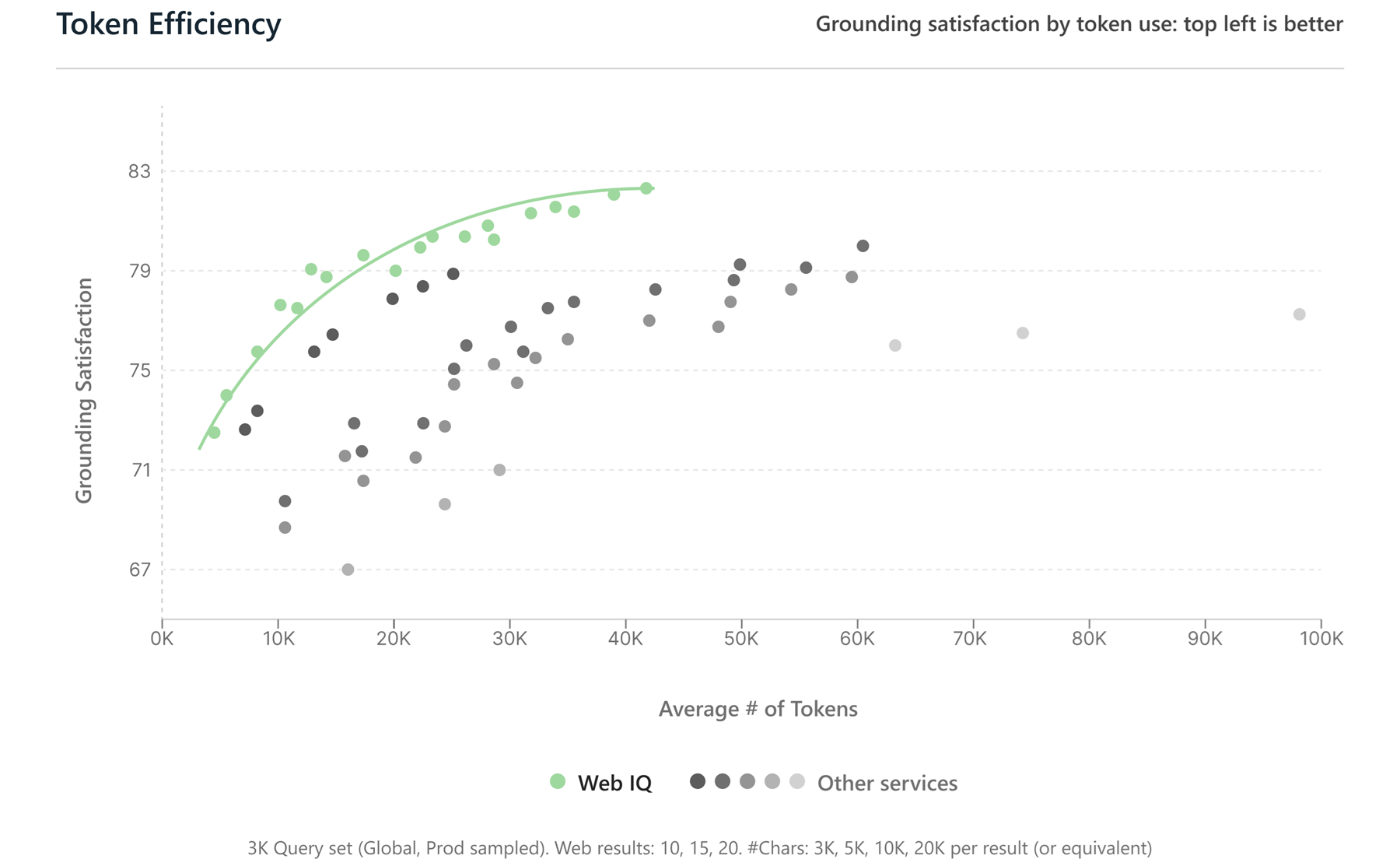
Source: Microsoft Web IQ (aka.ms/WebIQ) — Web IQ’s “Pareto Frontier” positioning: highest grounding satisfaction, lowest latency, fewest tokens.
Pricing in one line: Per the public Work IQ REST API documentation, users with a Microsoft 365 Copilot add-on licence can use Work IQ APIs at no extra cost for in-Copilot scenarios. For everything else — your own agents, third-party agents calling Microsoft IQ — Build 2026 introduces Copilot Credits as the consumption meter. The pricing decoder in §3 below has the full meter detail. Web IQ pricing follows its own model (currently limited access).
📖 Microsoft IQ on Microsoft Build Live · Web IQ · Bing Search blog: Announcing Web IQ · Work IQ Learn docs
2. Microsoft Foundry — the production layer for agents
For: Developers · IT · Architects · Status: Mixed (Hosted Agents GA in coming weeks; MAF 1.0 GA; several capabilities preview)
The hard part of building agents isn’t the prototype — it’s everything after. Isolation. Identity. Tools that actually work. A path from production back to a better version. Microsoft Foundry’s Build 2026 updates round out the four layers production agents have been missing. From Microsoft Build Live item #4:
💡 The catalogue stat worth knowing: The Microsoft Foundry model catalogue now has 11,000+ models — frontier closed-weight models (OpenAI GPT-5.5, Anthropic Claude Opus 4.8 / Sonnet 4.5 / Haiku 4.5), open-source via Fireworks AI, Microsoft's own MAI family, plus specialised small models, vision models, multimodal, multilingual, time-series — all behind one Azure endpoint with one billing relationship. Model Router (where applicable) handles switching for cost and performance at runtime. This is what makes "build once, swap models later" viable in practice.
Build. Microsoft Agent Framework (MAF) 1.0 is generally available — ships an agent harness as a first-class concept where skills, context, memory and middleware are production-ready. Drop a GitHub Copilot SDK or Claude Agent SDK agent into a MAF workflow as a named participant; the orchestrator stays deterministic. (MAF 1.0 GA announcement on DevBlogs). New toolboxes in Foundry (preview) unify access to web/file search, MCP, OpenAPI spec and A2A protocol. Fireworks AI on Foundry (GA) offers fast access to open-source models through a single Azure endpoint; Managed Compute (private preview) adds dedicated GPU capacity. And Claude in Microsoft Foundry brings Sonnet 4.5, Haiku 4.5 and Opus 4.1 to Foundry’s catalogue (public preview).
Ground. Foundry IQ knowledge bases (GA) unify Work IQ, Fabric IQ, File Search, Azure SQL and MCP behind one SLA-backed retrieval endpoint. Microsoft World Grounding extends that reach to live external information alongside internal data. Procedural memory (preview) lets agents learn the how across multiple runs, not just the what.
Operate. Hosted Agents in Foundry Agent Service reach General Availability by end of June 2026 — and Microsoft has shipped four new capabilities making them production-ready out of the box. Microsoft’s framing: “You bring your code and your framework; the platform handles the rest.”
- Hypervisor-isolated runtime per session — each agent gets its own hypervisor-isolated sandbox with a dedicated persistent file system, an automatically provisioned Microsoft Entra ID (per-agent identity), built-in OpenTelemetry tracing, sub-100ms cold starts and zero idle cost. Framework-agnostic.
- Source-code deployment — no container required. Zip a Python 3.13/3.14 or .NET 10 project, run
azd ai agent init+azd deploy, done (deploy from source guide). - Built-in content safety guardrails — every prompt and response evaluated in real time by Foundry Content Safety. No middleware to write.
- Voice Live + WebSocket protocol — text-based hosted agents get real-time speech-to-speech with one click; native voice agents over a persistent bidirectional WebSocket (Voice Live integration).
- Agent Optimizer (private preview now, public preview in 30 days) — closed-loop improvement: evaluates your agent against criteria, auto-generates better instructions/skills/model/tool-descriptions, ranks them, deploy winner as a new version with one command.
Alongside: Adaptive Evaluations (preview) convert policies into automated tests for agent behaviour. Agent Control Specification (ACS) (preview) lets teams define and enforce what agents can do in production, across Foundry, Microsoft Agent Framework and LangChain — the open policy-as-code layer that pairs with Foundry’s authoring and hosting. The hosted-agents protocol triad — Responses (conversational + Teams/M365 publishing) · Invocations HTTP (webhooks, structured) · Invocations WebSocket (real-time voice, bidirectional) — covers most production patterns out of the box.
Reach. One-click publishing to Microsoft Teams and Microsoft 365 Copilot will be generally available next month. Identity and tenant policy will flow through automatically.
💡 Why it matters: This is the production-readiness milestone Foundry has been working toward. Six months ago, taking a prototype to production meant building your own sandboxing, your own observability, your own policy enforcement, your own retrieval. After Build, that stack is managed — and the policy layer (ACS) is framework-portable, so the work your team does survives a framework change.
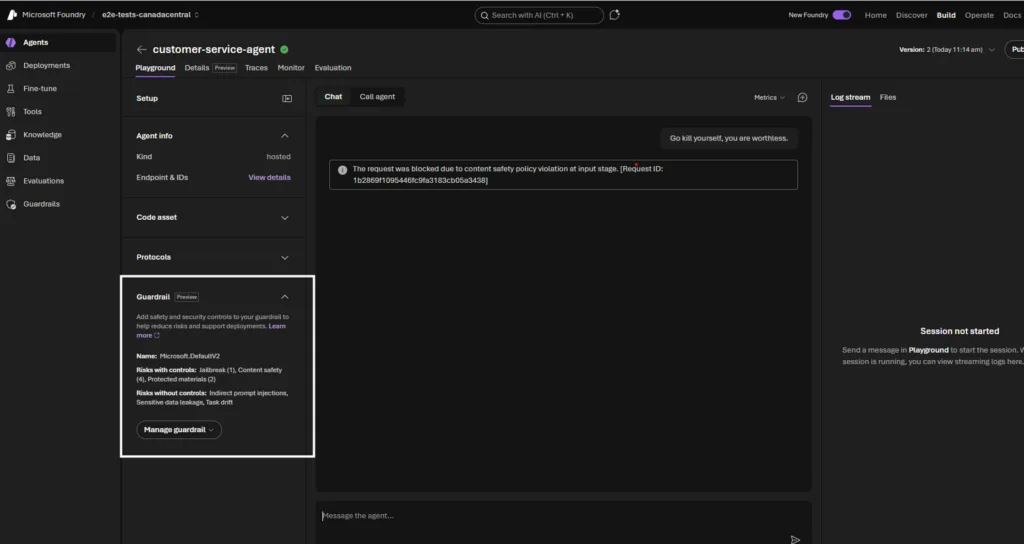
Source: Microsoft Foundry DevBlogs — Hosted Agents at Build 2026 — built-in guardrails for responsible agentic AI in Hosted Agents. The Guardrail panel shows Microsoft.DefaultV2 controls (Jailbreak, Content safety, Protected materials) blocking a harmful user prompt at input stage.
📖 Microsoft Foundry updates on Microsoft Build Live · Microsoft Agent Framework Learn · Hosted Agents Learn
3. Copilot Credits — the consumption meter has a name
If you only read one section in this post, read this one. This shift will be the conversation in every IT leadership meeting between now and end of year.
The change, in plain English:
Microsoft 365 Copilot stays per-user. The licence you pay for human-facing Copilot — typing in Word, summarising emails, asking Copilot Chat questions — keeps the same model. That part is settled.
Agent work moves to a consumption meter — and that meter has a name: Copilot Credits. When an agent runs autonomously on your behalf (or on a schedule, or reacts to an event), or when a third-party agent calls Microsoft’s Work IQ APIs to ground in your tenant data, the cost gets measured in Copilot Credits — Microsoft’s unified consumption currency that also covers Copilot Studio and other Microsoft AI services. Two ways to acquire them:
- Pay-as-you-go — $0.01 per Copilot Credit. No annual commitment. The natural starting point for piloting before you know your usage shape.
- Prepaid packs — commitment-based, lowest per-credit cost. Worth it once usage patterns are known; credits pool across Copilot Studio agents and other consumptive services.
Admin activation matters. Consumption pricing is OFF by default. A tenant administrator has to turn it on in the Microsoft Admin Center before any billing begins, and the same place is where you set named billing policies, scope which services and agents can spend credits, configure alert emails as usage approaches limits, and (optionally) apply per-user caps. The activation step is a deliberate guardrail — not a hoop. Treat it as the moment to set the rules of the road before the first credit is spent.
Why the shift? Per-user pricing makes sense when work happens because you’re at the keyboard. It stops making sense when work happens while you’re asleep, because the agent is doing it for you.
Think of it like the difference between a phone plan (per user, fixed monthly) and your electricity bill (per kWh used). Both make sense. They just measure different things. (The metaphor is about the shape of the shift; exact metering for specific surfaces will keep being refined through the Azure and M365 roadmaps.)
What it means for you:
- Budget conversations change. “How many Copilot seats?” gets joined by “how many Copilot Credits do we need, prepaid or pay-as-you-go?” Two separate lines now.
- Governance matters more. A poorly-scoped agent that loops or over-calls APIs becomes a cost event, not just a quality event. Agent Control Specification, observability, billing policies and per-user caps all matter more.
- Procurement should know. Per-user + Copilot Credits is a different procurement pattern from your current Microsoft 365 negotiation. Worth a quiet conversation before your next renewal.
5 questions to ask before turning on agent work at scale
A short checklist to take into your governance / FinOps conversation:
- Who owns the agent? Not the tool — a named human accountable for what it does and what it costs.
- What data can it touch? And where do the traces live, so you can prove it after the fact.
- What’s the budget cap? Per agent, per workflow, per cost centre. And who gets alerted when 80% of cap is hit.
- Can we trace usage back to agent · user · workflow? If not, you can’t allocate cost or audit behaviour.
- How do we turn it off? Both individual agents and the meter as a whole — make sure the kill-switch exists before you need it.
Procurement questions worth raising at your next renewal
- What exactly is metered — tasks, actions, tokens, all three?
- Is there included capacity bundled with our existing licences?
- Can we cap, throttle, or alert at a defined threshold?
- Which cost centre does agent consumption land against by default?
- Can we trace usage back to a specific agent, user, or workflow for chargeback?
📖 Exact meters, SKU names and per-meter pricing will surface through the Azure pricing and Microsoft 365 admin centre over the coming weeks — this section captures the shape of the shift, not per-meter pricing.
4. Agent 365 expansion — SDK, Local Agents, and how E7 fits
For: IT · Security · Architects · Status: Mixed (Agent 365 itself GA from 1 May 2026; SDK GA at Build; Local Agents Public Preview)
Microsoft Agent 365 went GA on 1 May 2026 as the unified control plane for managing, securing and governing AI agents (Observe · Govern · Secure — see the Microsoft Learn Agent 365 overview for the three pillars in full). It’s not a Build 2026 reveal — it’s a Build 2026 expansion. Three substantial moves landed:
Agent 365 SDK — GA (free). Developer SDK for bringing third-party and custom agents into Agent 365’s observe/govern/secure control plane. Framework-agnostic — Microsoft publishes packages for the Microsoft Agent Framework, OpenAI Agents SDK, LangChain, Semantic Kernel, and Azure AI Foundry (with more frameworks likely to follow). No separate cost. This is the door for “agents I didn’t build on the Microsoft stack” to come under the same governance umbrella.
Agent 365 for Local Agents — Public Preview. Agent 365 now discovers AI agents running on managed endpoints — mapped to associated devices and users. The first wave covers Claude Code and GitHub Copilot CLI; OpenClaw and OpenAI Codex follow about two weeks later. Controls flow through Intune (block unsanctioned agents at endpoint), Defender (runtime detection — prompt injection, risky actions), and Purview (prevent sensitive data leaks from local agent interactions). With Build 2026, OpenClaw now also has a Windows-native runtime (see supporting moves below).
Licensing — what Microsoft actually says. Per the public Agent 365 documentation, Agent 365 “does not require specific product prerequisites to enable; however, it is recommended that customers have Entra P1, Entra P2, or Entra Suite in addition to Purview Data Loss Prevention to make full use of the benefits.” The cleanest path is Microsoft 365 E7, which bundles E5, Copilot, Entra Suite and Agent 365 in one SKU — that’s the Frontier Suite story. For organisations not on E7: Agent 365 is licensed per user and starts being most useful when the Defender / Purview / Entra signals are also in your tenant (which is where ME5 + Defender Suite + Purview Suite combinations come in).
💡 Why it matters: Agent 365 is rapidly becoming the answer to "how do we govern agents at scale" — including agents your engineering teams have already started using locally without IT's permission. The SDK being free + framework-agnostic is a deliberate signal: Microsoft wants every agent in the enterprise (theirs and not) under one observable, governable, securable umbrella. (For the deeper read, the Agent 365 Security & Governance complete guide → is the explainer.)
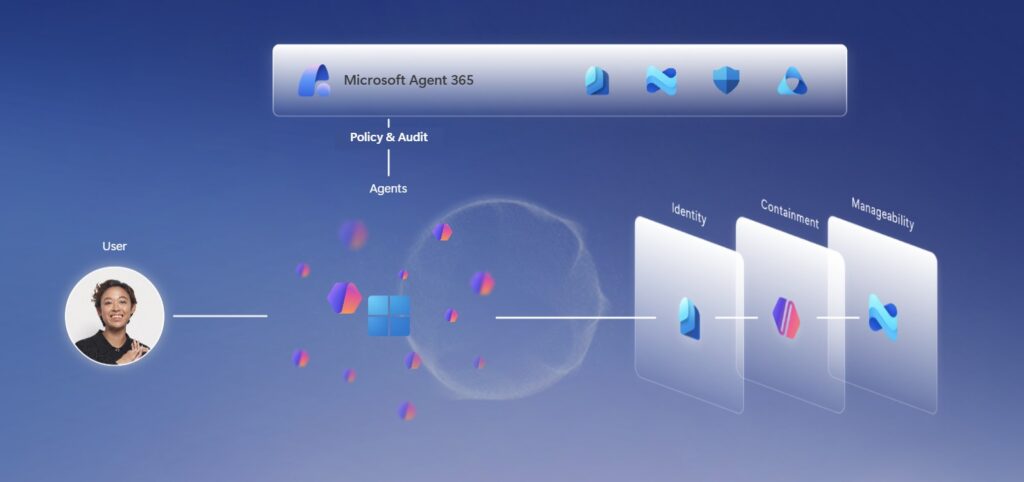
Source: Windows Developer Build 2026 blog — Microsoft Agent 365 sits above Identity, Containment and Manageability layers, governing agent activity with Policy & Audit.
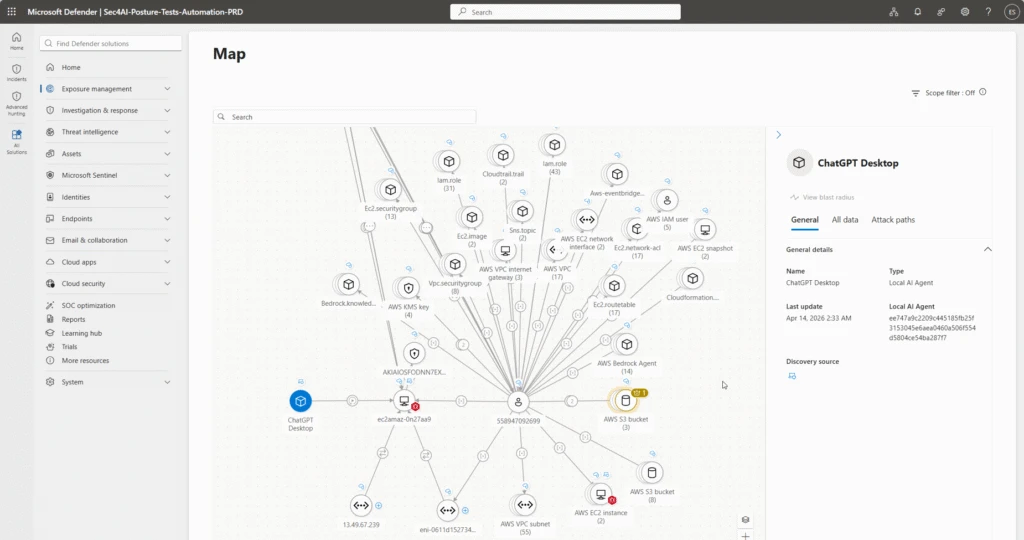
Source: Microsoft Security Blog — Agent 365 GA (1 May 2026) — Defender’s agent map shows where an agent runs, which MCP servers it uses, the identities associated with it, and the cloud resources those identities can reach.
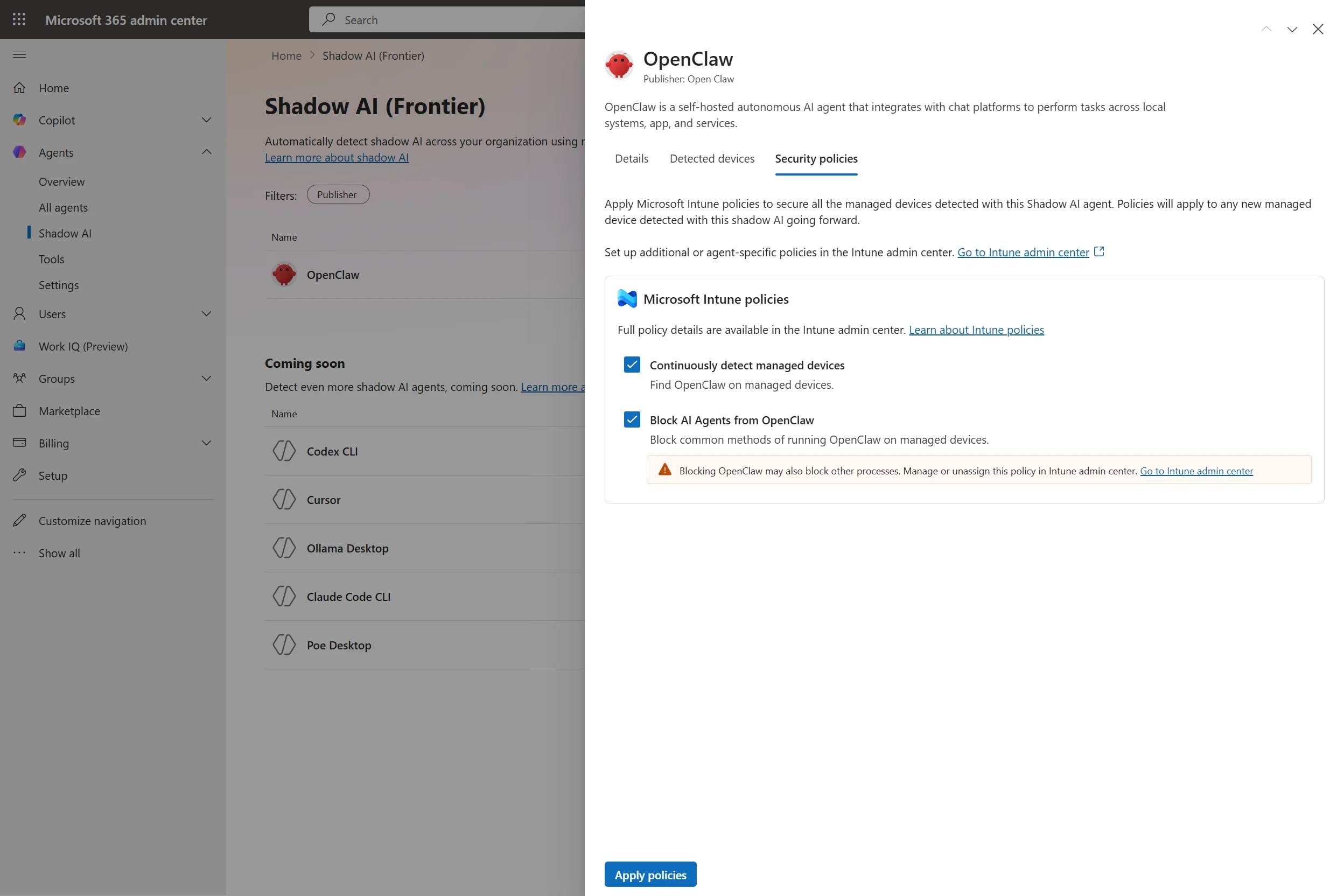
Source: Microsoft Security Blog — Agent 365 GA (1 May 2026) — admin centre applying Intune policies to detect and block unsanctioned OpenClaw agents on managed devices.
📖 Microsoft Agent 365 product page · Agent 365 GA announcement (Microsoft Security blog, 1 May 2026)
The supporting moves — depth on request
Beyond the 4 big stories, here’s what else moved at Build — short paragraphs with links to the official source for each.
Agent Control Specification (ACS) — open-standard runtime governance for agents
The biggest piece of the Foundry update that deserves its own callout. Agent Control Specification (ACS) is Microsoft’s new open specification and reference implementation for the runtime governance layer of AI agents — published under the broader Agent Governance Toolkit (AGT) on GitHub. It defines eight interception points (agent startup, input, pre-model-call, post-model-call, pre-tool-call, post-tool-call, output, agent shutdown) where policies can be evaluated against the agent’s runtime context — independent of the agent framework, the runtime, or the policy engine that authors the rules themselves. Microsoft explicitly positions ACS to work across Foundry, Microsoft Agent Framework and LangChain. Pairs with ASSERT for policy-driven agent evaluation.
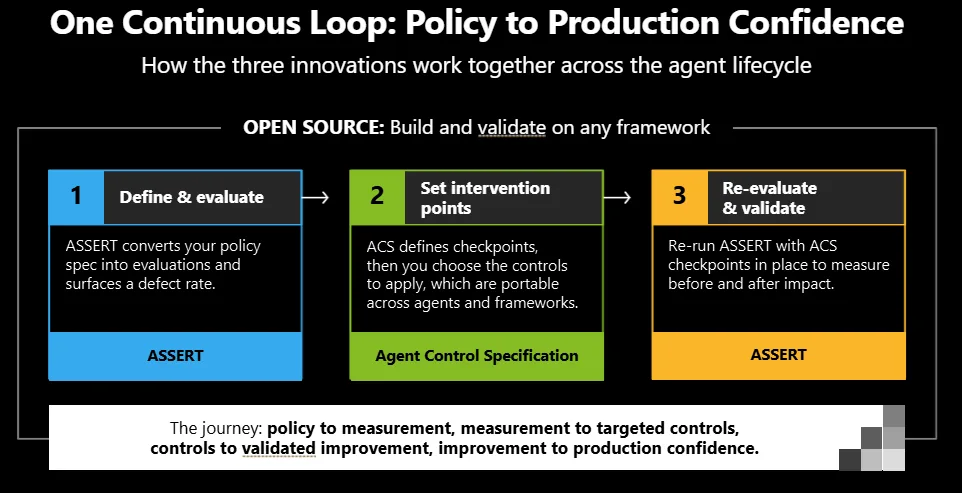
Source: Microsoft Foundry — Build 2026 Open Trust Stack for AI Agents — policy-to-production confidence loop powered by ACS.
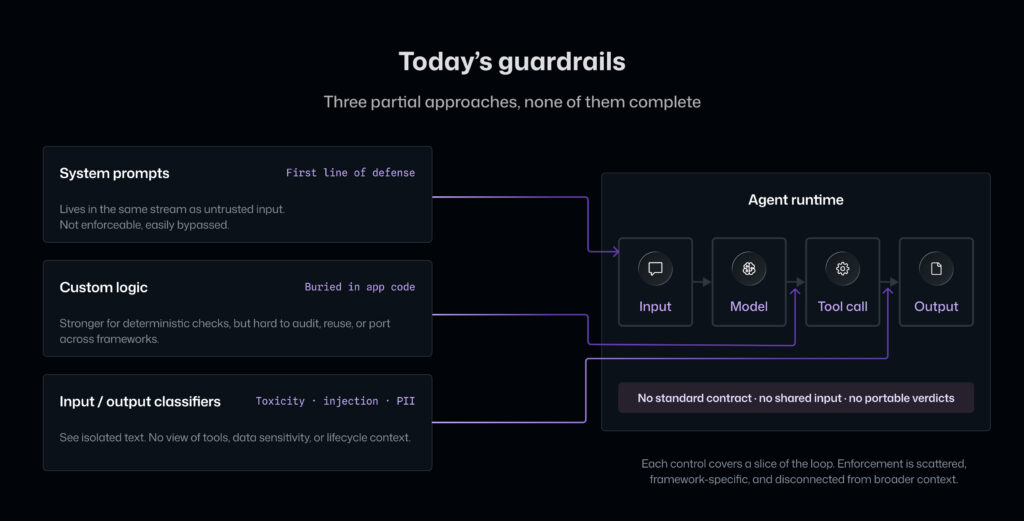
Source: Command Line — Agent Control Specification — the gap in today’s agent guardrails that ACS addresses.
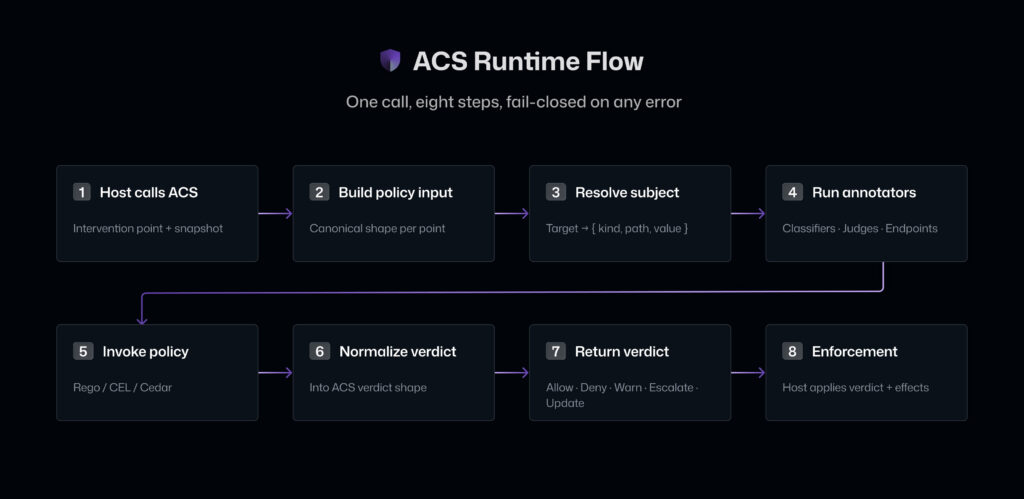
Source: Command Line — Agent Control Specification — ACS runtime flow: eight interception points across the agent lifecycle.
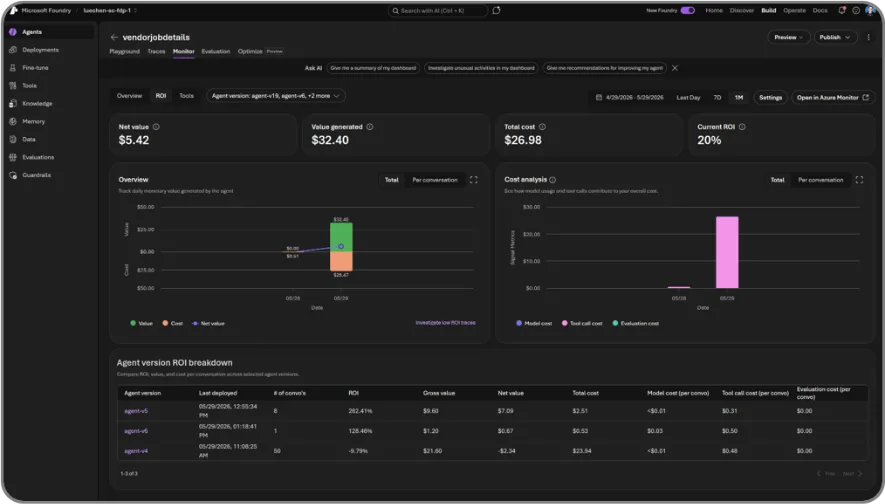
Source: Microsoft Foundry — Build 2026 Open Trust Stack for AI Agents — Foundry’s new Agent ROI dashboard for measuring agent value in production.
Windows Agent Runtime — OpenClaw on Windows + Microsoft Execution Containers (MXC)
The umbrella term Microsoft used on stage for the Windows-side agent OS surface is Windows Agent Runtime — Windows treating agents as first-class citizens with OS-enforced identity, containment boundaries, runtime provisioning, and enterprise-grade manageability. Two big pieces under that umbrella:
Microsoft Execution Containers (MXC) is the kernel-enforced sandbox for running untrusted code (model output, plugins, tools). Microsoft’s own one-liner: “a sandboxed code execution system for running untrusted code on Windows, Linux, and macOS.” Yes, cross-platform — Windows is the headline but MXC ships with 8 containment backends spanning a full spectrum: ProcessContainer (lightweight, like the Copilot CLI sandbox), Windows Sandbox, WSL Containers (WSLC), MicroVM (NanVix), Hyperlight, IsolationSession on the Windows side; Bubblewrap and LXC on Linux; Seatbelt on macOS. Composability is the point: pick the boundary that matches the risk — process sandbox for low-trust shell snippets, micro-VM or Windows 365 for Agents for high-blast-radius autonomous work. Policies are JSON (filesystem allow-lists, network rules, UI/clipboard/display controls), the SDK is TypeScript (@microsoft/mxc-sdk on npm), and there’s a state-aware lifecycle (provision → start → exec → stop → deprovision) for session sandboxes.
OpenClaw — the open-source agent runtime (Peter Steinberger’s project, 350K+ GitHub stars) — is now alpha for Windows on GitHub, running inside MXC. NVIDIA is collaborating to bring NVIDIA OpenShell (its own open-source agent runtime) to Windows via MXC. Together with Agent 365 Local Agents discovery (above), this gives IT a consistent view + control of local agents on managed devices. Microsoft Scout (the first Autopilot, see next section) is the first Microsoft-built consumer of this runtime. 📖 Microsoft Execution Containers on GitHub · Build 2026 Windows Developer blog
💡 The partnership feels mutual. The OpenClaw community publicly embraced Windows-native containment through MXC, and Microsoft is bringing OpenClaw-style autonomous agents directly into M365 Copilot (work led by Corporate VP Omar Shahine). One side gets enterprise-grade containment, identity, and governance; the other side gets the 350K-star open-source agent community on Windows by default. That's how you turn "yet another sandbox" into a platform.
Autopilots — a new category, with Microsoft Scout as the first
This is arguably Build 2026’s actual headline product reveal. Per the official 2 June 2026 Microsoft 365 Blog:
“Today we are introducing a new category of agents called Autopilots. Autopilots are always-on agents that work autonomously, with their own identity, and act on your behalf.”
The defining characteristics:
- Always-on — stay active in the background, take action without being prompted each time
- Their own identity — each Autopilot operates under a governed Entra ID (not a shared service account), so every action is attributable to a known actor your directory already understands
- Permissions + policies — act within the boundaries you and your organisation set, including Microsoft Purview sensitivity labels and DLP enforced in the moment before anything is sent or written
- Durable continuity — “keep work in motion so it continues even when your attention is elsewhere”
Microsoft Scout — the first Autopilot. A desktop AI application for Windows 11+ and macOS 12+, built on OpenClaw open-source technology. You interact in Teams; you extend it through the desktop app to your browser, local resources, and MCP servers. It’s grounded in Work IQ — learning how you work, what you care about, what needs to happen next.
What Scout can do (from the official Microsoft Learn overview):
| Capability | Detail |
|---|---|
| Acts on files | Creates, edits, searches in your workspace (Word, Excel, PowerPoint, code files) |
| Runs shell commands | Tiered permission system; auto-approve allow-list, sensitive directories always require explicit approval |
| Automates browsers | Uses Playwright under the hood — navigates pages, fills forms, interacts with web apps |
| Connects to Microsoft 365 | Email, calendar, Teams messages, OneDrive files, meetings |
| Heartbeat mode | Periodic background check-ins every 15–120 minutes — runs prompts while you’re away |
| Automations | Scheduled or condition-triggered tasks that execute independently |
| Delegates work | Launches specialised sub-agents that run in parallel for research / code review / complex tasks |
| Memory | Remembers your preferences and decisions across conversations |
| Bundled skills | Word/Excel/PowerPoint, Loop (browser-automation editing), Web Artifacts Builder. Custom skills via SKILL.md files in your skills directory. |
How you get it. Available through the Microsoft Frontier program as an experimental preview. Access requires: Frontier enrollment + Intune policy configuration + opt-in attestation + a GitHub Copilot licence. Full setup: learn.microsoft.com/microsoft-scout.
💡 What kind of agent is being described: picture a personal AI co-founder that lives on your desktop, has its own permissioned identity in your tenant, watches the calendar / Teams / inbox proactively, runs background heartbeats every 15–120 min, lets you load custom skills as
SKILL.mdfiles, and asks for approval before sensitive actions. Yes — it's effectively the GitHub Copilot CLI architecture, scaled up to M365-native + autonomous. Same DNA, bigger surface.
📖 Go deeper on our site: Microsoft Scout — The Complete Guide — what it is, the two-gate admin install, all 7 bundled skills, and the secure-config reference · Introducing Microsoft Scout — M365 Blog · Microsoft Scout overview (Learn) · Microsoft Scout FAQ (Learn) · Frontier program
Project Solara — chip-to-cloud platform for an agent-first world
What is it? A new Microsoft hardware-and-software platform purpose-built for agent-first experiences and the new device form factors they enable — not just a new device but a chip-to-cloud platform where the OS is “liminal,” transcending device and cloud. Each Solara device becomes a “window into long-running intelligence and action” with state held in Azure. Codename today; reference designs piloted internally and with silicon partners (Qualcomm for portable, MediaTek for stationary).
“The next platform shift is from apps to agents — from software you open to intelligence you invoke; from graphical interfaces of buttons to expressing intent through agents; and from AI operating inside your applications to agents working outside and across your apps, workflows, and devices.”
— Steven Bathiche, Applied Sciences Group, Microsoft
Why useful — three reasons:
- Agents shouldn’t be confined to one app, screen or device. Solara breaks the laptop/phone confinement so agents follow you into the moments (badge on lanyard, ambient desk companion, eventually wearables and verticals).
- Specialised devices stop being prohibitively expensive to build. Today each new form factor needs its own app model + UI patterns + optimisation. Just-in-time UI changes the equation — agents adapt their visual/voice/multimodal interface to the device, no per-form-factor redesign.
- The future is many specialised agents, not one dominant agent. Solara assumes you use Microsoft agents AND source/build your own; the platform brings them together coherently while respecting data/identity/organisational boundaries.
Three pillars: (1) Enterprise-readiness — MDEP (AOSP-based enterprise OS), Agent Shell for dynamic multi-agent loading, Microsoft Intune for device management, Entra ID, Hello for Business biometric, physical mic-mute + clear listening/recording indicators. (2) Agent-driven interaction with just-in-time UI — same agent renders custom experiences across screen sizes and modalities (voice, vision, touch, multimodal) with little or no extra developer work. (3) Extensibility for bring-your-own-agents — agent dispatcher + agent task manager surface the right agent at the right moment in a multi-agent world.
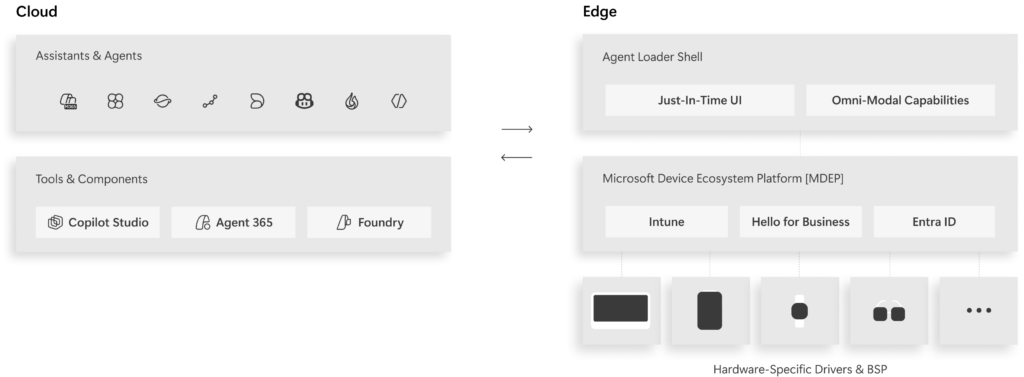
Source: Command Line — Project Solara deep dive — the three-pillar platform stack.
Two concept reference devices. A badge device (portable, Qualcomm wearable silicon) — Microsoft re-imagining the lanyard worn by information workers, nurses and frontline workers — with touchscreen, Hello for Business fingerprint button, privacy switch, far-field mic array, side-facing camera, WiFi/BT/GNSS/5G. Use cases: glance at what’s next via your Priority Agent; one-tap record an impromptu hallway conversation via Facilitator. And a desk device (stationary, MediaTek IoT silicon) — humble ambient companion with touchscreen, face authentication, dual far-field mic array, UWB presence sensor, 2 USB-C ports — usable in three modes: (1) stand-alone glance device for calendar / Priority Cards / Copilot voice grounded in Work IQ, (2) PC companion via Bluetooth (hand off tasks, consistent lock state), (3) plug in a USB-C display and it transforms into a full Windows 365 client while staying agent-first.
How will this change things?
- Short term (2026–early 2027) — concept and pilots. Don’t budget for badge/desk devices yet. Microsoft employees dogfooding internally; first vertical pilots in healthcare, retail, financial services.
- Medium term (12–24 months) — first turnkey reference-design devices ship from Microsoft + partner ecosystem. The desk-as-Windows-365-client is the most pragmatic near-term enterprise play (additive purchase, not a category bet).
- Strategic read — Solara is the signal Microsoft expects device specialisation to accelerate now AI streamlines the dev stack. Badge form-factor for frontline, desk for knowledge workers, eventually verticals. “When the cost of specialisation drops, innovation accelerates.”
📖 Project Solara deep dive on Command Line (Steven Bathiche) · aka.ms/ProjectSolara · aka.ms/MDEPforProjectSolara · Microsoft Build Live
Frontier Tuning — teaching AI to work the way YOU do
This is the “Improve” step of Microsoft’s official agent platform lifecycle (Build → Contextualize → Run → Govern → Improve → Surface) — and arguably the most consequential one for enterprises with strong proprietary knowledge.
Frontier Tuning is Microsoft’s new approach to applying reinforcement learning inside your compliance boundary with your own data, processes and conventions. Announced today in private preview through Microsoft’s Forward Deployed Engineering (FDE) team; coming to Microsoft Copilot Studio and Microsoft Foundry in the coming months. Led by Ranveer Chandra, VP of Copilot Frontier Tuning.
Three parts:
- A continuously evolving Reinforcement Learning Environment (RLE) — Microsoft’s framing: “training gyms for AI.” The RLE is used for both post-training and inference; during training the system learns from real workflows, tool usage and eval signals without affecting production systems; at inference it explores multiple frontier + fine-tuned models across turns to find stronger candidate paths.
- Your company’s data, domain knowledge, and workflows brought into the RLE — content, processes, conventions, terminology. Microsoft is explicit: “no need for a data science degree.”
- Tuned models, skills, orchestration logic and runtime harness that stay within your compliance boundary. Models inherit your access controls (only people who could see the underlying data can access models built from it). Tools are virtualised so agents improve without affecting production.
The numbers that matter — direct from Microsoft customers in private preview:
| Customer | Result |
|---|---|
| Microsoft HR | Successful task completion 13% → 87% with Frontier Tuning |
| EY | Tuning a tax-advisory agent within the RLE for deployment to 75,000 tax professionals globally |
| MAI tuned for Excel | Matches GPT-5.4 quality at up to 10× more efficient |
| McKinsey | Custom-tuned MAI achieved highest win rate of any model tested at ~10× lower cost |
| Pearson | Communication Coach outputs “more closely aligned with Pearson’s learning science” |
Other launch customers: Land O’Lakes, Bristol Myers Squibb, McCarthy Tétrault, Josh Bersin Company.
💡 Why it matters: For two years the question for enterprises with deep proprietary knowledge has been: "do we wait for the foundation model to catch up, or do we build our own?" Frontier Tuning is Microsoft's answer — keep the foundation model (Microsoft MAI, OpenAI, partner), teach it your workflows in a managed RL gym, and the resulting institutional knowledge stays yours, inside your compliance boundary, inheriting your access controls. "Your institutional knowledge becomes part of the model, and it stays yours."
The MAI angle. This sits alongside the seven new Microsoft MAI models announced today — spanning image, voice, transcription, coding and reasoning. They’re designed to be tuned, not just called. Microsoft co-designs the model family with its own Maia 200 silicon, citing a 1.4× efficiency boost from that co-design. Distribution: Foundry, Open Router, Fireworks, Baseten — and for the first time, developers can tune the weights themselves.
The Mayo Clinic angle. Microsoft announced a collaboration with Mayo Clinic to co-create a frontier AI model for healthcare that brings Mayo Clinic’s world-leading clinical expertise + de-identified clinical data + longitudinal insights together with Microsoft’s foundational AI. The model will be owned by Mayo Clinic, deployed first inside Mayo’s environment, then made available to other organisations through Azure Foundry once validated.
📖 Frontier Tuning — Microsoft 365 Dev Blog (Ranveer Chandra) · aka.ms/frontiertuning · Introducing MAI — Microsoft AI · AI alone won’t change your business — Jay Parikh, Microsoft
Microsoft MAI — the new model family (all 7 launched today)
Microsoft just announced seven new in-house MAI models (microsoft.ai/news/building-a-hillclimbing-machine) — spanning image, voice, transcription, coding and reasoning. All built from scratch with zero distillation from other labs, sharing the same data discipline, training infrastructure and eval framework. Microsoft’s framing: “a hill-climbing machine — an organization that can continuously improve, cycle after cycle, as we apply more compute, better data, and sharper evaluation.”
| Model | What it is | Where it’s going | Why it matters |
|---|---|---|---|
| MAI-Thinking-1 | Flagship reasoning model. 35B active / ~1T total parameters (MoE). Built from scratch for serious math, coding and real-world enterprise deployment. | Microsoft Foundry (private preview, multi-region; sign-up form). Also on Baseten + Open Router. | Competitive with Claude Opus 4.6 on SWE-Bench Pro but smaller inference footprint. Independent human raters on Surge prefer it over Sonnet 4.6 in blind side-by-sides. Microsoft’s “most cost-efficient frontier-class model in its tier.” Built-in safety guardrails + copyright protection + easy migration. |
| MAI-Code-1-Flash | Lightweight, agentic coding model. | Built into GitHub Copilot and VS Code as the default fast-path. Foundry distribution. | Engineering teams get fast, agentic code suggestions without paying frontier-model token rates. Pairs with MAI-Thinking-1 for hard problems. |
| MAI-Image-2.5 | Text-to-image generation model. | Foundry, Open Router, Fireworks. | Microsoft claims best-in-class Arena ELO scores at a lower price than competing image models. Design-ready outputs from text or photo prompts. |
| MAI-Image-2.5 Flash | Ultra-efficient variant of MAI-Image-2.5. | Same channels as MAI-Image-2.5. | Fast / cheap path for high-volume image generation workloads where latency matters more than absolute quality. |
| MAI-Voice-2 | Voice generation / speech-to-speech model. | Foundry + 1P products (Copilot voice surfaces). | Powers natural-voice experiences inside Microsoft 365 Copilot, Teams, and Foundry Voice Live integration with Hosted Agents. |
| MAI-Voice-2 Flash | Ultra-efficient variant of MAI-Voice-2. | Same channels as MAI-Voice-2. | Real-time voice scenarios where the latency budget is tight — agents on the phone, accessibility tooling, voice-first interfaces. |
| MAI-Transcribe-1.5 | Speech-to-text transcription model. | Foundry, Copilot transcription surfaces (Teams meetings, voicemail). | Microsoft claims leading FLEURS and Artificial Analysis accuracy scores — turns noisy real-world audio into precise, domain-specific transcripts. |
Where they all run. Distribution beyond Foundry: Open Router, Fireworks, Baseten — and for the first time, developers can tune the weights themselves (via Frontier Tuning above).
Co-design with Microsoft’s own Maia 200 silicon is showing a 1.4× efficiency boost already — Microsoft’s framing: “long-term self-sufficiency for Microsoft and our partners.”
💡 Why this matters — the underlying strategic shift: Microsoft is no longer just a distributor of frontier models from OpenAI and Anthropic. MAI is Microsoft training its own frontier-class family from scratch, zero distillation, on its own silicon — and giving developers the ability to tune the weights themselves. Together with Frontier Tuning, this is Microsoft's bet on "models you can trust, models adapted to you, models that stay yours." It does NOT replace the OpenAI / Claude / Fireworks options in Foundry — it sits alongside as a multi-model strategy where the best model for the task wins.
📖 Microsoft AI news — Building a hill-climbing machine · All MAI models on microsoft.ai/news · Frontier Tuning · aka.ms/MAI-Build
Claude in Microsoft Foundry (preview)
Microsoft and Anthropic expanded their partnership: Claude Sonnet 4.5, Haiku 4.5, and Opus 4.1 are now in public preview in Microsoft Foundry, deployable through Foundry’s APIs with Microsoft Entra authentication, Azure billing (MACC-eligible), and Python / TypeScript / C# SDKs. Microsoft also announced Claude Opus 4.8 now in Foundry. Anthropic models also extend into Microsoft 365 Copilot Researcher, Copilot Studio custom agents, and a new Claude option in Excel Agent Mode. 📖 Claude in Microsoft Foundry (Anthropic) · Microsoft Foundry catalog
OpenAI GPT-5.5 in Microsoft Foundry (GA tomorrow)
OpenAI’s GPT-5.5 goes generally available in Microsoft Foundry on 3 June 2026, with GPT-5.5 Pro as the premium variant. Microsoft’s framing: “deeper long-context reasoning, more reliable agentic execution, improved computer-use accuracy, and greater token efficiency — designed for sustained, high-stakes professional workflows.” Pricing: GPT-5.5 = $5/M input · $0.50/M cached · $30/M output; GPT-5.5 Pro = $30/M input · $3/M cached · $180/M output. Eligible for Microsoft Azure Consumption Commitment (MACC). 📖 OpenAI’s GPT-5.5 in Microsoft Foundry (Azure Blog)
Windows 365 for Agents — secure Cloud PCs for agent workloads
Windows 365 for Agents (generally available as part of Agent 365 tools; preview in Microsoft Copilot Studio) gives AI agents secured, managed Cloud PCs that operate inside the environments where business happens — modern, legacy, API-based or UI-driven. Every Cloud PC is Entra ID-joined, Intune-managed and policy-enforced. Already powering computer-use scenarios in Researcher and Project Opal. Consumption-based pricing so organisations pay as they go. 📖 Microsoft Build Live — Windows 365 for Agents segment · Pricing
Foundry Toolkit for VS Code (GA) + Magentic-One multi-agent orchestration
Foundry Toolkit for VS Code is now generally available — create agents from templates or with GitHub Copilot, debug runs locally with trace visualisation, connect to Toolboxes, and deploy to Foundry Agent Service from VS Code. Plus inside Microsoft Agent Framework: Magentic-One multi-agent orchestration patterns reach stable release, alongside file-system tools, memory tools, and a deep-research agent in public preview. The path from “agent on my laptop” to “agent in production” is the shortest it’s been. 📖 Foundry Toolkit for VS Code · What’s new in Microsoft Foundry — Build 2026 recap
Surface Laptop Ultra + Surface RTX Spark Dev Box + NVIDIA collaboration
Two new Surface devices on the same NVIDIA RTX Spark silicon — and a broader Microsoft + NVIDIA stack for Windows agents.
Surface Laptop Ultra — Microsoft’s most powerful Surface laptop ever. NVIDIA Blackwell RTX GPU + 20-core Grace CPU connected via NVLink (the new NVIDIA RTX Spark superchip), up to 1 petaflop of AI compute, up to 128 GB unified memory, capable of running up to 120B parameter models locally. 15-inch mini-LED PixelSense Ultra display at up to 2,000 nits peak HDR — Microsoft’s brightest Surface display ever. Full ports (HDMI, USB-C, USB-A, SD card, headphone), Platinum + Nightfall finishes, all-day battery for sustained creative + AI workloads. Positioned for world makers — creators, developers, AI builders. 📖 Surface Laptop Ultra — Microsoft Devices blog · Microsoft.com product page

Source: Introducing Surface Laptop Ultra — Microsoft Devices blog (31 May 2026).
Surface RTX Spark Dev Box — the sibling dev-box on the same RTX Spark silicon. 1 petaflop AI compute, 128 GB unified memory, up to 120B parameter models locally. Purpose-built for sustained dev workloads — long-running training jobs, agentic AI pipelines, local model fine-tuning. 100W thermal envelope, ships with custom-tuned Windows 11 Pro + WSL2 + native GPU passthrough + CUDA support + VS Code + GitHub Copilot pre-installed. Available later this year in the US. 📖 Microsoft Build Live · devbox
Source: Microsoft Build Live — Surface RTX Spark Dev Box segment.
Alongside both Surface devices, Microsoft and NVIDIA announced a unified developer stack bringing agentic AI to every Windows developer — NVIDIA RTX Spark Windows PCs and NVIDIA DGX Station for Windows. Windows 11 picks up unified-memory optimisations and the new Microsoft Power and Thermal Framework co-developed with NVIDIA. Native CUDA support on Windows.

Source: Microsoft Build Live — NVIDIA collaboration segment · Introducing a powerful new chapter for Windows PCs accelerated by NVIDIA RTX Spark — Windows Experience blog.
GitHub Copilot app for agentic development
The GitHub Copilot app is a native desktop app in technical preview today, no waitlist for Copilot Pro / Pro+ / Max / Business / Enterprise customers (changelog). It’s purpose-built as the agent-driven dev cockpit — a single place to direct AI agents across parallel workstreams, manage GitHub Issues and Pull Requests, and run the full PR-to-merge lifecycle without context-switching between IDE / terminal / browser tabs. Built on GitHub Copilot CLI under the hood; integrates natively with your GitHub repositories, branches and CI pipelines out of the box.
Things to know:
- Parallel isolated sessions — each agent session lives in its own git worktree with its own branch, files, conversation and task state; multiple agents can work on the same repo simultaneously without branch conflicts.
- Unified inbox — Issues and PRs across all your connected repos in one view; start a session from any of them.
- Three session modes — Interactive (step-by-step collaboration) · Plan (agent proposes, you approve, agent executes) · Autopilot (fully autonomous within the guardrails you set).
- Agent Merge — the standout feature: the agent autonomously resolves PR review comments, fixes failing CI checks, resolves merge conflicts and merges once branch protections + checks pass.
- Automated repeatable workflows — automate triage, dependency updates, release notes; standard or custom.
- Per-session model + reasoning effort selection — pick the right model + intensity for the task in front of you, not the org-wide default.
- Integrated terminal + diff review — run commands, preview changes, validate before merging — all inside the session.
- Session pause/resume + cross-device handoff — pause a session mid-stream, pick up days later; or start work on desktop and finish from your phone via the GitHub Mobile app (remote control of Copilot sessions now lives there).
- Cross-platform — direct installers for Windows x64 / ARM, macOS (Apple Silicon + Intel), and Linux (AppImage) — all from the github/app releases page.
📖 GitHub Copilot app repo · Official changelog (14 May 2026) · Microsoft Build Live
Windows 365 — Dev-maxed Cloud PCs for developers
Windows 365 Developer Configuration (Public Preview) brings the same “ready-to-code in minutes” experience the Windows 11 local-dev-image gives, but as a Cloud PC streamed from anywhere. Each Cloud PC is pre-configured with VS Code, GitHub Copilot, WSL2 + Ubuntu, PowerShell 7, Git and the GitHub CLI — extensible with your own SDKs, CLIs, packages and build tools per project, while still aligned with your organisation’s policies and controls. Same dev experience cross-device, from local Surface to cloud-streamed Cloud PC. (Microsoft’s Dev Box capabilities were already merged into Windows 365 in November 2025; Build 2026 is the developer-image preview that formalises the cloud-dev path.) 📖 Windows Developer Build 2026 blog
Windows developer experience refresh — Coreutils, WSL containers, Intelligent Terminal, Dev Configs
Five updates in one — the most under-the-radar but practically useful announcements at Build 2026 for anyone who works on Windows daily. All confirmed in the Windows Developer Build 2026 blog.
Coreutils for Windows (GA) — Linux-like command-line utilities that run natively on Windows, built from the open-source
uutilsproject (a cross-platform reimplementation of GNU Coreutils in Rust). The commands and workflows you’ve built over years moving between Linux, macOS, WSL, containers and cloud —ls,cat,cp,mv,head,tail, the lot — just work on Windows now. No more “do I have this utility on this surface” friction.WSL containers (coming soon to public preview) — built-in way to create, run and interact with Linux containers on Windows, via a new
wslc.exeCLI and a WSL containers API for native Windows apps to spin up Linux containers programmatically (for local AI workloads, testing pipelines, Linux-based processing). Enterprises get policy-based enablement and management — IT can see what Linux containers are running on dev machines, control where images come from, govern container ↔ host interactions. WSL itself went open-source at Build 2025 and the community is shipping 200+ PRs/month.Windows Developer Configurations (GA) —
dev-config.wingetis a single WinGet config file that gets you a distraction-free dev environment in minutes: VS Code, GitHub Copilot, WSL, PowerShell 7, Git, GitHub CLI, Python and more, plus developer-optimised settings (Git in File Explorer, file extensions visible, hidden files shown). The killer add: WSL comfort-setup scripts that bring Homebrew, zsh, Starship and other macOS / Linux comforts to Windows. If you’ve ever wanted “Windows that feels like my Mac terminal”, this is it. Workload-specific scripts for container / cloud / infrastructure dev are included too. Works the same whether you’re on a local Windows 11 device or a Windows 365 Cloud PC (see § Windows 365 — Dev-maxed Cloud PCs for developers above).Intelligent Terminal (experimental preview) — Windows Terminal with native agent CLI integration in a dedicated agent pane. Brings context-aware intelligence directly into the terminal so you stay in flow instead of bouncing between tools. Built on top of the existing Windows Terminal (tabs, profiles, themes, settings, shells — all preserved). Speaks ACP (Agent Communication Protocol) to your favourite agents. If you don’t have an agent installed, GitHub Copilot is bundled to get you started. When a command fails, Intelligent Terminal automatically surfaces the context and suggests fixes you can run immediately in the agent pane. This is the one I’d download today.
Windows Development Skills (GA) — gives agents structured knowledge to build native Windows apps end-to-end, using WinUI3 skills and the WinApp CLI. The point: when you ask an agent to “build me a native Windows app”, it now has the Microsoft-curated knowledge of how WinUI3 actually works, which means better-quality output with fewer tokens. Connect to your favourite agent at aka.ms/winui-skills.
📖 Windows Developer Build 2026 blog for the full Windows-side announcement reel.
Unmetered intelligence on Windows — Aion 1.0 + Windows AI APIs
Microsoft’s framing on stage: “Unmetered intelligence on Windows powered by on-device AI.” The deliberate counterpoint to the Copilot Credits consumption meter (§3) — cloud agent work is metered; on-device intelligence runs unmetered on hardware you already paid for.
Two new on-device small language models lead the story:
- Aion 1.0 Instruct (preview) — smaller, faster, smarter on-device SLM. Designed for everyday text intelligence: summarisation, rewrites, intents, accessibility. Available as open weights with integration into Microsoft Edge.
- Aion 1.0 Plan (coming) — a 14B-parameter reasoning and tool-calling model with 32K context length that ships in-box as part of Windows on supported hardware. Enables fully agentic workflows on the local device — applications can reason over user intent, invoke tools, manage files and orchestrate sub-agents, all without a cloud round-trip.
Alongside, Windows AI APIs expand to more PCs across CPU + GPU + NPU: Speech-to-text recognition now runs on NPUs and CPUs (was NPU-only); on-device SLMs extend to capable discrete GPUs for richer local text intelligence; Video Super Resolution is now available on CPUs so developers can deliver richer experiences without a cloud round-trip.
📖 Windows Developer Build 2026 blog for the full Aion + Windows AI APIs detail.
Azure infrastructure for the agentic era
Maia 200, Microsoft’s second-gen AI accelerator, is in production in Iowa and Arizona with Italy, Australia and South Korea next. New Cobalt 200-based VMs are in preview, and the Cobalt 200 processor is deployed in 10+ global regions. Multipath Reliable Connection (MRC) is a new open network protocol co-developed with AMD, Broadcom, Intel, OpenAI and NVIDIA — shifting intelligence to endpoints so workloads can dynamically route around issues. 📖 Microsoft Build Live
Rayfin — enterprise-grade app backends
Rayfin (preview) is an open-source SDK and CLI: describe the app you want, in code or natural language to a coding agent, and Rayfin generates a typed, governed backend (database, auth, storage, access policies). One CLI command ships it to Microsoft Fabric — app data lands in OneLake by default, no copy, no ETL. Replit is the launch partner. 📖 Microsoft Build Live
Fabric Data Warehouse GPU acceleration
Fabric Data Warehouse now runs eligible queries directly on NVIDIA accelerated computing inside the execution engine — enabled in workspace settings, no rewrites. The underlying CoddSpeed research was named Best Industry Paper at SIGMOD 2026; internal benchmarking showed up to 7× faster than three other major cloud warehouses. UNC Health is seeing up to 5× improvement on existing workloads. Query acceleration enters early access preview in coming weeks. 📖 Microsoft Build Live
Connector library
The Studio + Foundry connector library kept growing — broader out-of-the-box coverage for systems most enterprise agents need to reach. The practical questions remain (auth mode, premium-licensing requirements, DLP, action coverage, connector quality), but the starting point is in better shape than 12 months ago. 📖 Microsoft Build Live
Microsoft Discovery — agentic AI for scientific R&D
What it is. Microsoft Discovery hit GA at Build 2026 — an enterprise agentic platform that brings AI agents into the full scientific R&D loop (hypothesis → literature review → experiment design → simulation → analysis → validation). Built on Azure with trust, compliance and governance baked in; a graph-based knowledge engine sits underneath so agents reason over nuanced, distributed scientific data rather than just retrieving facts. Highly extensible — bring your own models, tools, datasets, partner solutions. Plus the Microsoft Discovery app preview on GitHub for smaller research teams who don’t need full enterprise deployment.
Why now. R&D is iterative, vast and nuanced — three properties that general-purpose chatbots and even foundation models struggle with. Microsoft’s bet: specialised AI agents working alongside scientists, in a continuous discovery loop, will fundamentally change R&D — not just speed up existing experiments.
Why it matters. Pick the killer stat: Microsoft’s own researchers used Discovery to find a novel coolant prototype for datacentre immersion cooling in ~200 hours — work that would otherwise have taken months or years. Other live applications: Yale Engineering using it to accelerate small-molecule design for battery development; Ginkgo Bioworks plugging its automated Cloud Lab into Discovery so agents can run real-world wet-lab experiments end-to-end. Domains in scope today: chemistry & materials · silicon design · energy · manufacturing · pharma. For Microsoft customers in those industries, this is the first time “have an agent do the R&D scaffolding” stops being a slide and starts being a Foundry-grade product.
📖 Microsoft Discovery (Azure) · GA + App Preview announcement · Introducing Microsoft Discovery (Azure Blog)
Also worth knowing — the rest of Build 2026’s AI announcements
Microsoft announced 100+ things this year. The 4 big stories above are the headline; the supporting moves round out the picture; this list catches everything else worth a glance that didn’t earn its own section above. The official source for each is Microsoft Build Live unless otherwise noted.
Microsoft Foundry — small additions
- Adaptive Evaluations (preview) — convert policies into automated tests for agent behaviour.
- Fireworks AI on Foundry (GA) — fast access to open-source models through a single Azure endpoint.
- Managed Compute (private preview) — dedicated GPU capacity for Foundry workloads.
- Foundry toolboxes (preview) — unified access to web/file search, MCP, OpenAPI, A2A.
- Microsoft World Grounding — Foundry IQ extension to live external information.
- Procedural memory (preview) — agents learn the how across runs.
Teams + cross-vendor agents
- 3rd Party Agents in Microsoft Teams (GA) — @mention third-party agents in Teams. Discovery via Microsoft Marketplace.
- Teams SDK (GA — JavaScript, C#, Python) — unified SDK for Teams-native agents, MCP + A2A built-in.
Data + state for agents
- Azure HorizonDB (Preview) — managed PostgreSQL with built-in AI and vector search; up to 3× faster transactions vs self-managed Postgres. Why it matters: if you’re already on Postgres and adding vectors, this collapses two databases into one.
GitHub — beyond the Copilot app
- Copilot SDK (GA) — official developer SDK for building on top of GitHub Copilot.
- Copilot Code Review on Agent Platform (GA) + Azure Repos preview.
- GitHub Sandbox (preview) — isolated environments for experimenting with Copilot agents.
/everyrecurring agent tasks (GA) — scheduled and event-driven Copilot agents.- Rubber Duck Agent (GA) — “think-with-me” pattern.
- Chronicle / Cross-Surface Memory (preview) — context that follows you across Copilot surfaces.
- Customizable AI Automations (GA) — repetitive SDLC parts.
Cross-vendor models in Foundry — beyond OpenAI
- Claude Opus 4.8 (preview) plus existing Sonnet 4.5, Haiku 4.5, Opus 4.1 from Anthropic in Foundry.
- Mistral, Cohere, Meta, NVIDIA Nemotron continue expanding in the Foundry catalogue.
- Full catalogue is the 11,000+ models referenced in §2.
💡 Already covered deeply above: Microsoft IQ + Web IQ (§1) · Foundry Hosted Agents + Agent Optimizer (§2) · Copilot Credits (§3) · Agent 365 SDK + Local Agents + Microsoft Entra Agent ID (§4) · Windows Agent Runtime + OpenClaw + MXC + NVIDIA OpenShell · Microsoft Scout + Autopilots · Project Solara · Frontier Tuning · all 7 MAI models · Microsoft Discovery · Claude in Foundry · OpenAI GPT-5.5 · Windows 365 for Agents · Foundry Toolkit for VS Code · Surface Laptop Ultra + RTX Spark Dev Box + NVIDIA DGX Station · GitHub Copilot app · Windows 365 Developer Configuration · Windows developer experience refresh (Coreutils, WSL containers, Intelligent Terminal, Windows Developer Configurations, Windows Development Skills) · Unmetered intelligence on Windows (Aion 1.0 Instruct + Plan, Windows AI APIs expansion) · Azure infrastructure (Maia 200, Cobalt 200, MRC) · Rayfin · Fabric Data Warehouse GPU acceleration · Connector library.
- Cobalt 200 VMs (preview) — 10+ global regions.
- Multipath Reliable Connection (MRC) — open network protocol with AMD, Broadcom, Intel, OpenAI, NVIDIA.
Cross-vendor models in Foundry
- Claude Sonnet 4.5, Haiku 4.5, Opus 4.1 in Microsoft Foundry (preview) — public preview through Foundry’s serverless deployment.
- Claude option in Microsoft 365 Excel Agent Mode — build and edit spreadsheets with Claude.
📚 The full Build 2026 announcements are on Microsoft Build Live (Microsoft has replaced the traditional Book of News with a real-time live blog this year) and across the Microsoft Build site, the Microsoft 365 Blog, the Azure Blog, Microsoft DevBlogs, the Windows Developer blog, the GitHub Blog, and Microsoft’s new Command Line technical blog. This recap covers the AI side end-to-end; for data centre, networking, security, and developer tooling deep-dives outside the AI announcements, those product blogs are the source.
📖 Acronym glossary
Build 2026 introduced a lot of new acronyms. Here’s the cheat sheet:
| Acronym | Stands for | What it is |
|---|---|---|
| MAF | Microsoft Agent Framework | The framework Microsoft is aligning agent dev around. 1.0 GA at Build. Python + .NET. |
| ACS | Agent Control Specification | Open spec + reference implementation for runtime agent governance. Defines 8 interception points across the agent lifecycle. Works across Foundry, MAF, LangChain. |
| ASSERT | Agent Security and Safety Evaluation Run-Time | Open framework for policy-driven agent evaluation. Pairs with ACS. |
| AGT | Agent Governance Toolkit | Microsoft’s GitHub-published umbrella for agent governance tooling (includes ACS, ASSERT). |
| MXC | Microsoft Execution Containers | Kernel-enforced sandbox for running untrusted code. Cross-platform (Windows / Linux / macOS) with 8 containment backends (process → micro-VM). Alpha on GitHub. Anchors the Windows Agent Runtime. |
| Windows Agent Runtime | (no abbreviation) | Microsoft’s umbrella term for Windows treating agents as first-class citizens — OS-enforced identity, containment, runtime provisioning, manageability. Built on MXC + OpenClaw + OpenShell. |
| Autopilots | (no abbreviation) | New category Microsoft introduced at Build 2026 — always-on autonomous agents with their own Entra identity, acting on your behalf within your permissions. Microsoft Scout is the first. |
| Microsoft Scout | (no abbreviation) | The first Autopilot — desktop app for Win 11+ / macOS 12+, built on OpenClaw, integrated with M365, grounded in Work IQ. Frontier program preview today. |
| A2A | Agent-to-Agent (protocol) | Structured protocol for agents to delegate work to other agents and receive results. |
| MCP | Model Context Protocol | Open protocol for exposing tools and context to LLM clients. Microsoft Foundry, Work IQ, and Agent 365 all speak MCP. |
| ACP | Agent Communication Protocol | Newer protocol for agent ↔ developer-tool integration. Used by Intelligent Terminal. |
| MACC | Microsoft Azure Consumption Commitment | The Azure commit-spend agreement that makes Claude / GPT-5.5 / Fireworks billable through existing Azure agreements. |
| OneLake | (no expansion) | Microsoft Fabric’s unified data lake. Rayfin apps land data here by default. |
| RLE | Reinforcement Learning Environment | The architecture behind Frontier Tuning — continuous hill-climbing for enterprise agent customisation. |
| SLM | Small Language Model | Aion 1.0 Instruct (preview) is Microsoft’s new on-device Windows SLM. |
| OpenClaw | (no expansion — open-source project name) | Open-source agent runtime. Now alpha on Windows via MXC. |
| OpenShell | (no expansion — NVIDIA open-source project name) | NVIDIA’s open-source autonomous-agent runtime. Coming to Windows via MXC. |
📚 Sources & verification
This recap is grounded in publicly verifiable Microsoft sources — links inline throughout. The post was drafted live as Microsoft Build Live updated through the keynote and rechecked after.
Primary Microsoft sources used to verify this post:
- Microsoft Build Live — the live blog that replaces the Book of News
- Microsoft Build 2026 main page
- Command Line — Microsoft’s new technical blog
- Command Line — Agent Control Specification: runtime governance for AI agents
- Command Line — Project Solara deep dive
- Microsoft Foundry Build 2026 recap (DevBlogs)
- Hosted Agents Build 2026 (DevBlogs)
- Build 2026 Foundry Models (DevBlogs)
- Build 2026 Open Trust Stack for AI Agents (DevBlogs)
- Microsoft Agent Framework at Build 2026 (DevBlogs)
- Azure Blog — OpenAI’s GPT-5.5 in Microsoft Foundry
- Azure AI Foundry Blog — Claude Opus 4.8 in Microsoft Foundry
- Web IQ · waitlist
- Microsoft Execution Containers (GitHub)
- Agent Governance Toolkit (GitHub)
- Microsoft Agent Framework Learn
- Hosted Agents in Foundry Agent Service
- Microsoft Agent 365 — product page
- Microsoft Learn — Agent 365 overview
- Microsoft Learn — Agent 365 SDK
- Microsoft Security Blog — Agent 365 GA (1 May 2026, names OpenClaw publicly)
- Microsoft Learn — Work IQ overview
- Microsoft Learn — Work IQ API overview
- Microsoft Learn — Work IQ REST API
- Windows 365 for Agents pricing
- Microsoft 365 E7 — product page
- Anthropic — Claude in Microsoft Foundry
- NVIDIA — RTX Spark Windows announcement
- Windows Developer — Build 2026 blog
- Visual Studio — Build 2026 announcements (DevBlogs)
Pre-keynote leak corrections noted on stage:
- Pre-keynote third-party reports referred to Microsoft’s autonomous-agent work using inconsistent codenames. The Build 2026 announcement clarified the official picture: Autopilots is the new category name (always-on autonomous agents with their own identity); Microsoft Scout is the first specific Autopilot product, available today through the Frontier program preview; the Windows Agent Runtime (OpenClaw + MXC + NVIDIA OpenShell) is the OS-level platform Scout and other Autopilots run on.
- Internal pre-brief vocabulary used “Agent Shield” for the Foundry policy surface. The official public name is Agent Control Specification (ACS).
If you find a claim in this post that doesn’t match the live Microsoft announcement, open an issue on the feedback repo and I’ll correct it.
Where to go next
- 🛰️ Microsoft Scout — The Complete Guide — the headline Build 2026 reveal in full: what it is, the two-gate admin setup, all 7 skills, MCP servers, and secure configuration
- 🌱 Prompting Field Guide — the fundamentals that still apply on top of every Build 2026 feature
- 🆕 2026 Prompting Upgrade Brief — Notebooks, Researcher, Analyst, Memory — the layer Build builds on
- 🏗️ Agent Builder vs Copilot Studio vs Foundry — the three-kitchens decision guide
- 🛡️ Agent 365 Security & Governance — the governance reading that pairs with Agent Control Specification and observability
- 🤖 Microsoft 365’s Built-in Agents — the agents Microsoft ships inside Teams, Planner and SharePoint, and how to switch each one on
- 📅 Monthly recaps: January · February · March · April · May