Microsoft 365 Copilot March 2026 Recap: 36 Updates
← what changed this month, in plain English
On this page
March 2026 is a huge month for Microsoft 365 Copilot with 36 updates — from Edit with Copilot in Excel for Copilot Chat users, to meeting scheduling, PowerPoint editing, voice and memory improvements, new connectors, and admin controls. Some features are available now, while others are still rolling out.
📅 2026 monthly recaps: January · February · March (you are here) · April · May
If you only have 2 minutes — March’s 3 picks
If 36 changes feels like too much, these are the three I’d start with:
- Edit with Copilot (Agent Mode) in Excel — extends one of the most practical Copilot experiences to Chat users without a paid licence AND to desktop Excel on Windows and Mac (not just web). Biggest reach unlock this month — and paid users get the bonus of choosing between OpenAI and Anthropic models.
- Scheduling with Copilot — ask Copilot to find a time, book the room, draft the agenda, and send the invite, all from chat. Replaces a five-step admin chore with one request. Will save real time every day.
- Copilot Can Edit PowerPoint — natural-language editing of an existing deck, with brand-kit awareness. The conversational PowerPoint experience finally moves from “side panel suggestions” to “real editor that stays on-brand”.
Admin Checklist — March 2026
Five admin checks worth doing this month, in priority order:
Review whether your tenant allows the Anthropic model choice for eligible paid Copilot users. Microsoft says model choice is available “where your organisation allows it” — so check your Microsoft 365 admin center Copilot settings for model-provider controls before you communicate availability to users. Action: Confirm the toggle/policy in your tenant, then update your Copilot training and FAQ to reflect what’s actually available to your users.
Roll out Excel Copilot to Chat users (no licence needed). This is the biggest no-cost-to-you adoption opportunity of the month — users without a paid licence can now use Excel Copilot on web, Windows, and Mac. Action: Make sure Copilot Chat is enabled tenant-wide, then announce the new capability to teams. No special admin work to enable.
Pilot Scheduling with Copilot with one team before broad comms. Book one real team meeting via Copilot, including room and agenda, to validate it works for your tenant’s rooms and resources.
Review watermark availability for AI-generated content and decide whether to include it in your content-integrity guidance. Microsoft says this is controlled through the privacy dashboard. Action: Look at the watermark setting yourself, then decide what to recommend (or require) in your AI-content policy.
Brief your comms / internal-comms team about Audio Overview of Meetings (English only for now) and the AI Audio Briefing in Viva Connections. Both make work content consumable on the move — useful for organisations with field workforces or commute-heavy staff.
1. Edit with Copilot (Agent Mode) in Excel
For: All users
Edit with Copilot in Excel now reaches Copilot Chat users without a paid licence, and it also works in the desktop app on Windows and Mac — not just on the web. If you do have a paid licence, you can also choose between OpenAI and Anthropic models where your organisation allows it.
💡 Why it matters: This takes one of the most practical Copilot experiences and opens it to far more people. Instead of needing an expensive licence just to tidy a spreadsheet, analyse columns, or reshape a table, more users can now get help directly inside Excel.
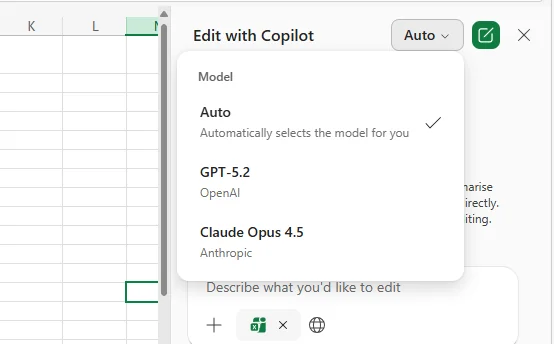
How to find it: Open a workbook in the Excel desktop app on Windows or Mac and look for Edit with Copilot.
2. Chat History Update
For: All users
Copilot Chat now has an updated Chats experience in the left-hand menu, with better filtering and an easier way to clear filters. In short, your chat history is becoming much easier to browse instead of feeling like one long scroll.
💡 Why it matters: Chat history becomes valuable only if you can actually find something again. This update makes Copilot feel less like a disposable chat tool and more like a searchable work memory you can return to later.
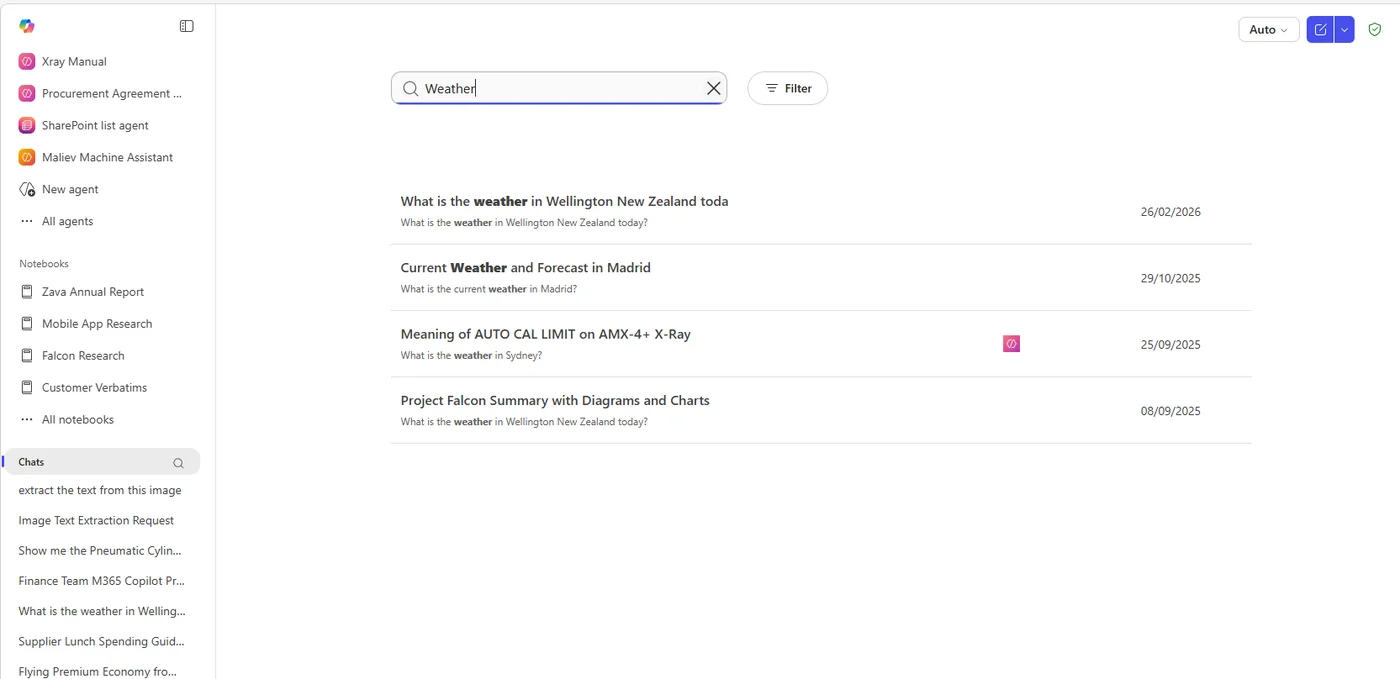
How to find it: Click Chats in the left-hand menu in Copilot Chat.
3. Copilot with OneDrive Files in macOS Finder
For: Mac users
If your files are synced with OneDrive on Mac, you can now right-click a file in Finder and use Copilot against it directly. That means less jumping between Finder, browser tabs, and apps just to ask a question about a file.
💡 Why it matters: This is the kind of workflow improvement people notice immediately. When Copilot comes to where your files already live, you save those tiny context switches that add up all day long.
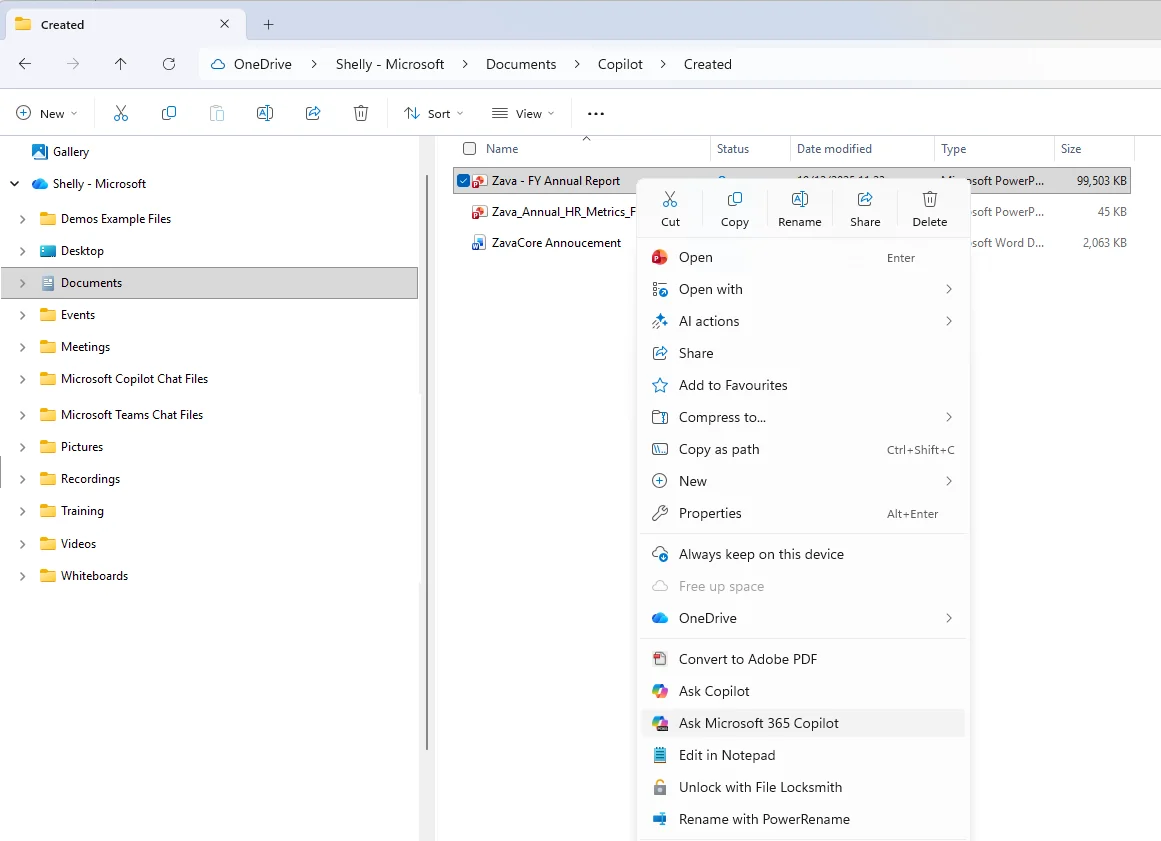
How to find it: In macOS Finder, right-click a synced OneDrive file and look for the Copilot option in the context menu.
4. Scheduling with Copilot
For: All users
You can now ask Copilot to schedule meetings from chat, including finding times, booking rooms, drafting agendas, and helping with the meeting setup in one flow.
💡 Why it matters: Meeting scheduling usually means five small chores stitched together — checking calendars, finding a room, writing an agenda, and sending the invite. Copilot now helps turn that admin chain into one request.
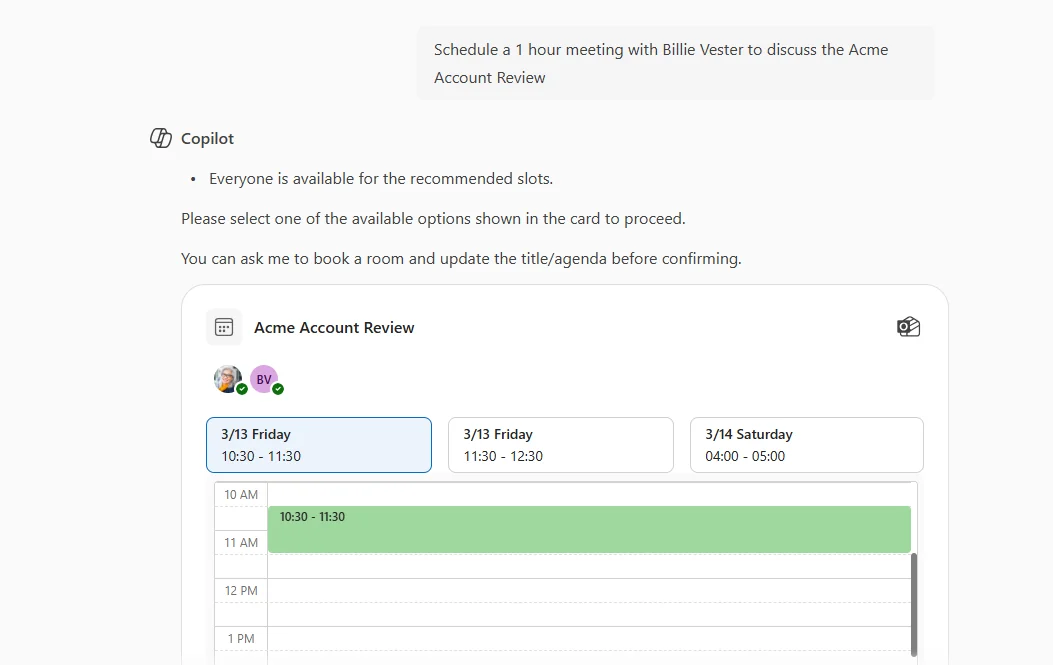
How to find it: In Copilot Chat, ask Copilot to schedule a meeting, find a time, book a room, or draft an agenda.
5. Share with Summary for OneDrive Files
For: All users
When you share a file, the Copilot icon in the share dialog can now send a summary along with it. This is available in File Explorer and OneDrive Activity Center.
💡 Why it matters: Most people do not want just another file link — they want to know why the file matters. This adds the missing context automatically, so your recipient can understand the file before they even open it.
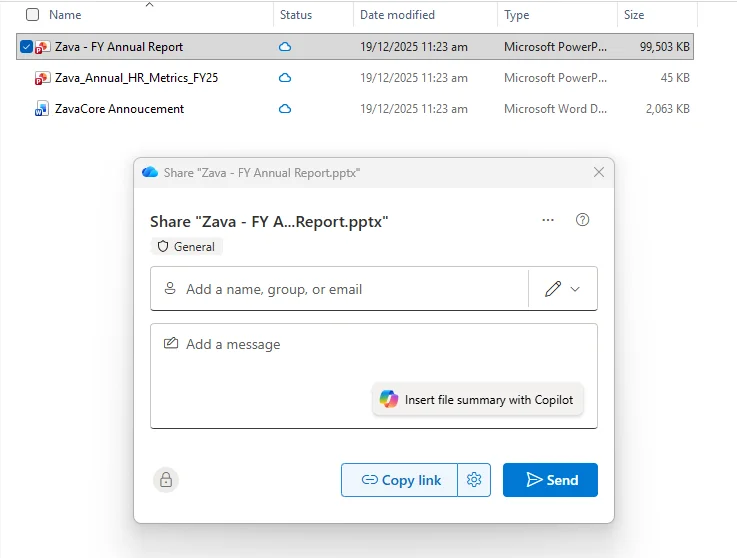
How to find it: Open the share dialog for a file in File Explorer or OneDrive Activity Center, then click the Copilot icon.
6. Floating Copilot Button in OneDrive
For: All users
OneDrive now gets a floating Copilot button that gives you quick access to contextual actions based on the file or files you have selected.
💡 Why it matters: This brings Copilot to the moment of decision. Instead of wondering what prompt to type, OneDrive starts surfacing useful actions right where you are already working.
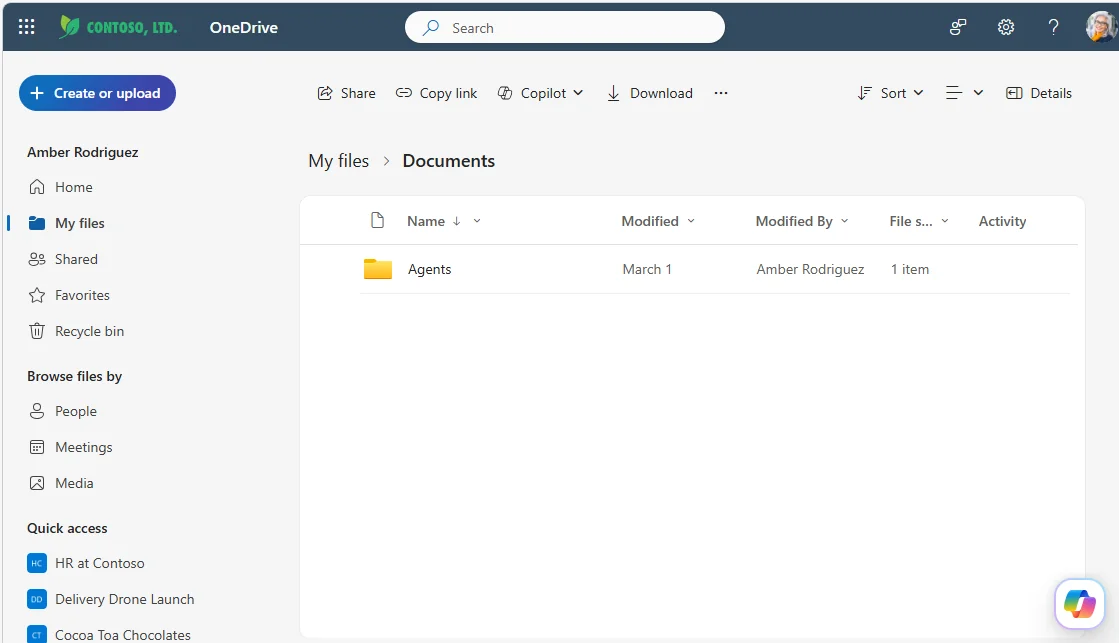
How to find it: Open OneDrive, select a file, and look for the floating Copilot button.
7. Loop Notebooks in ContextIQ
For: All users
You can now scope prompts to Loop Notebooks from the Files tab in ContextIQ, making it easier to ground Copilot on the right notebook content.
💡 Why it matters: Copilot works best when you point it at the right source. If your team captures planning, notes, and collaboration inside Loop, this update helps Copilot stay focused on that shared context instead of guessing.
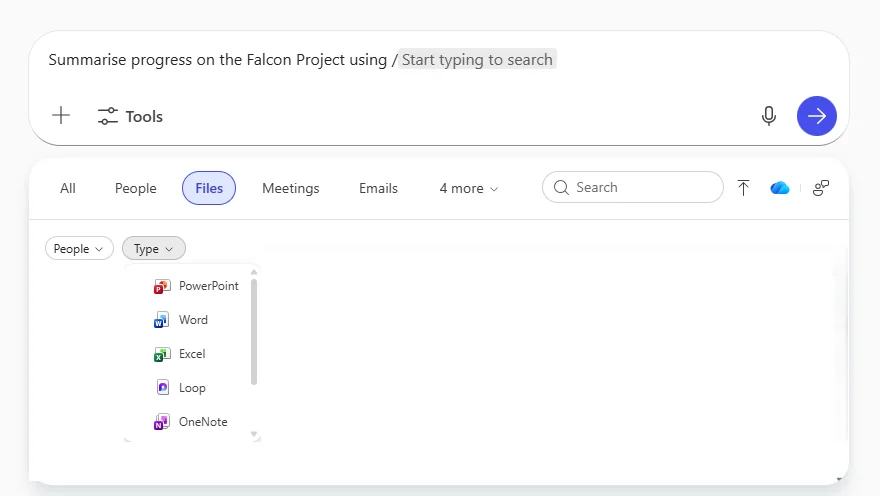
How to find it: In Copilot Chat, open the Files tab in ContextIQ and select a Loop Notebook to ground your prompt.
8. Review PDFs with Copilot
For: All users
Copilot can now help you review PDFs, explain selected text in plain language, and let you customise prompts for the kind of answer you want.
💡 Why it matters: PDFs are where complexity goes to hide — contracts, reports, vendor documents, technical papers. This makes Copilot feel like a translator sitting beside you, turning dense language into something usable.
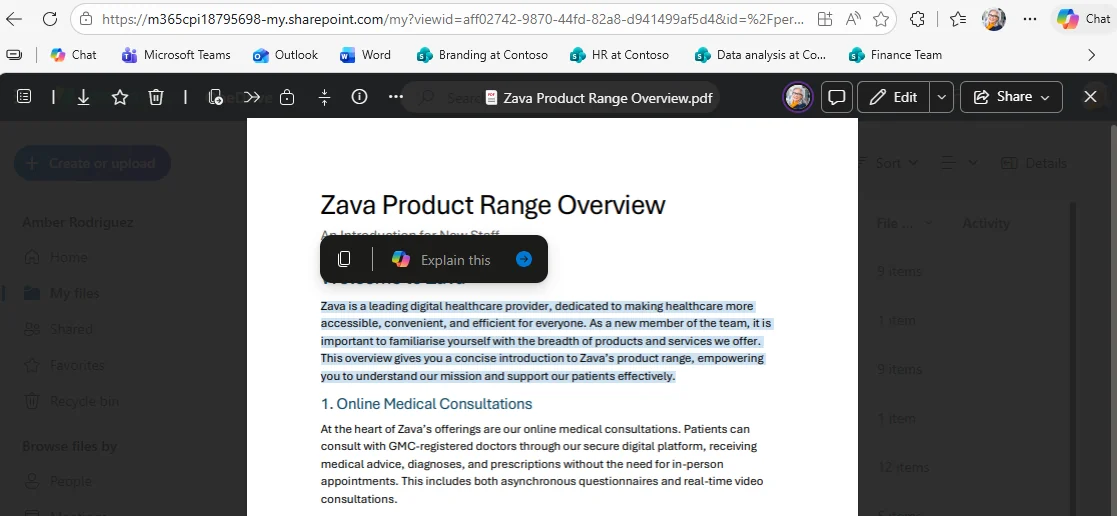
How to find it: Open a PDF, select the relevant content, and use Copilot to review or explain it.
9. Agents in Classic Outlook
For: Outlook users on Windows
Agents are no longer limited to New Outlook. You can now access them in Classic Outlook by typing @ or selecting the tools icon.
💡 Why it matters: Many organisations still rely on Classic Outlook. Bringing agents there removes the awkward split where the newest AI experiences existed only in the newer client.
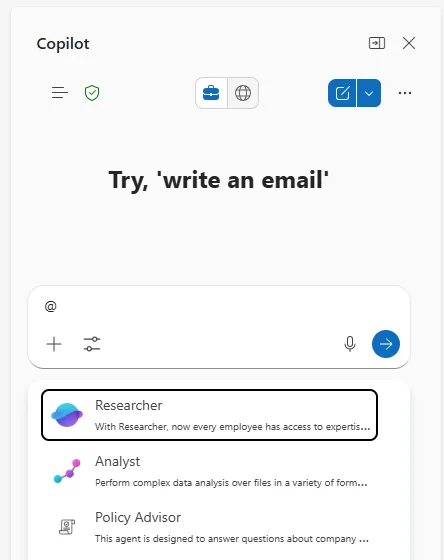
How to find it: In Classic Outlook, open Copilot Chat and either type @ or click the tools icon.
10. Audio Overview of Meetings
For: Teams users · English only
Copilot can now generate an audio overview of a transcribed meeting with one or two speakers, and you can adjust the tone and length. Microsoft says this is accessed through the Meet app in Teams.
💡 Why it matters: Sometimes you do not need the full transcript or recording — you just need the short version while walking between meetings. Audio overviews turn meeting catch-up into something you can consume like a mini podcast.
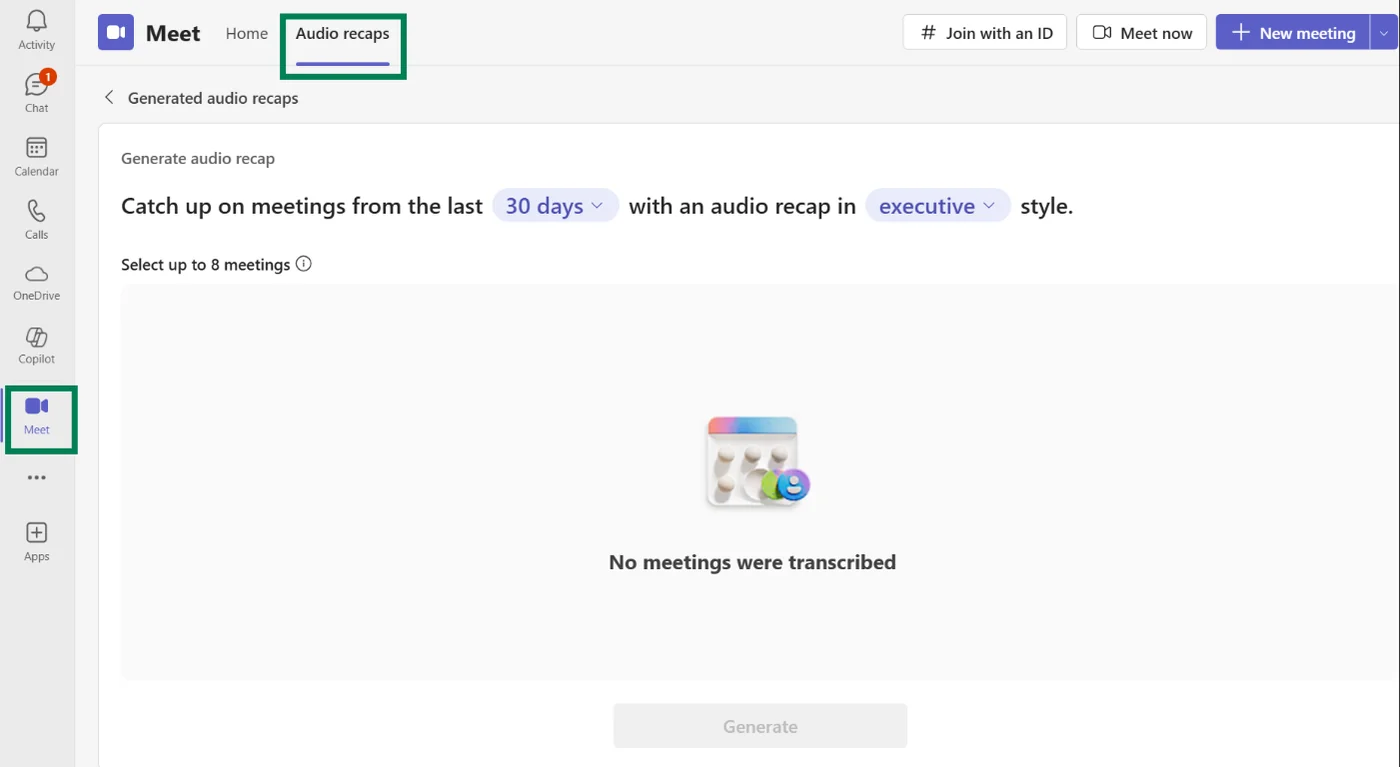
How to find it: Open the Meet app in Teams for a transcribed meeting and choose the audio overview option.
11. Ask Copilot from Edge Address Bar
For: Edge users
Microsoft Edge now lets you type a query in the address bar and send it directly to Copilot. It is a faster on-ramp into Copilot without opening a separate starting point first.
💡 Why it matters: The address bar is where many people start every web task. Adding Copilot there means AI help becomes part of your normal browsing habit instead of a separate destination you have to remember to open.
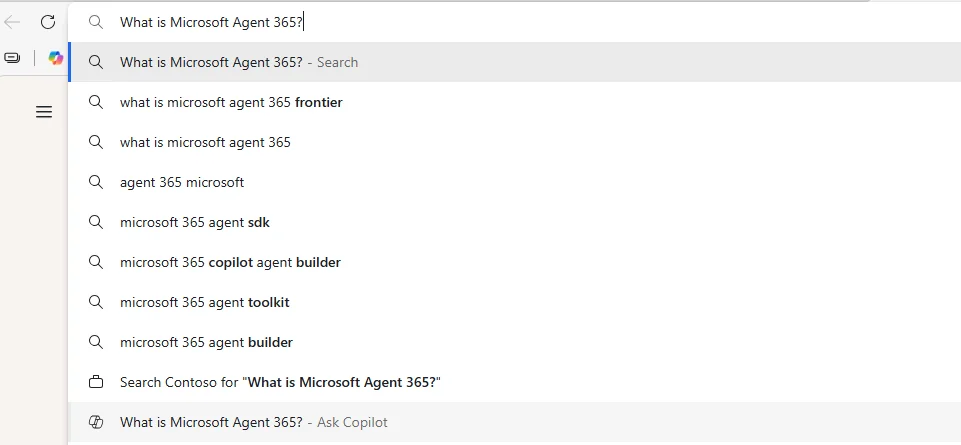
How to find it: Type a query into the Edge address bar and send it to Copilot.
12. Summarise & Explain in PDF Reader
For: Edge users
Microsoft Edge PDF Reader now adds two built-in actions: Summarise and Explain. Instead of writing your own prompt, you get one-click actions for overviews and plain-language clarification.
💡 Why it matters: This is the fast lane for PDF comprehension. When Microsoft gives you dedicated actions inside the reader, it lowers the effort so much that people are far more likely to use Copilot in the moment.
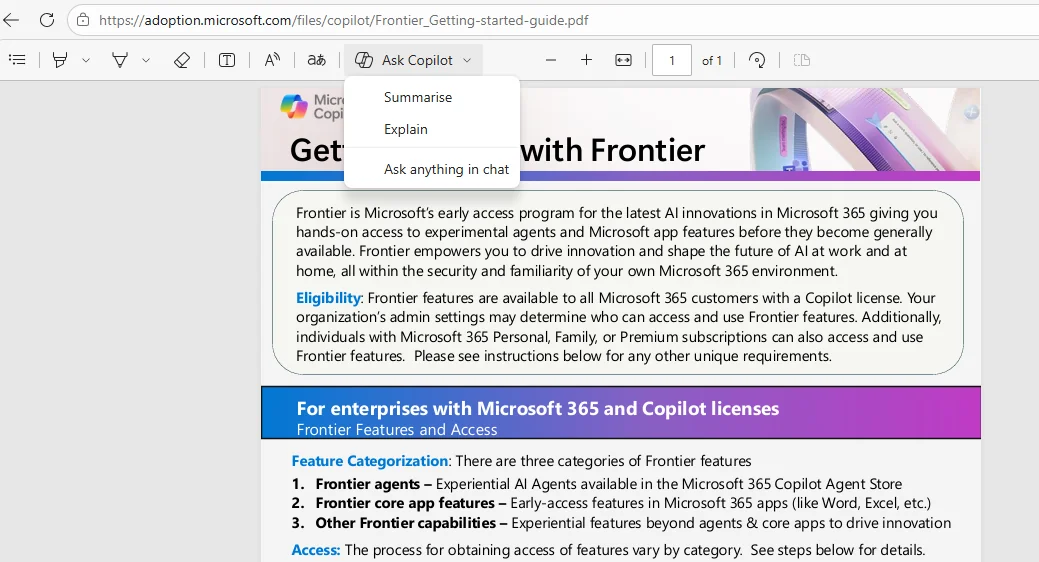
How to find it: Open a PDF in Microsoft Edge and use the Summarise or Explain actions in PDF Reader.
13. Copilot Can Edit PowerPoint
For: Users with a Copilot licence · Currently rolling out
Copilot can now edit PowerPoint presentations through natural conversation and work with your brand kit. This is about refining an existing presentation inside PowerPoint rather than just generating content from the side.
💡 Why it matters: This is where Copilot starts saving the painful middle part of presentation work — rewriting slides, tightening wording, making content fit the deck, and keeping it on-brand without endless manual polishing.
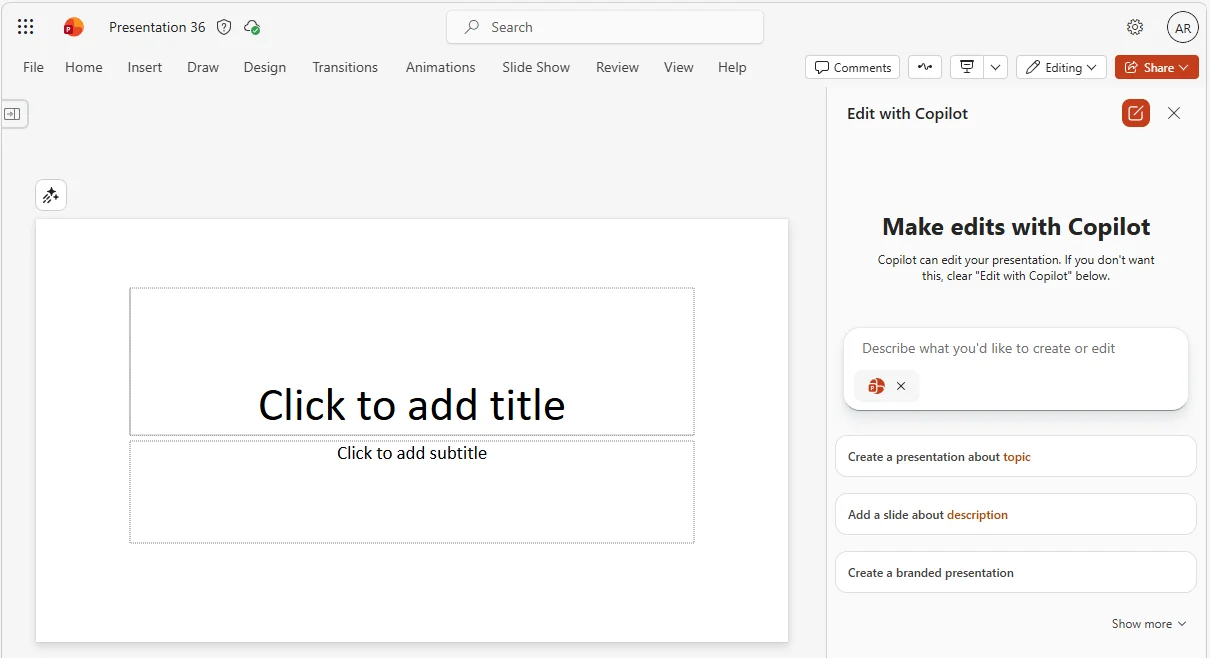
How to find it: Open a presentation in PowerPoint and ask Copilot to edit the deck using natural language.
14. Watermarks for AI-generated Content
For: All users
Microsoft is adding watermarks for AI-generated video, audio, and image content, controlled through the privacy dashboard.
💡 Why it matters: As AI-created media becomes more common, provenance matters more. Watermarks help organisations signal what was AI-generated, which supports trust, transparency, and safer sharing.
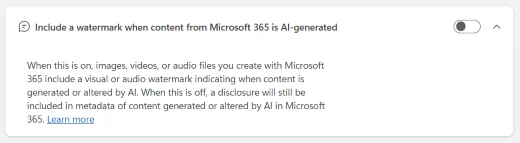
How to find it: Go to the Microsoft privacy dashboard and look for the watermark setting for AI-generated content.
15. Enhanced Memory with Work Data
For: All users · Currently rolling out
Copilot Memory is being enhanced with work data, helping responses become more relevant and contextual over time. You manage this in Settings > Personalisation.
💡 Why it matters: A useful assistant should remember what matters to you at work. This update pushes Copilot closer to that ideal by making memory more grounded in your real working context instead of isolated chat history.
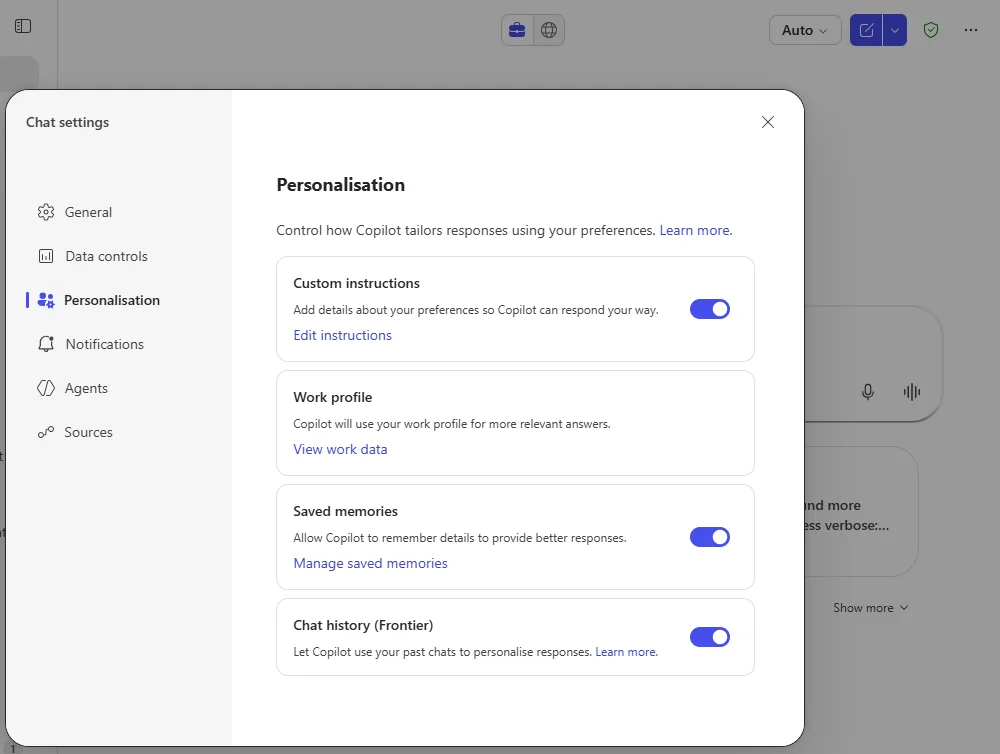
How to find it: Open Copilot Settings > Personalisation.
16. Word Agent
For: All users · Currently rolling out
The new Word Agent appears in the All agents menu and helps with research, structure, and formatting. Microsoft says it is available with or without a paid licence.
💡 Why it matters: Writing a good document is usually not blocked by typing speed — it is blocked by messy thinking. A Word-focused agent helps you get from rough idea to structured draft much faster.
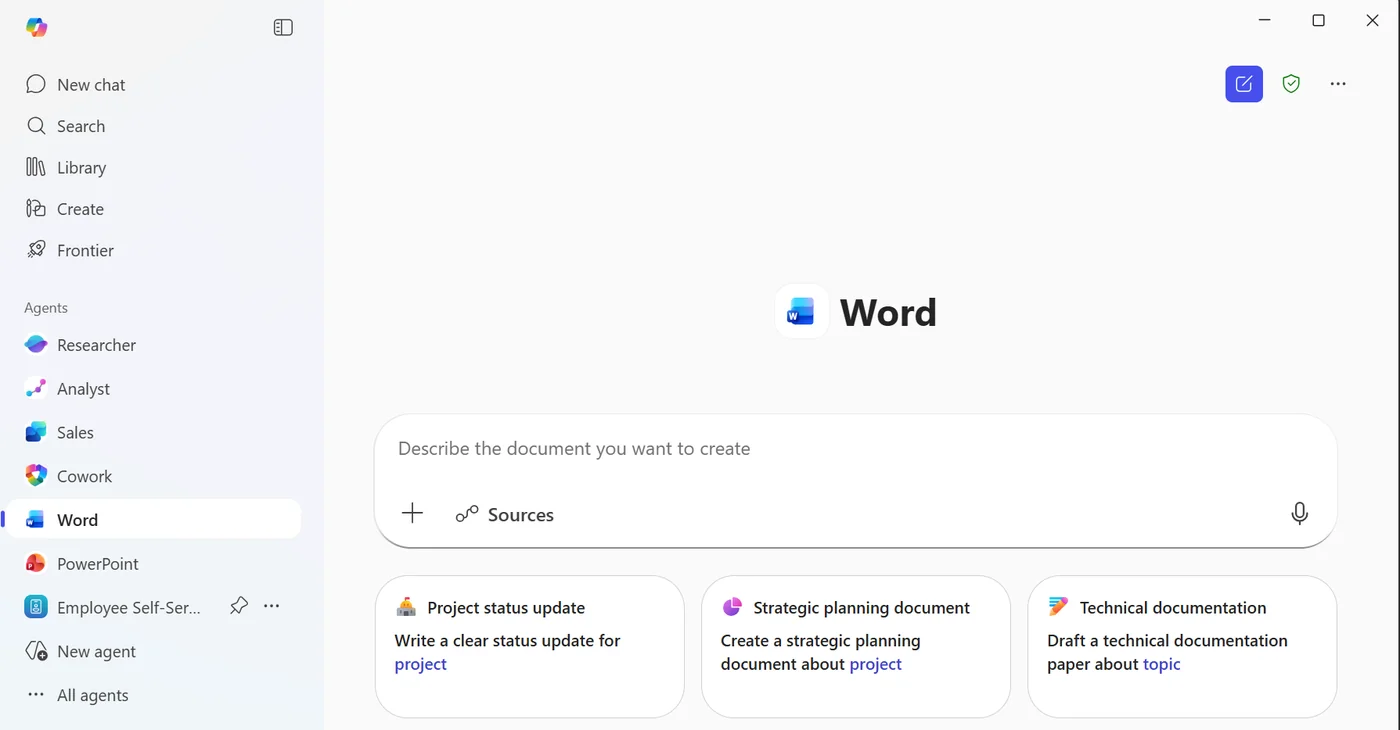
How to find it: Open Copilot Chat and look for Word Agent under All agents.
17. SharePoint List Agent
For: All users · Currently rolling out
The SharePoint List Agent helps you build lists from prompts and can generate the schema for you. Microsoft places it in the All agents area.
💡 Why it matters: Building a useful list sounds easy until you start deciding columns, formats, and structure. This agent helps you skip the blank-canvas problem and get to a usable list much faster.
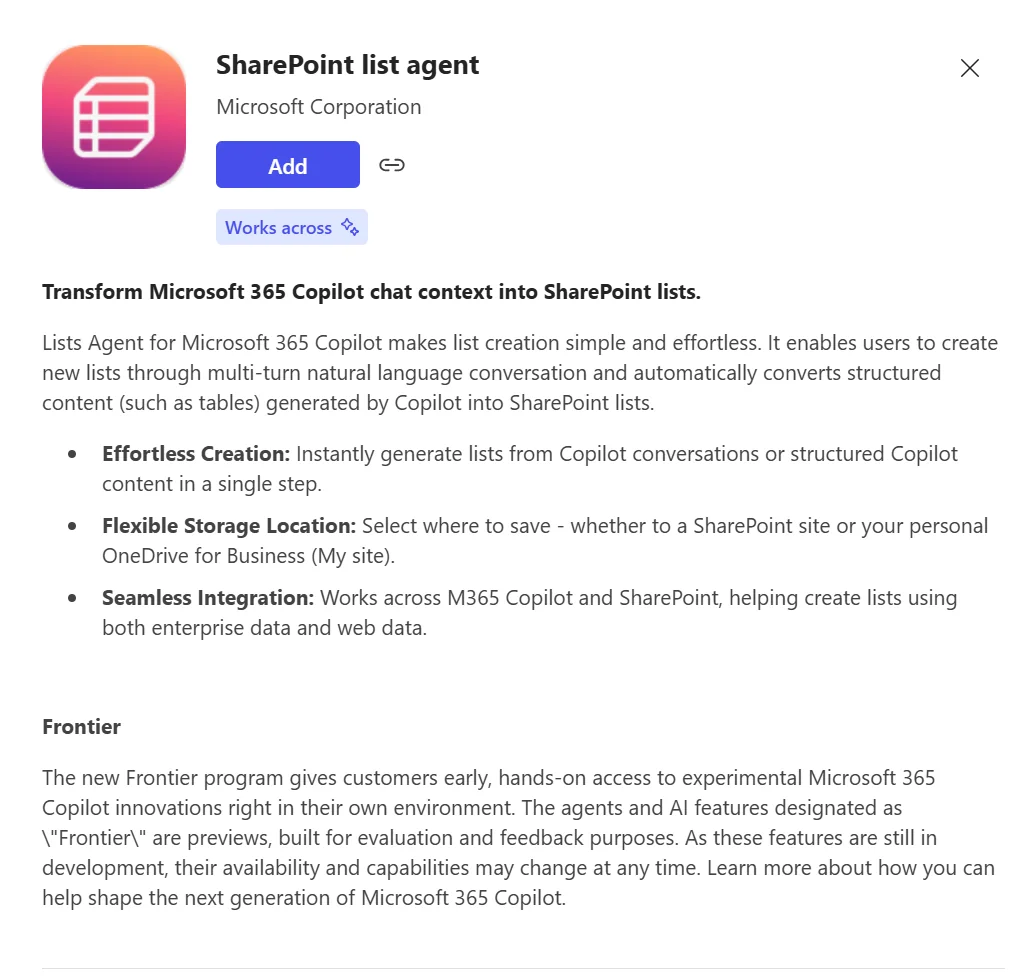
How to find it: Open Copilot Chat and go to All agents to find the SharePoint List Agent.
18. Voice Chats Reference Memory
For: All users · Currently rolling out
Voice chats can now reference your stored Memory so Copilot sounds more consistent and personal across interactions. Microsoft notes that you still cannot modify Memory by voice yet.
💡 Why it matters: Voice becomes much more useful when Copilot remembers context rather than treating every conversation like the first one. This makes spoken interactions feel less shallow and more genuinely assistant-like.
How to find it: Use voice chat after enabling and managing Memory in Settings > Personalisation.
19. Voice Support in Word & PowerPoint
For: All users · Currently rolling out
Copilot voice support is coming to Word and PowerPoint, so you can talk to Copilot to brainstorm, create, and analyse without relying only on typing.
💡 Why it matters: Many people think faster than they type, especially when shaping ideas. Bringing voice into Word and PowerPoint makes Copilot feel more like a live thinking partner during document and deck creation.
How to find it: In Word or PowerPoint, start a voice interaction with Copilot.
20. Metadata Support for SharePoint Queries
For: All users · Currently rolling out
Copilot can now use column metadata when querying SharePoint libraries and folders, which should make answers more precise when your content is well tagged.
💡 Why it matters: Good metadata has always been valuable, but users often never felt the payoff. This update makes those columns finally work harder for you by improving how Copilot understands and narrows results.
How to find it: Ask Copilot about files in a SharePoint library or folder that uses metadata columns.
21. Overview Page in Copilot Notebooks
For: Users with a Copilot licence · Currently rolling out
Copilot Notebooks now get an Overview Page that surfaces summaries and insights as a landing experience.
💡 Why it matters: Notebooks are most useful when they help you re-enter context quickly. An overview page gives you the "catch me up" moment immediately instead of forcing you to re-read everything from scratch.
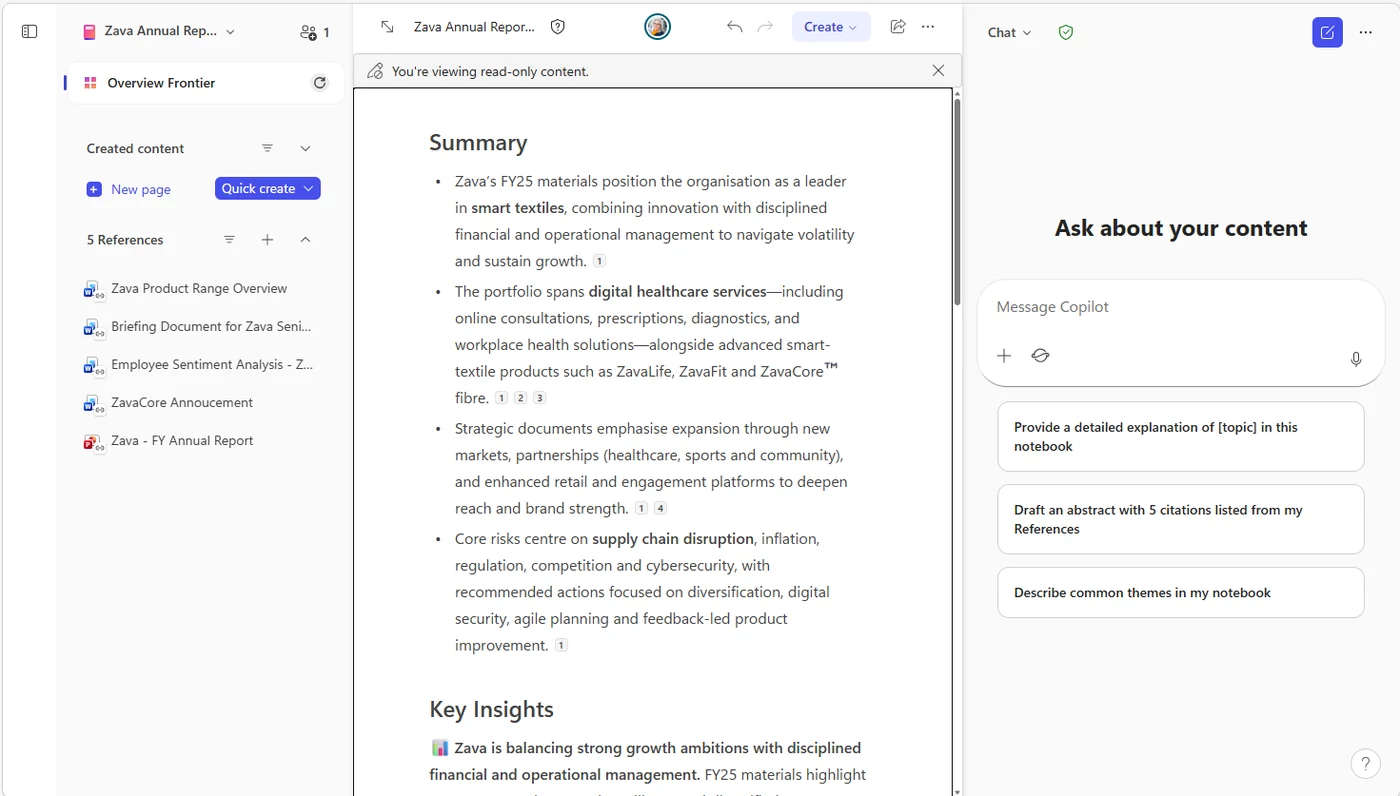
How to find it: Open a Copilot Notebook and look for the new Overview Page landing experience.
22. Prepare for Meetings in Outlook Mobile
For: Users with a Copilot licence · Currently rolling out
Outlook mobile now gives you a single-tap way to prepare for meetings with Copilot.
💡 Why it matters: Mobile meeting prep is where Copilot can be practical. When you are walking into a meeting, you do not want ten clicks — you want one tap and a quick briefing.
How to find it: In Outlook mobile, open an upcoming meeting and tap the Copilot meeting prep option.
23. Copilot Chat for Teams Chats, Channels, Calling & Meetings
For: All users · Currently rolling out
Copilot Chat is expanding into Teams chats, channels, calling, and meetings, with access to both Microsoft 365 data and web data even while you are in the meeting flow.
💡 Why it matters: This is one of the biggest usability wins in the list. Copilot becomes more helpful when it shows up inside the work you are already doing instead of making you leave Teams and start over somewhere else.
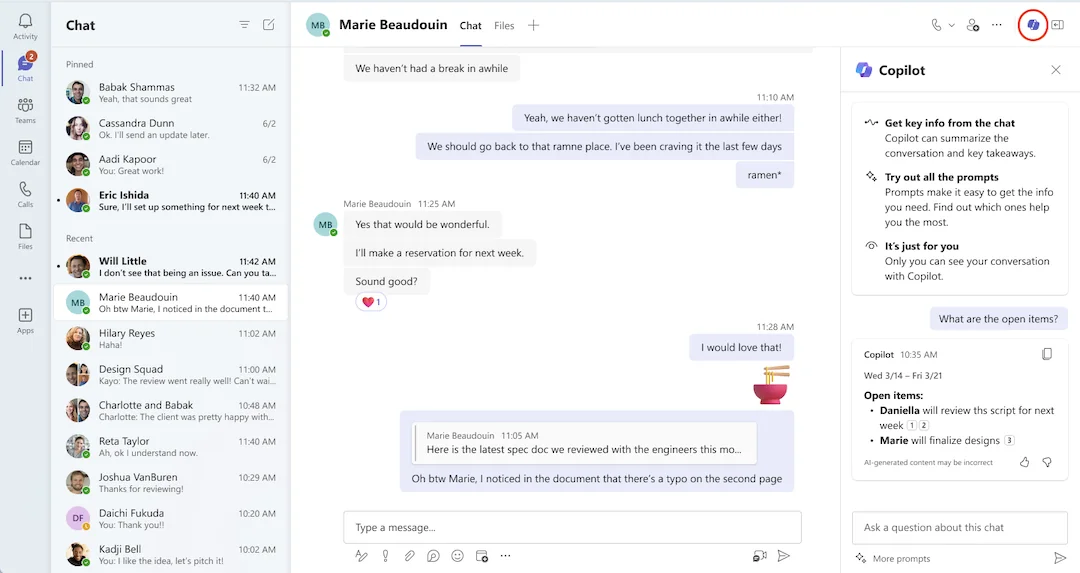
How to find it: Use Copilot Chat inside Teams chats, channels, calls, or meetings.
24. Copilot Chat Across Multiple Edge Tabs
For: Edge users · Currently rolling out
Copilot in Edge can now reference all open tabs, not just the active tab.
💡 Why it matters: This is brilliant for comparison work. If you are researching vendors, reading multiple articles, or jumping between source pages, Copilot can now reason across the whole set instead of the single tab in front of you.
How to find it: Open multiple tabs in Microsoft Edge and ask Copilot a question about what is open.
25. Ground Copilot in YouTube Videos
For: Edge users · Currently rolling out
Copilot in Edge can now ground responses in open YouTube videos, helping you get insights from what is on screen.
💡 Why it matters: Sometimes you do not need the full 25-minute video — you just need the key takeaway. This helps turn long video content into something faster to interrogate and extract value from.
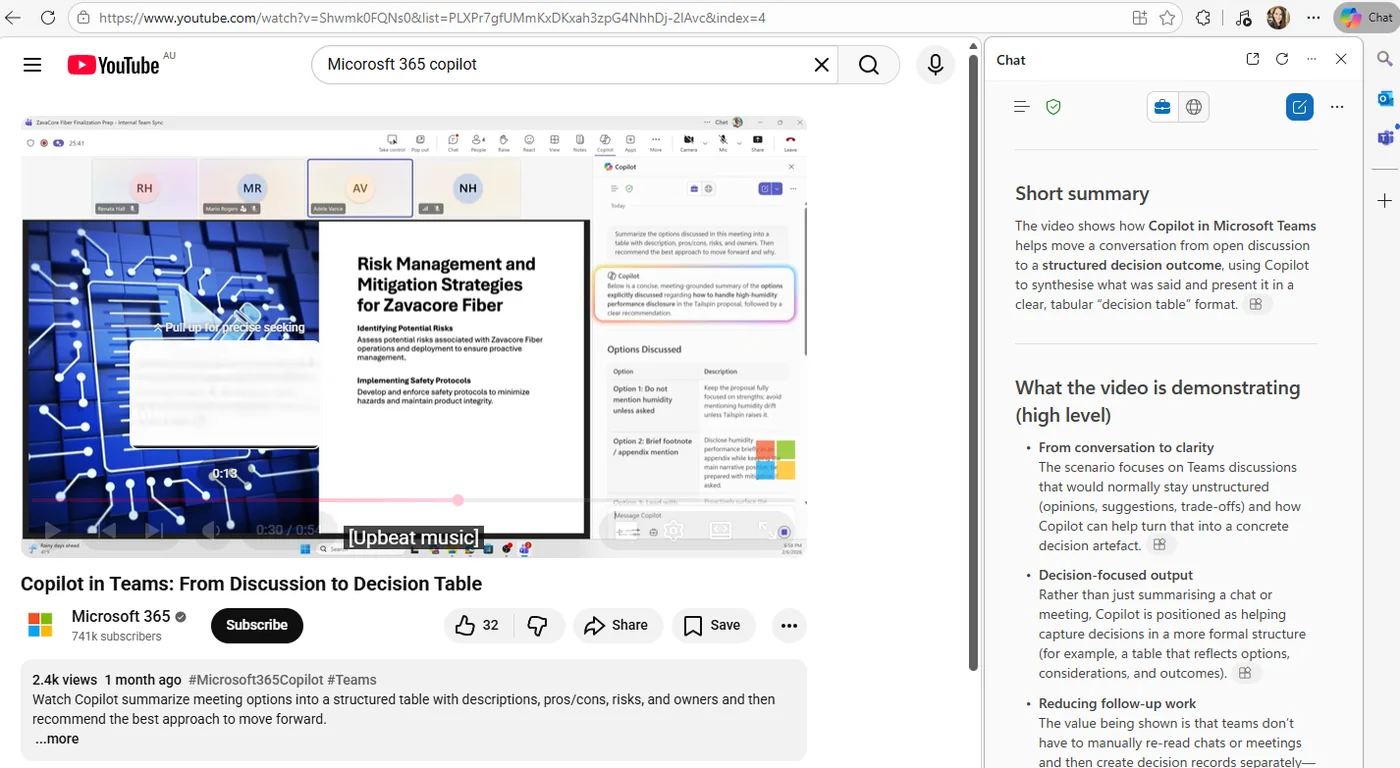
How to find it: Open a YouTube video in Microsoft Edge and ask Copilot about it.
26. Viva Connections AI Audio Overview
For: Viva Connections users · Currently rolling out
The Viva Connections AI audio overview is expanding with additional languages and support for site pages, not just the original content types.
💡 Why it matters: Intranet content often gets ignored because people do not have time to read it. Audio overviews make internal updates easier to consume, and broader language support means more organisations can actually use the feature at scale.
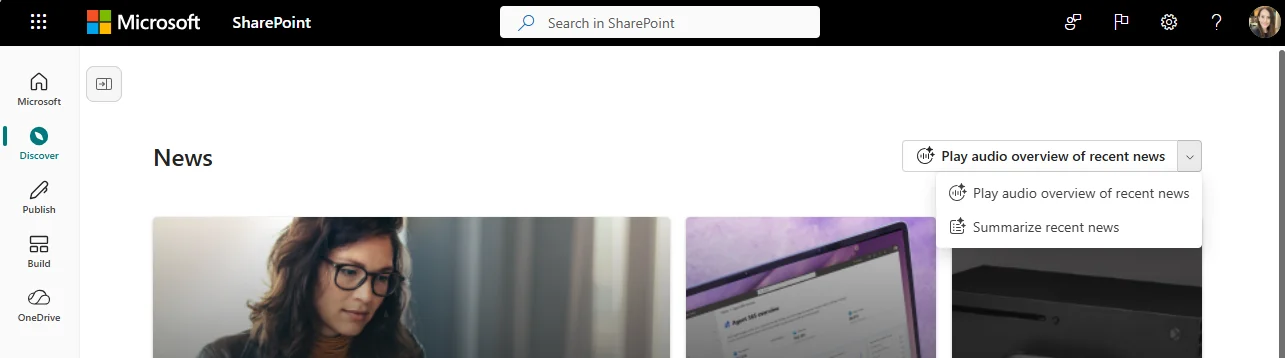
How to find it: In Viva Connections, look for the AI audio overview experience on supported content such as site pages.
27. Copilot Search Admin Experience
For: IT admins · Available now
Microsoft has introduced a new Copilot Search Admin Experience in the admin center, giving admins a central place to manage connectors, bookmarks, and acronyms.
💡 Why it matters: Search quality does not improve by accident. Giving admins a clearer control surface for Copilot search means they can shape the experience users actually get instead of hoping the defaults are good enough.
How to find it: Open the Microsoft 365 admin center and look for the Copilot Search admin experience.
📖 No public M365 Roadmap ID listed for this feature.
28. People Skills Expanded AI for E3/E5
For: Microsoft 365 E3 and E5 users · Available now
People Skills AI inferencing is expanding to E3 and E5 users, where previously this was more limited to Copilot and Viva-focused licensing.
💡 Why it matters: This broadens access to AI-inferred skills beyond the premium early adopters. In practice, that means more complete talent signals across the organisation and less of a two-tier experience.
29. ServiceNow Edit Permissions
For: IT admins · Available now
Admins can now edit existing ServiceNow connections to change how permissions are handled, instead of rebuilding the setup from scratch.
💡 Why it matters: Permission models nearly always need tuning after real-world rollout. Being able to adjust them on an existing connection saves time, reduces disruption, and makes connector governance much more practical.
How to find it: Open your existing ServiceNow connector connection and edit the permissions settings.
New Copilot Connectors
For: All users (admin must deploy connectors) · Available now
This month brings five new Copilot Connectors, making Copilot more useful for product, engineering, and whiteboarding workflows outside Microsoft 365.
| # | Connector | What you can do | Roadmap |
|---|---|---|---|
| 30 | Bitbucket Pull Requests | Ask Copilot about pull request activity and review work | 515163 |
| 31 | Aha! | Ask about product ideas, planning, and roadmap content | 515159 |
| 32 | Shortcut | Retrieve tracked engineering work and stories | 515178 |
| 33 | GitLab Merge Requests | Query merge request activity and code review context | 515162 |
| 34 | Miro | Bring board content and workshop knowledge into Copilot | 515166 |
💡 Why it matters: Every connector removes one more reason to leave Copilot. If your teams live in product tools, code review tools, or digital whiteboards, these integrations help Copilot answer questions using the systems your organisation already depends on.
How to find it: Your admin deploys connectors from the Microsoft 365 admin center → Settings → Copilot → Connectors. Once deployed, users can simply ask Copilot questions against the connected systems.
35. ServiceNow Connector Edit User Mappings & Query Filters
For: IT admins · Currently rolling out
Microsoft is also rolling out more advanced editing for the ServiceNow connector, including user mappings and query filters.
💡 Why it matters: This is the tuning layer. Once a connector is live, admins need ways to improve relevance, align identities properly, and tighten the scope of what gets surfaced. That is exactly what this update enables.
How to find it: Open the ServiceNow connector configuration and edit the user mappings and query filters.
36. Teams Organisation Evaluation Score
For: IT admins and Copilot champions · Currently rolling out
Microsoft is introducing a Teams Organisation Evaluation Score that helps IT admins evaluate apps and agents more automatically.
💡 Why it matters: Admins should not need a spreadsheet marathon to work out what is delivering value. An automated evaluation score helps you spot which apps and agents are worth backing, improving, or retiring.
📚 Official Microsoft Resources
- Microsoft 365 Copilot overview
- Microsoft 365 roadmap
- Microsoft 365 Copilot adoption guide
- Copilot Voice
- Copilot in Edge
- What’s new in Microsoft 365
🔗 Related Content on This Site
- January 2026 Copilot Updates
- February 2026 Copilot Updates
- April 2026 Copilot Updates
- May 2026 Copilot Updates
- M365 Copilot Full Tutorial
- Master All 6 Copilot Agents
- Copilot Studio Beginner Lab
- Browse all AI tutorials
- Daily AI News
💡 Want More?
- 📺 Subscribe to A Guide to Cloud & AI on YouTube for new tutorials every week
- 📰 Check out the AI News page for the latest AI headlines
- ☕ Download free resources
- 📥 Monthly Copilot recaps as free PDF slide packs
Originally published on LinkedIn. This article accompanies a video tutorial on the A Guide to Cloud & AI YouTube channel.