Microsoft 365 Copilot January 2026 Recap: 30 Updates
← what changed this month, in plain English
On this page
January 2026 opens with 30 Microsoft 365 Copilot updates — from Writing Coaching in Word and a new Model Selector, to Agent Mode in Excel, richer video creation, smarter Copilot Search, and better sharing across notebooks and pages. Most features are available now, while a second wave is currently rolling out.
📅 2026 monthly recaps: January (you are here) · February · March · April · May
If you only have 2 minutes — January’s 3 picks
If 30 changes feels like too much, these are the three I’d start with:
- Model Selector in Microsoft 365 Copilot — three modes (Auto · Quick response · Think deeper) backed by GPT-5. Foundational — it changes how every Copilot interaction feels. Most users won’t notice the rest of January until they get this right.
- Writing Coaching in Word — guidance on structure, flow, and tone right inside the Word context menu. Most people draft something every day; this one quietly improves a lot of those drafts.
- Library in the Microsoft 365 Copilot app — a new visual-first home for everything Copilot generates (images, pages, shared content). Solves the “where did that Copilot thing I made go?” problem that had been quietly costing time.
Admin Checklist — January 2026
Five admin checks worth doing this month, in priority order:
Brief teams on the Model Selector before they discover it. People will see Auto, Quick response, and Think deeper appear in their Copilot prompt — without context, they’ll pick randomly. Action: Update your Copilot intranet page with a one-line guide: “Auto for most things · Quick for short answers · Think deeper for complex analysis.”
Update your Outlook Copilot training material to cover the new “Edit in Outlook” draft handoff from Chat. This is a small UX change with high adoption pull — once people see it, they use it. Action: Add a screenshot + one-paragraph note to your existing Outlook training.
Brief Copilot champions on the new Library. Library is where Copilot-generated images, pages, and shared content now live. Your champions need to know it exists so they can answer the inevitable “where did that go?” question. Action: Microsoft 365 Copilot app → Library → familiarise yourself, then share a short walkthrough.
Re-test active Agent Builder projects now that Copilot Studio Lite uses GPT-5. Better reasoning and longer-context handling — agents that previously felt brittle on multi-turn conversation are worth a fresh smoke test. Action: Open your active agents and run them through the conversation flows that used to cause trouble.
Review Copilot Dashboard’s new chat-adoption insights. The dashboard now exposes adoption signal for users without a paid Copilot licence — important for measuring whether Copilot Chat habits are forming broadly before you justify more licences. Action: Viva Insights → Copilot Dashboard → look for the new Copilot Chat adoption insights.
1. Writing Coaching in Word
For: Word users · Available now
The Copilot context menu in Word now includes Writing Coaching, giving you guidance on structure, flow, and tone without leaving the document.
💡 Why it matters: This is like having an editor sitting beside you before you hit send. Instead of rewriting your work for you, Copilot helps you tighten the parts that usually make a draft feel rough or unclear.
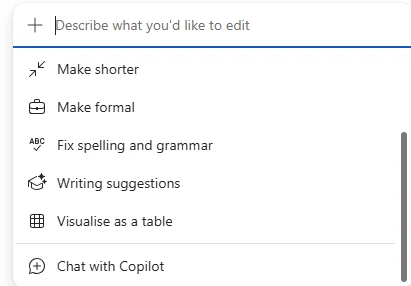
How to find it: In Word, highlight content and open the Copilot context menu to look for coaching.
2. Recent Prompts in Draft with Copilot in Word
For: Word users · Available now
Draft with Copilot in Word now surfaces your recent prompts, so you can reuse them as they are or tweak them instead of starting from zero each time.
💡 Why it matters: Good prompts are often reusable. This saves you from retyping the same instruction over and over, a bit like having your favourite email templates ready when you need them.
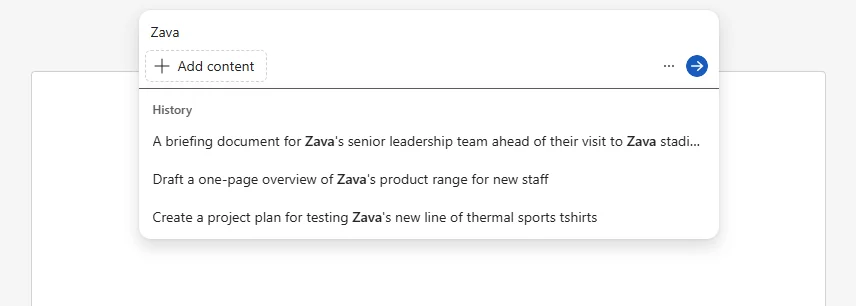
How to find it: Open Draft with Copilot in Word and look for your recent prompts in the drafting experience.
3. Generate Word, Excel, and PowerPoint Files from Agents
For: Agent builders · Available now
Agent Builder can now generate Word documents, Excel workbooks, and PowerPoint presentations. Microsoft says you enable this by turning on ‘Create documents, charts and code’ for the agent. (Agent Builder deep dive →)
💡 Why it matters: This moves agents from “answer bot” to “output builder”. Instead of getting a nice response and then doing the real work yourself, the agent can hand you the file you actually need.
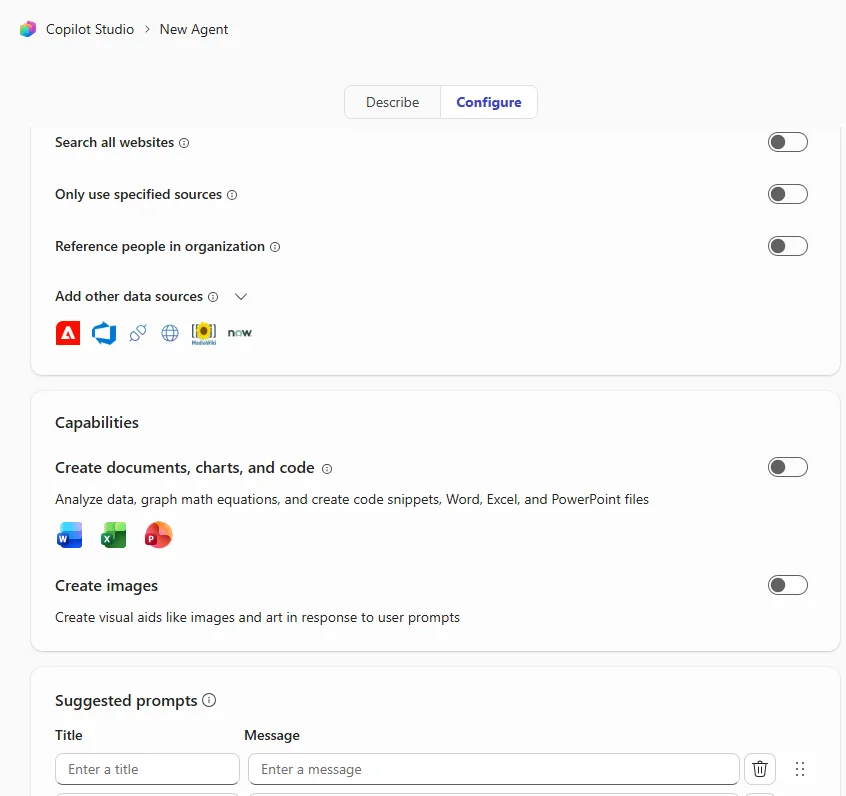
How to find it: In Agent Builder, open your agent configuration and turn on Create documents, charts and code.
4. Model Selector in Microsoft 365 Copilot
For: All users · Available now
Microsoft 365 Copilot now includes a Model Selector with GPT-5 behind it, giving you three choices: Auto (default), Quick response, and Think deeper. (Deep dive on model choice →)
| Mode | What it does |
|---|---|
| Auto | Lets Copilot choose the right level of reasoning |
| Quick response | Prioritises speed |
| Think deeper | Spends longer reasoning through the task |
💡 Why it matters: Not every task needs the same brainpower. This is like choosing between a quick chat in the hallway and booking a proper strategy session — same colleague, different depth.
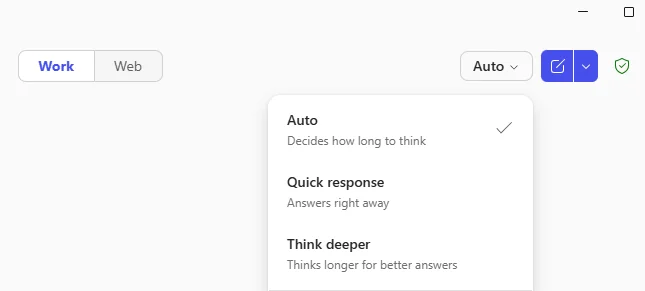
How to find it: In Microsoft 365 Copilot, start a prompt and look for the Model Selector options.
5. Updated Navigation Pane
For: All users · Available now
The navigation pane is being refreshed with a simplified agents list, more visible chat history, and a more prominent search experience.
💡 Why it matters: Small navigation fixes can save a surprising amount of time. When chats, agents, and search are easier to spot, Copilot feels less like a maze and more like a proper workspace.
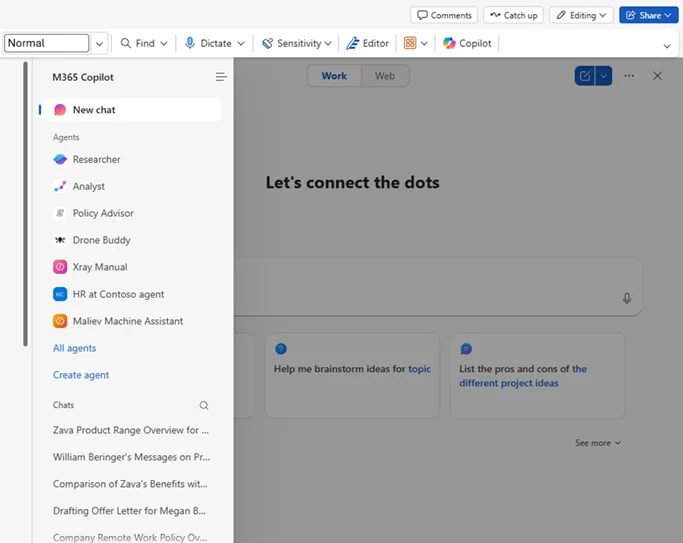
How to find it: Open Microsoft 365 Copilot and check the left-hand navigation pane.
6. Precise Text Selection in Word
For: Word users · Available now
When you prompt Copilot from a selection in Word, it no longer expands that selection to the full paragraph, table, or list. You can work against the exact text you meant to choose.
💡 Why it matters: Precision matters. This fixes the frustrating moment where you select one sentence but Copilot behaves as if you handed it the whole room.
How to find it: In Word, select a small piece of text and run a Copilot prompt against that exact selection.
7. Continue Editing in Outlook from Copilot Chat
For: Outlook users · Available now
When Copilot recognises that you are drafting an email, it can now show an Edit in Outlook button that opens a pre-filled draft with the subject, message, and recipients ready for you.
💡 Why it matters: This closes the gap between “nice draft” and “ready to send”. It is the difference between getting advice from Copilot and having the email already sitting in Outlook waiting for your final review.

How to find it: Ask Copilot Chat to draft an email and look for the Edit in Outlook button.
8. PowerPoint Grounded on Copilot Pages
For: PowerPoint and Copilot Pages users · Available now
You can now create a PowerPoint presentation grounded on a Copilot Page, turning page content into presentation material more directly. (Pages and prompting brief →)
💡 Why it matters: This is a cleaner handoff from thinking to presenting. Instead of rebuilding a deck from scratch, you can turn the page where the work already lives into slides.
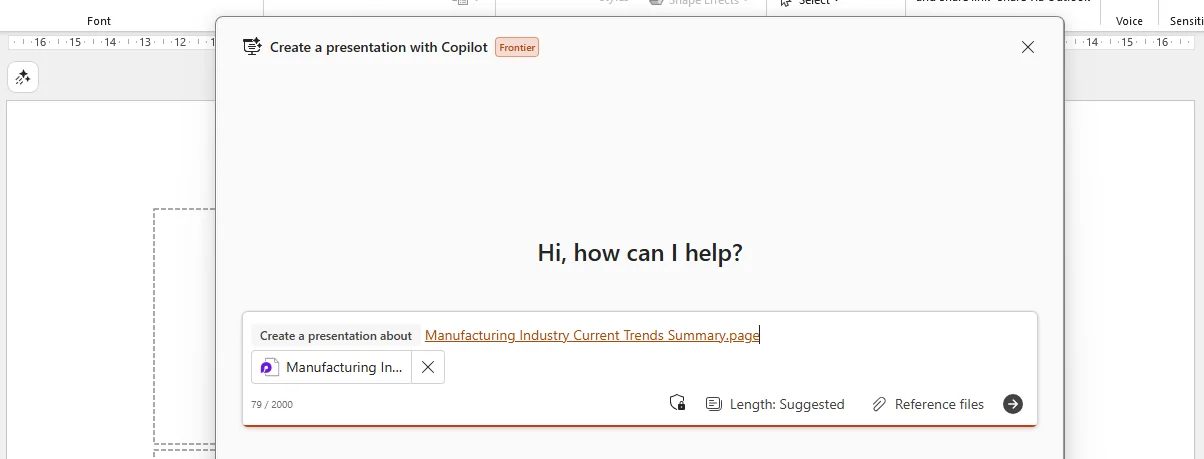
How to find it: When creating a presentation with Copilot, reference or choose a Copilot Page as your grounding source.
9. Video Creation Updates in Microsoft 365 Copilot
For: Content creators and business users · Available now
The Create experience in Microsoft 365 Copilot can now build videos from a prompt, PowerPoint, PDF, or Word document. Microsoft also added transcript editing, OneDrive media, voiceovers, brand colours, and a redesigned scene experience. Some capabilities require a paid licence.
💡 Why it matters: Video creation usually means juggling scripts, assets, timelines, and design choices across multiple tools. This makes the process feel more like assembling with Lego than starting from an empty editing suite.
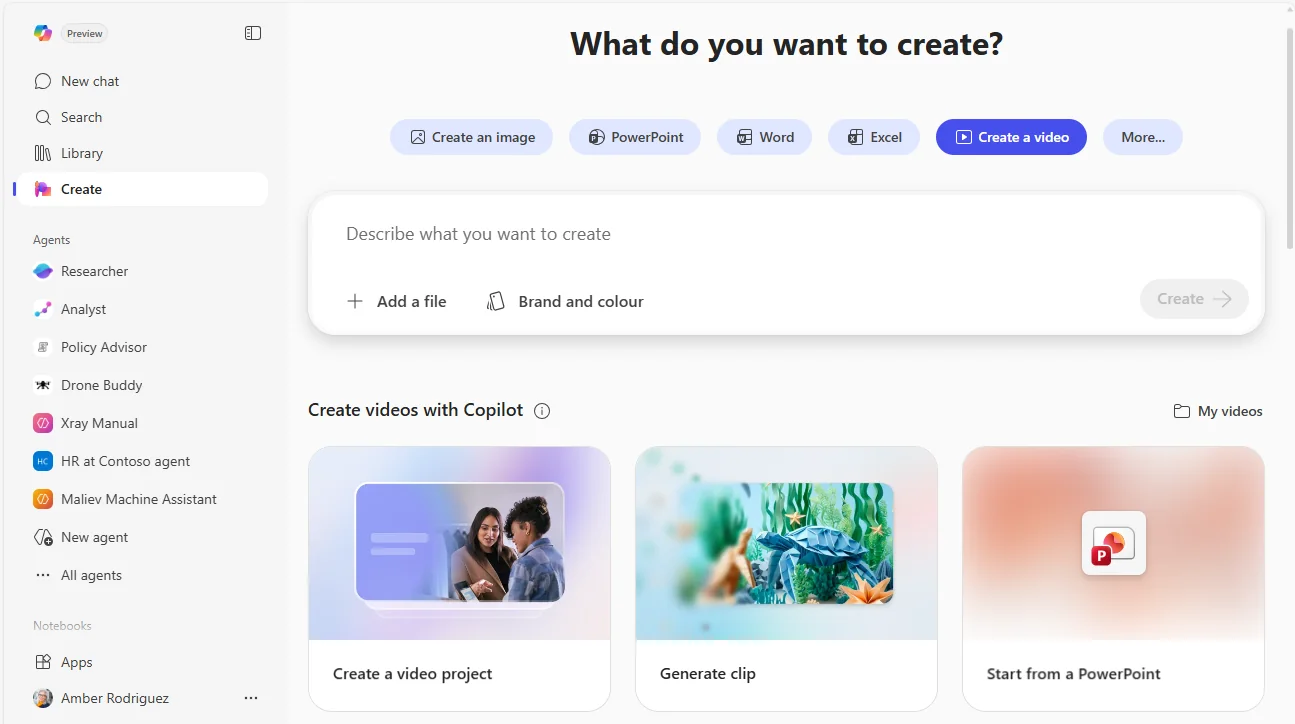
How to find it: In the Microsoft 365 Copilot app, open Create and start a video from a prompt or supported file.
10. Calendar Search in Copilot Search
For: All users · Available now
Copilot Search can now find meetings by description, then show the related attendees, files, and follow-ups.
💡 Why it matters: Meetings are rarely remembered by exact title. We remember them as “that budget review with marketing”, and this lets search work the same way your brain does.
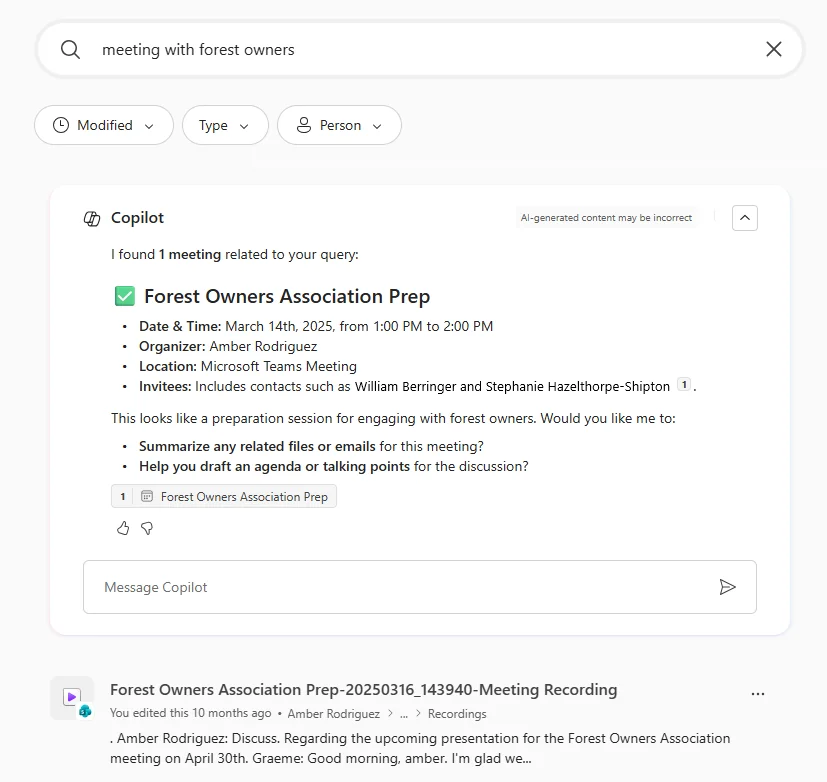
How to find it: Open Copilot Search and search for a meeting using plain-language details or descriptions.
11. Library in the Microsoft 365 Copilot app
For: All users · Available now
The Library is a new visual-first home for your Copilot-generated content, including items such as images and pages, plus content shared with you.
💡 Why it matters: Copilot outputs are only useful if you can actually find them later. Library gives those artefacts a proper shelf instead of leaving them scattered around like sticky notes on a desk.
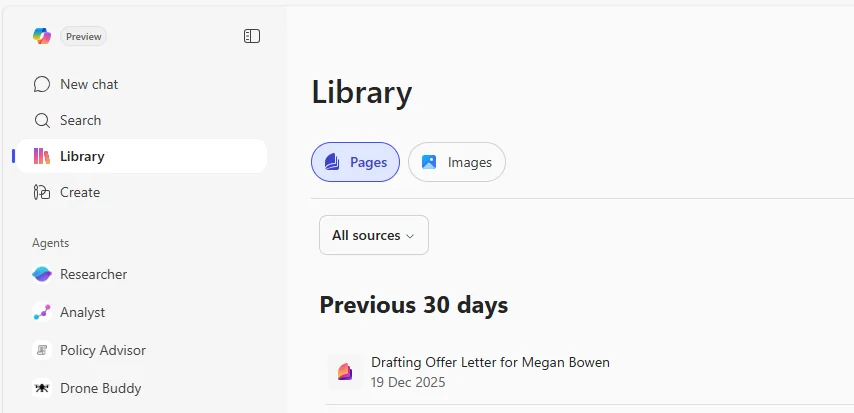
How to find it: Open the Microsoft 365 Copilot app and select Library.
12. GPT-5 in Agent Builder
For: Agent builders · Available now
Copilot Studio Lite in Agent Builder now uses GPT-5, which should improve reasoning, context handling, and performance in longer conversations.
💡 Why it matters: Better models usually show up as fewer dead ends. If your agent can hold context more reliably and reason more clearly, it feels less like a scripted bot and more like a capable assistant.
How to find it: Create or edit an agent in Agent Builder and use the latest Copilot Studio Lite experience.
13. Sharing Copilot Notebooks
For: Copilot Notebook users · Available now
You can now share Copilot Notebooks with other people. The shared notebook exposes its references and instructions, while individual chats stay private.
💡 Why it matters: This makes notebooks more usable for team work. You can share the recipe without handing over every private conversation that happened in the kitchen.
How to find it: Open a Copilot Notebook and use the Share option.
14. SharePoint: Sections with Copilot
For: SharePoint authors · Available now
Sections with Copilot lets you prompt SharePoint to create page sections, with suggestions that take the page context into account.
💡 Why it matters: SharePoint page building can feel fiddly when you are deciding layout and content at the same time. This gives you a faster starting point, like sketching the room before moving in the furniture.
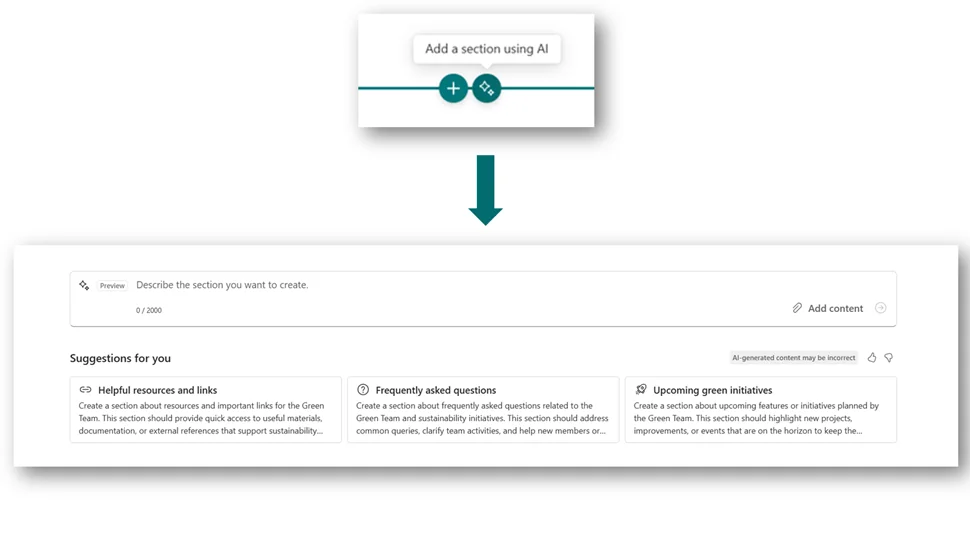
How to find it: In SharePoint page authoring, look for Sections with Copilot while building or editing a page.
15. Copilot Dashboard: Updated Meeting Metrics
For: IT admins and Copilot champions · Available now
Copilot Dashboard now includes updated meeting metrics that reflect both summarised and recapped meeting activity.
💡 Why it matters: Adoption stories are stronger when you can measure real behaviour. This gives organisations a fuller view of how Copilot is being used around meetings, not just whether it was opened.
How to find it: Open Copilot Dashboard and review the updated meeting activity metrics.
16. Copilot Dashboard: Chat Adoption Metrics
For: IT admins and Copilot champions · Available now
Copilot Dashboard now adds Copilot Chat adoption insights for users who are not licensed for Microsoft 365 Copilot.
💡 Why it matters: This helps organisations see whether broader Copilot habits are forming before everyone has a full licence. It is a useful “are people leaning in yet?” signal.
How to find it: Open Copilot Dashboard and look for Copilot Chat adoption insights.
17. Teams Channels in Context IQ
For: Teams users · Currently rolling out
You can now search for and select Teams channels in Context IQ, so prompts can be grounded against channel conversations and shared knowledge.
💡 Why it matters: The best answer often lives in a channel, not a document. This helps Copilot look in the right room first instead of guessing from the hallway.
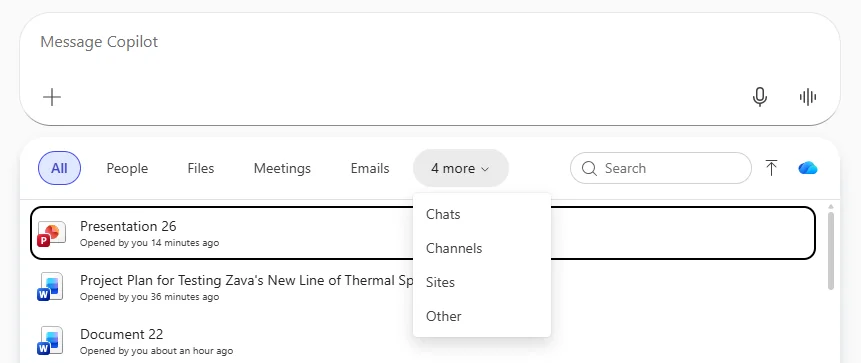
How to find it: In Copilot Chat, open Context IQ and look for the option to add Teams channels.
18. Agent Mode in Excel
For: Excel users · Currently rolling out
Agent Mode in Excel can build and edit workbooks and support multi-step workflows. Microsoft says it also becomes easier to access through the Tools menu.
💡 Why it matters: This is where Copilot starts doing spreadsheet work, not just talking about it. For many users, that is the leap from assistant to operator.
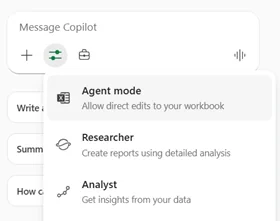
How to find it: In Excel, open Copilot and look under Tools for Agent Mode.
19. Copilot Chat Button Moves to the App Canvas
For: Word, Excel, PowerPoint, and Outlook users · Currently rolling out
The Copilot Chat button is moving from the ribbon to the app canvas in Word, Excel, PowerPoint, and Outlook.
💡 Why it matters: Discoverability matters. Moving the button closer to where you are already working is a bit like putting the light switch by the door instead of hiding it in a cupboard.
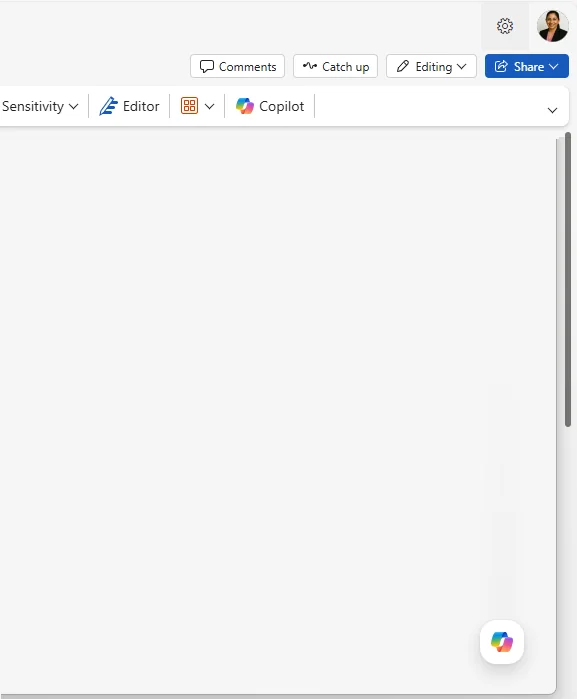
How to find it: In Word, Excel, PowerPoint, or Outlook, look on the app canvas rather than the ribbon for Copilot Chat.
20. Search Past Copilot Chat Conversations
For: All users · Currently rolling out
Copilot Search can now find your past Copilot chat conversations, with a dedicated Copilot Chats filter to narrow results.
💡 Why it matters: One of the biggest productivity leaks with AI is losing a great answer you already got last week. This makes past chats searchable instead of disposable.
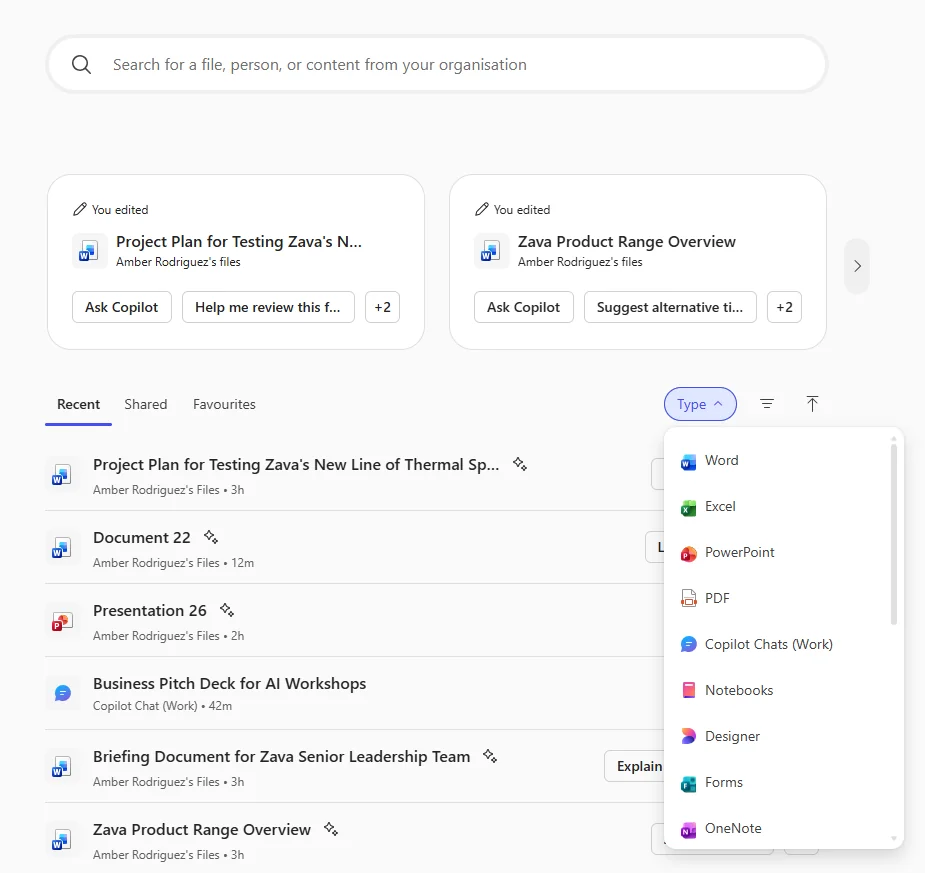
How to find it: Open Copilot Search and use the Copilot Chats filter.
21. Copilot Search Source-Specific Filters
For: All users · Currently rolling out
Copilot Search is adding dynamic filters that change based on the source, including Outlook, SharePoint, Jira, and Copilot Chats.
💡 Why it matters: Good search is not just about finding more. It is about narrowing faster, so you spend less time sifting and more time deciding.
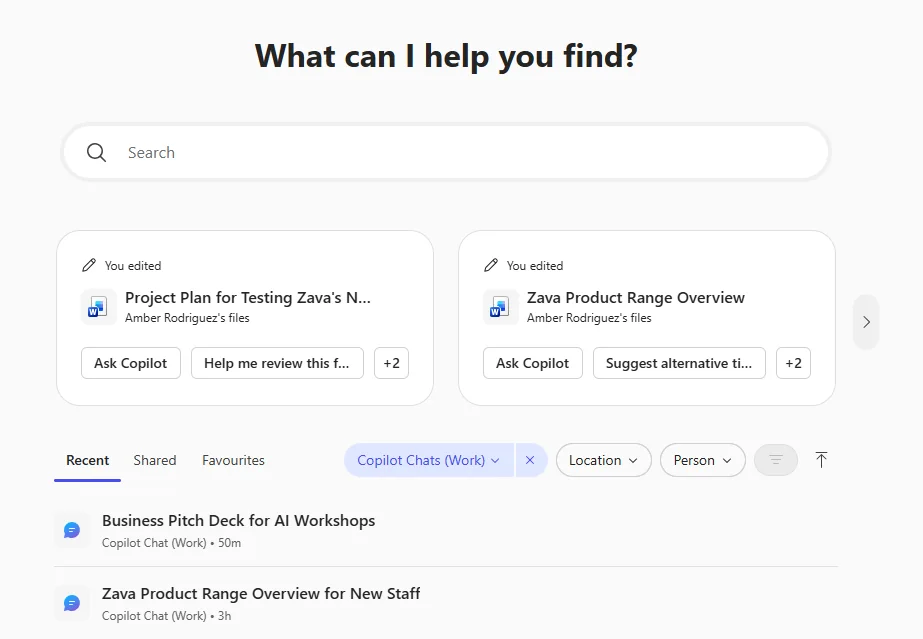
How to find it: Run a search in Copilot Search and look for filters that adapt to the source of the results.
22. Customise AI-Generated Notes in Meeting Recap
For: Teams meeting organisers and attendees · Currently rolling out
Meeting recap notes can now be tailored using built-in formats such as Speaker Summary and Executive report, or with your own custom template.
💡 Why it matters: Different audiences need different recaps. A project team wants details, while an executive wants the headline version — this helps one meeting produce both.
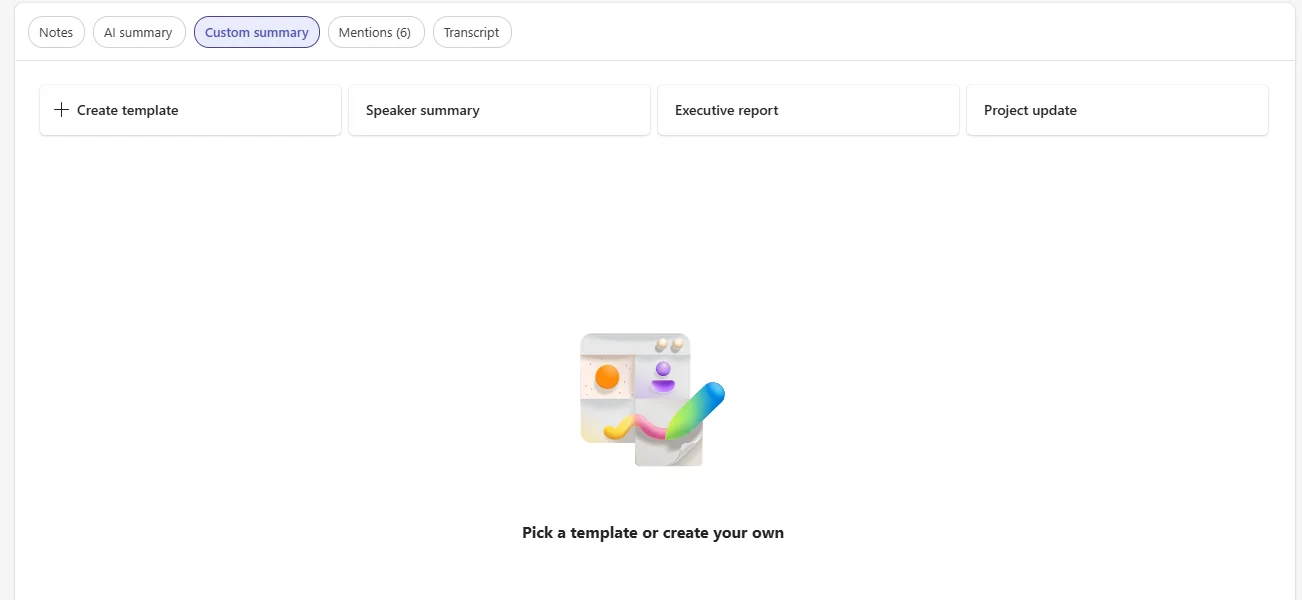
How to find it: Open a meeting recap and look for note options such as Speaker Summary, Executive report, or a custom template.
23. Voice Support in Word and PowerPoint
For: Word and PowerPoint users · Currently rolling out
Copilot in Word and PowerPoint is gaining voice support for brainstorming, creating, and analysing content.
💡 Why it matters: Some people think better out loud than on a keyboard. This makes Copilot feel more natural in moments where speaking is faster than typing.
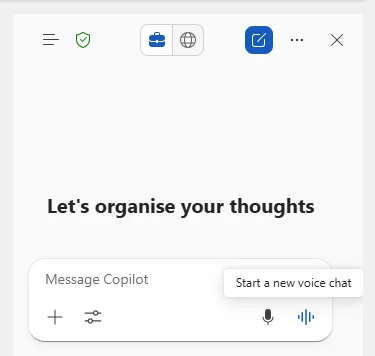
How to find it: In Word or PowerPoint, open Copilot and look for the voice option in the prompt experience.
24. File Preview and Chat on Android
For: Android users · Currently rolling out
The Microsoft 365 Copilot app on Android is adding file preview and chat for Word, Excel, and PowerPoint files.
💡 Why it matters: Mobile should be for quick understanding, not wrestling with tiny documents. This turns your phone into a pocket briefing tool — preview the file, ask the question, move on.
How to find it: On Android, open a Word, Excel, or PowerPoint file in the Microsoft 365 Copilot app.
25. Video Recap in Copilot Chat
For: Copilot Chat users · Currently rolling out
Video recap in Copilot Chat pulls out key topics, adds AI narration, and pairs them with 20–40 second video snippets.
💡 Why it matters: Not everyone has time to watch the whole thing. This gives you the trailer version first, so you can decide whether you need the full movie.
How to find it: In Copilot Chat, look for the video recap experience when recapping supported video content.
26. Session Persistence Enhancement
For: All users · Currently rolling out
Copilot conversations are now better preserved when you navigate away, so your session stays intact instead of feeling easy to lose.
💡 Why it matters: This removes that fragile feeling where one click in the wrong place can break your flow. It is the digital equivalent of saving your place in a book automatically.
How to find it: Start a conversation in Microsoft 365 Copilot, navigate away, and then return to confirm the session is preserved.
27. Rich Bing Web Answer Cards
For: All users · Currently rolling out
Microsoft 365 Copilot is adding richer Bing web answer cards for queries such as Weather and Stocks.
💡 Why it matters: For quick fact lookups, the best answer is often the one you can absorb in two seconds. Cards make common web answers feel more glanceable and less like a wall of text.
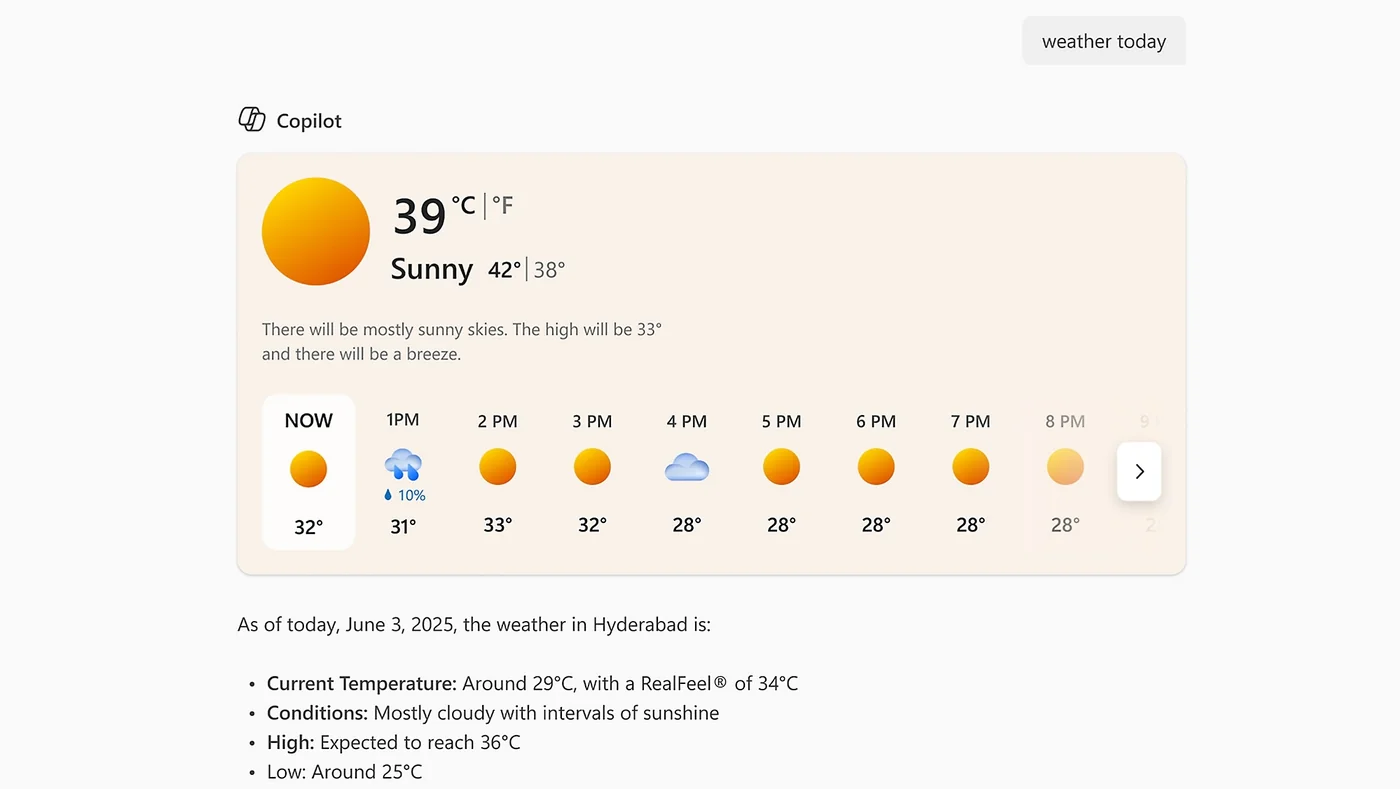
How to find it: Ask Copilot a web-style question such as the weather or a stock lookup and watch for the richer answer card.
28. Memory and Personalisation Updates
For: All users · Currently rolling out
Copilot is updating memory and personalisation so it can use chat history to produce more contextual responses.
💡 Why it matters: Repeating yourself to AI gets old quickly. Memory makes Copilot feel less like meeting a new person every morning and more like working with someone who remembers yesterday's conversation.
How to find it: Open Microsoft 365 Copilot settings and review the latest memory and personalisation controls.
29. Loop Notebooks in Context IQ
For: Loop users · Currently rolling out
Loop Notebooks can now be selected in Context IQ, letting you scope prompts to notebook content from the Files tab. (Notebook prompting guide →)
💡 Why it matters: Context is everything with Copilot. If your project thinking lives in Loop Notebooks, this makes it much easier to point Copilot at the right source instead of copying content around by hand.
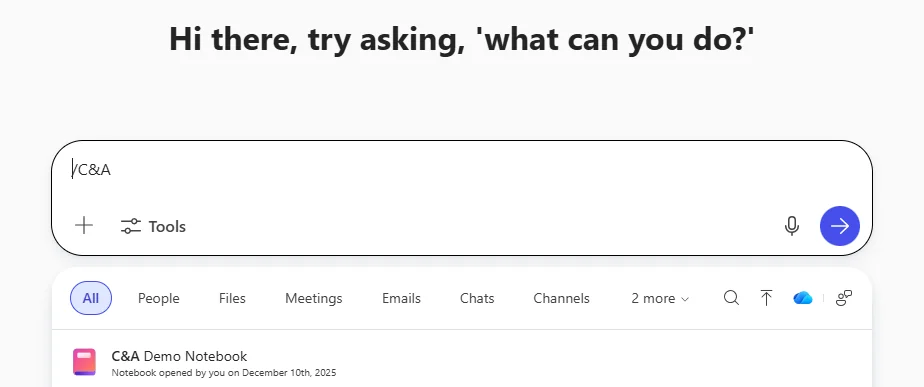
How to find it: In Context IQ, open the Files tab and look for Loop Notebooks.
30. Larger File Upload in Copilot Studio agent builder
For: Developers and agent builders · Available now
Copilot Studio agent builder now supports file uploads up to 512 MB.
💡 Why it matters: Bigger upload limits reduce the need to chop content into artificial pieces just to get it into an agent. It is simple, but it removes one of those annoying setup speed bumps.
How to find it: In Copilot Studio agent builder, upload a file to your agent and note the new 512 MB limit.
📚 Official Microsoft Resources
- Microsoft 365 Copilot overview
- Microsoft 365 roadmap
- Microsoft 365 Copilot adoption guide
- Copilot Dashboard
- Message center in Microsoft 365 admin center
- What’s new in Microsoft 365
🔗 Related Content on This Site
- M365 Copilot Full Tutorial — Beginner’s Guide
- February 2026 Copilot Updates
- March 2026 Copilot Updates
- April 2026 Copilot Updates
- May 2026 Copilot Updates
- Master All 6 Copilot Agents
- Browse all AI tutorials
- Daily AI News
💡 Want More?
- 📺 Subscribe to A Guide to Cloud & AI on YouTube for new tutorials every week
- 📰 Check out the AI News page for the latest AI headlines
- ☕ Download free resources
- 📥 Monthly Copilot recaps as free PDF slide packs
Originally published on LinkedIn. This article accompanies a video tutorial on the A Guide to Cloud & AI YouTube channel.