Microsoft 365 Copilot February 2026 Recap: 45 Updates
← what changed this month, in plain English
On this page
February 2026 is a huge month for Microsoft 365 Copilot with 45 updates — from Agent Mode in Excel reaching Copilot Chat users without a paid licence, to Copilot Pages getting much smarter, Outlook expanding to full inbox and calendar grounding, and eight new Copilot Connectors. Some features are available now, while others are currently rolling out.
📅 2026 monthly recaps: January · February (you are here) · March · April · May
If you only have 2 minutes — February’s 3 picks
If 45 changes feels like too much, these are the three I’d start with:
- Agent Mode in Excel for Copilot Chat Users — the most-asked-for Excel experience now reaches users without a paid Copilot licence, on web, Windows and Mac. Biggest reach unlock this month.
- Copilot Chat in Outlook with full inbox and calendar — Copilot in Outlook stops looking only at the message in front of you and starts reasoning across your full inbox and calendar, even for users without a paid licence. The depth jump that makes Outlook feel like a real assistant.
- Facilitator in Teams — captures action items automatically during meetings, lets you assign tasks that sync to Planner, and can draft documents from the discussion. Turns the “what were we going to do again?” end-of-meeting fog into structured follow-up.
Admin Checklist — February 2026
Five admin checks worth doing this month, in priority order:
Communicate the two no-extra-licence expansions to non-licensed users — Excel Agent Mode for Chat users and full-inbox-and-calendar Outlook Copilot. This is the biggest no-cost-to-you adoption opportunity of the month. Action: Send an org-wide note or update your Copilot intranet page so unlicensed users know what they can now do.
Pilot Facilitator with meeting hosts first. Facilitator can quietly produce tasks and documents during meetings, which is a behavioural shift for participants. Action: Pilot with a small group of meeting hosts who are comfortable adopting new tools, gather their experience, then decide broader comms and support material.
Enable Agents in OneDrive for power users. This requires a Copilot licence and is available on OneDrive Web. Action: Identify your power users (sales engineers, analysts, executive assistants) and brief them on building file-grounded agents.
Update your Outlook Copilot training material. Until now, training said “Copilot reads the open message”; that is no longer accurate. Action: Update your training decks, FAQ, and any internal Copilot champion content to reflect full-inbox/calendar reasoning.
Review the eight new Copilot Connectors (Dropbox · Miro · ServiceNow Knowledge templates · ServiceNow Tickets status update frequency · Aha! · Shortcut · GitLab Merge Requests · Bitbucket Pull Requests). Decide which to deploy based on what your teams actually use. Action: Microsoft 365 admin center → Copilot → Connectors → Gallery.
1. Agent Mode in Excel for Copilot Chat Users
For: Microsoft 365 users without a paid Copilot licence
Agent Mode in Excel is now available to Copilot Chat users without a paid licence across web, Windows, and Mac. Microsoft is also surfacing it through the Tools drop-down in the prompt box, making it easier to discover when you need spreadsheet help.
💡 Why it matters: This takes one of the most practical Excel experiences and opens it to far more people. It is a bit like moving a feature out of the VIP lounge and onto the main floor — more users can get spreadsheet help without hitting the premium wall first.
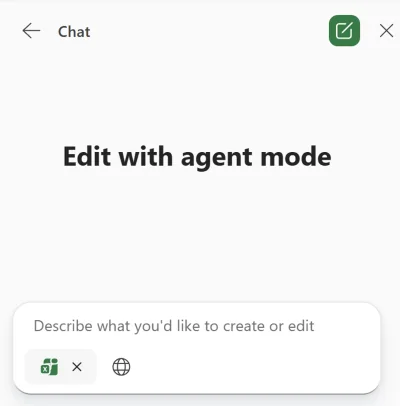
How to find it: Open Excel on the web, Windows, or Mac and look for Tools in the Copilot prompt box.
2. Copilot with OneDrive Files in Finder
For: Mac users
If your files are synced with OneDrive on Mac, you can now right-click a file in Finder and ask Copilot questions about it without opening the file first. Microsoft says this is enabled by default.
💡 Why it matters: Small workflow changes matter. When Copilot comes to where your files already live, you remove the constant back-and-forth between Finder, browser tabs, and apps.
How to find it: In Finder, right-click a synced OneDrive file and look for the Copilot option.
3. Steer Presentation Length, Tone, Style, and AI Images in PowerPoint
For: PowerPoint users
When creating a presentation with Copilot in PowerPoint, you can now steer the length, tone, style, and AI-generated images more deliberately. In short, Copilot gets a much clearer brief before it builds the deck.
💡 Why it matters: Most weak presentations are not weak because the topic is bad — they miss the mark on tone, length, or visual style. This gives you more of a creative-director role instead of just hoping Copilot guesses correctly.
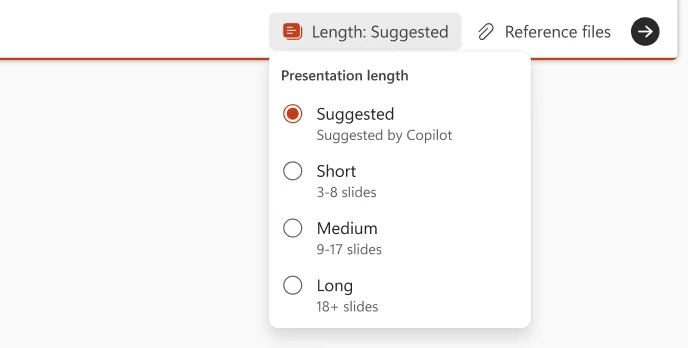
How to find it: In PowerPoint, ask Copilot to create or rewrite a presentation and specify the length, tone, style, or AI image preference in your prompt.
4. Copilot Search Source-Specific Filters
For: All users
Copilot Search now supports source-specific filters, so results can be narrowed dynamically based on the source you are searching — such as Outlook, SharePoint, Jira, or Copilot Chats.
💡 Why it matters: Better search is usually about narrowing faster, not searching harder. This makes Copilot Search feel less like one big bucket of results and more like a smart filing assistant that knows which drawer to open first.
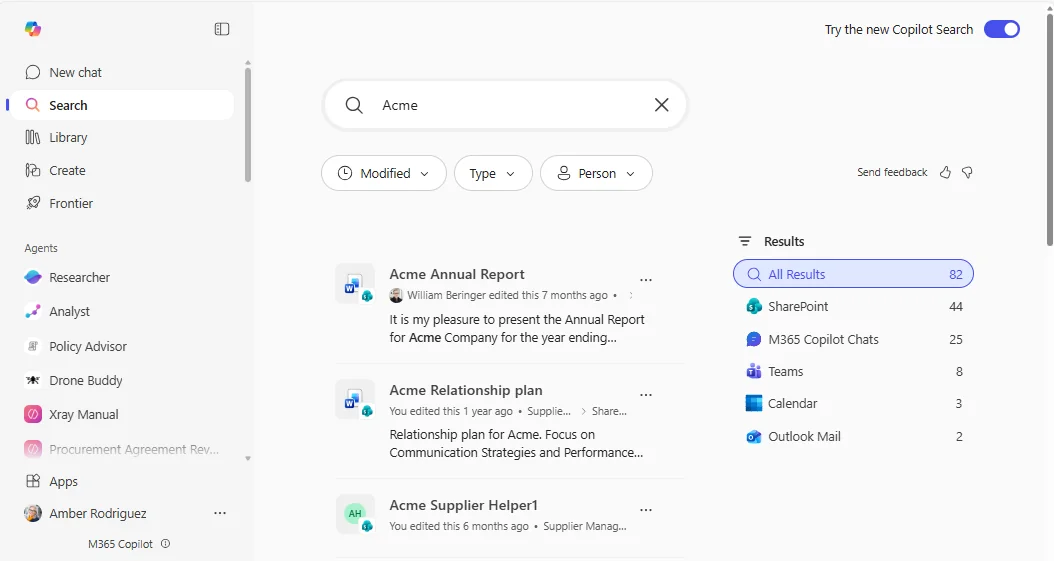
How to find it: Run a search in Copilot Search and look for dynamic filters based on the source of your results.
5. File Preview and Chat on Android
For: Android users
Opening a Word, Excel, or PowerPoint file in the Microsoft 365 Copilot app on Android now gives you a file preview plus Copilot Chat in the same experience.
💡 Why it matters: Mobile should be for quick understanding, not pinching and zooming through documents. This makes your phone feel more like a pocket analyst — preview the file, ask the question, get the answer.
How to find it: Open a Word, Excel, or PowerPoint file in the Microsoft 365 Copilot app on Android.
6. Auto-Summary on File Open in Word
For: Word users
Word can now show an automatic summary when you open a file, helping you understand the document before you start reading line by line.
💡 Why it matters: We all open documents and think, “Just give me the short version first.” This does exactly that, turning the first few seconds of confusion into a quick orientation moment.

How to find it: Open a document in Word and look for the automatic summary at the top of the file.
7. Document Comments Summary in Word
For: Word users
Word is adding a Discussion tab that summarises open comments, so you can quickly see the shape of the feedback before diving into every thread.
💡 Why it matters: Comment threads can feel like walking into the middle of an argument. A summary gives you the gist first, so you know what really needs your attention.
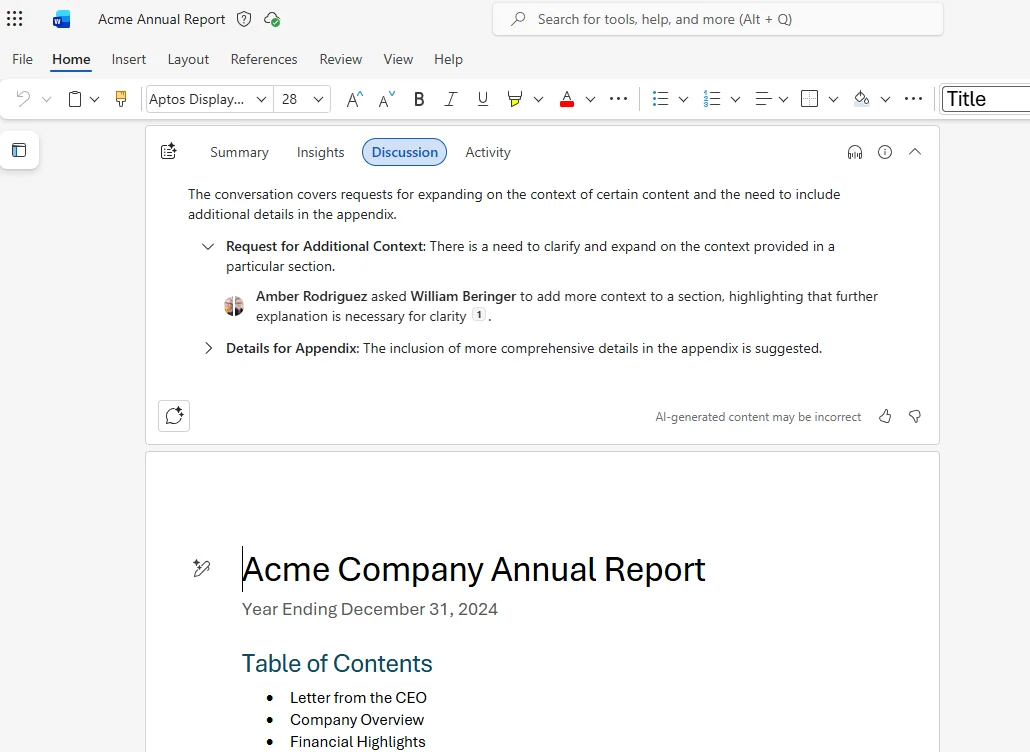
How to find it: Open a commented document in Word and look for the Discussion tab.
8. Chat Can Modify Copilot Pages
For: Copilot Pages users
When Chat and a Copilot Page are open side by side, prompts in Chat can now modify the Page or add new content to it directly. (Pages deep dive →)
💡 Why it matters: This makes Copilot Pages feel more like a live working canvas instead of a static output. It is closer to working with a colleague beside you who can edit the page while you keep talking.
How to find it: Open Chat and a Copilot Page side by side, then prompt Copilot to update or add content to the Page.
9. Ask Questions About Open Copilot Pages
For: Copilot Pages users
You can now ask questions about an open Copilot Page, and Copilot will answer using the contents of that page as context.
💡 Why it matters: Once a page becomes the source of truth, you want to interrogate it without re-explaining everything. This turns the page itself into the context window.
How to find it: Open a Copilot Page and ask Copilot questions about the page in Chat.
10. Auto-generated Copilot Pages
For: Copilot Chat users
Copilot can now automatically create and open a Copilot Page side by side when it recognises a scenario where a page would help.
💡 Why it matters: Sometimes the hardest part is deciding when a quick chat should become a reusable artefact. This bridges that gap automatically, like turning a hallway conversation into meeting notes before the ideas disappear.
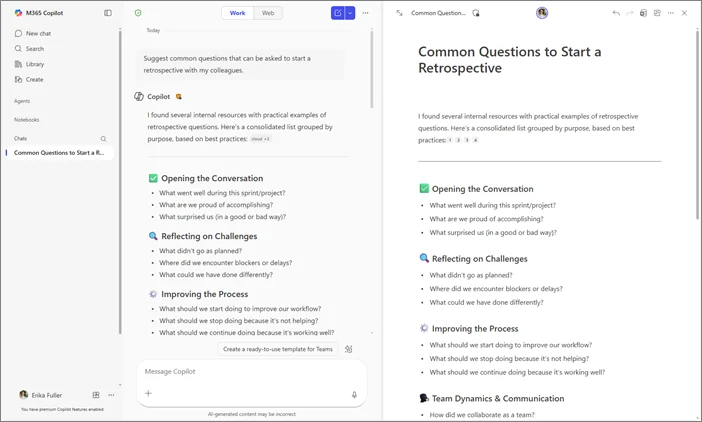
How to find it: Use Copilot Chat for brainstorming or drafting scenarios and watch for Copilot to automatically create and open a Page beside the chat.
11. PowerPoint from Copilot Pages
For: PowerPoint and Copilot Pages users
You can now create a PowerPoint presentation grounded on a Copilot Page by referencing the Page with / or the paperclip while prompting Copilot.
💡 Why it matters: This is a neat content handoff. Instead of rebuilding a deck from scratch, you can turn a working page into presentation material more directly — less copy-paste, less reformatting, less friction.
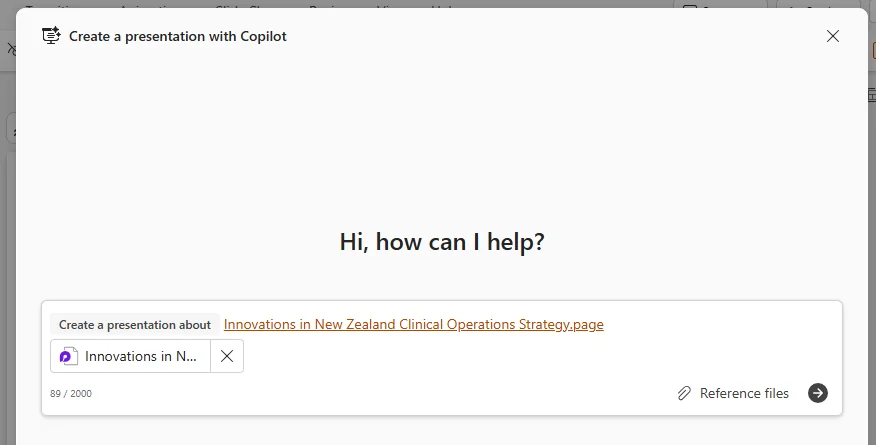
How to find it: In Copilot, use / or the paperclip to reference a Copilot Page when creating a PowerPoint.
12. Improved Python-powered Answers in Excel
For: Excel users
Copilot in Excel is improving its Python-powered answers, giving it stronger ways to reason over data questions and analysis tasks.
💡 Why it matters: When Excel can lean on Python behind the scenes, the experience starts feeling closer to having a data analyst on standby instead of just a formula helper.
How to find it: Ask Copilot in Excel a question that needs deeper analysis and look for the improved Python-powered response.
13. Teams Channels in Context IQ
For: Teams users
Teams Channels can now be selected in Context IQ, making it easier to ground prompts against channel context instead of relying only on files or people.
💡 Why it matters: Copilot gets better when you point it at the right conversation space. If the answers live in a channel, you should not need to hunt for a file just to give Copilot context.
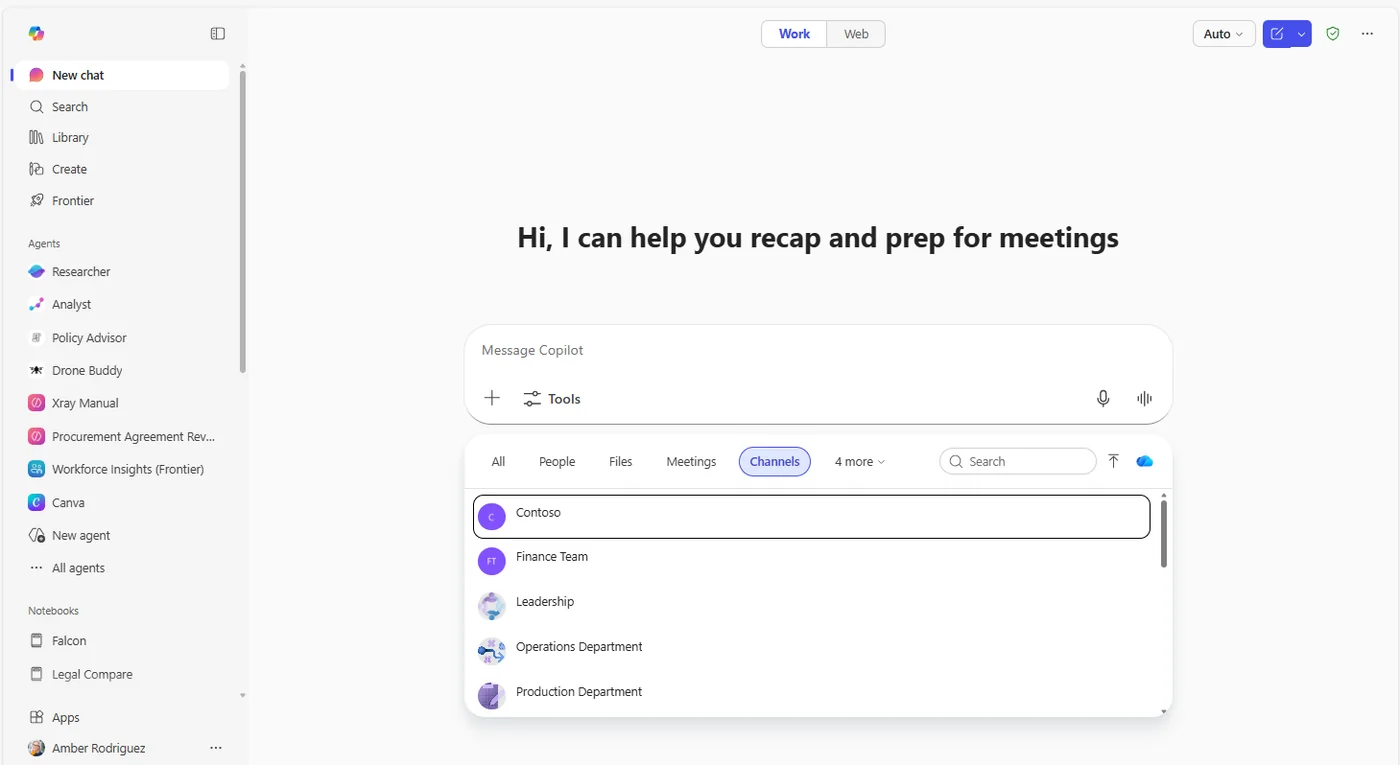
How to find it: In Context IQ, click + and choose Channels.
14. Summarise Email Without a Copilot Licence in Outlook
For: Outlook users without a Copilot licence
Users without a paid Copilot licence can now summarise an email in one click in both Classic Outlook and New Outlook.
💡 Why it matters: Not every useful Outlook feature should sit behind a premium wall. Sometimes you just want the short version of a long thread before replying, and this gives you that without extra friction.
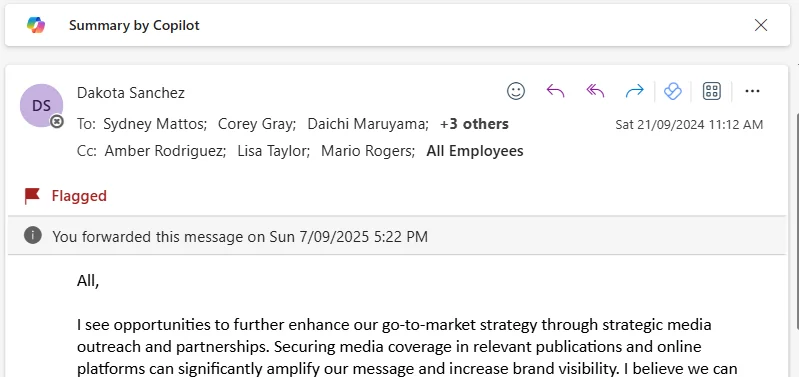
How to find it: Open an email in Classic Outlook or New Outlook and use the one-click Copilot summary option.
15. AI-generated Agent Icons
For: Agent builders
When creating an agent, you can now describe the icon you want and let AI generate it for you. Microsoft says icons are capped at 1 MB and 192px.
💡 Why it matters: An agent with a clear icon is easier to spot and trust. It sounds minor, but visual cues are often how people decide what to click and what they feel comfortable using.
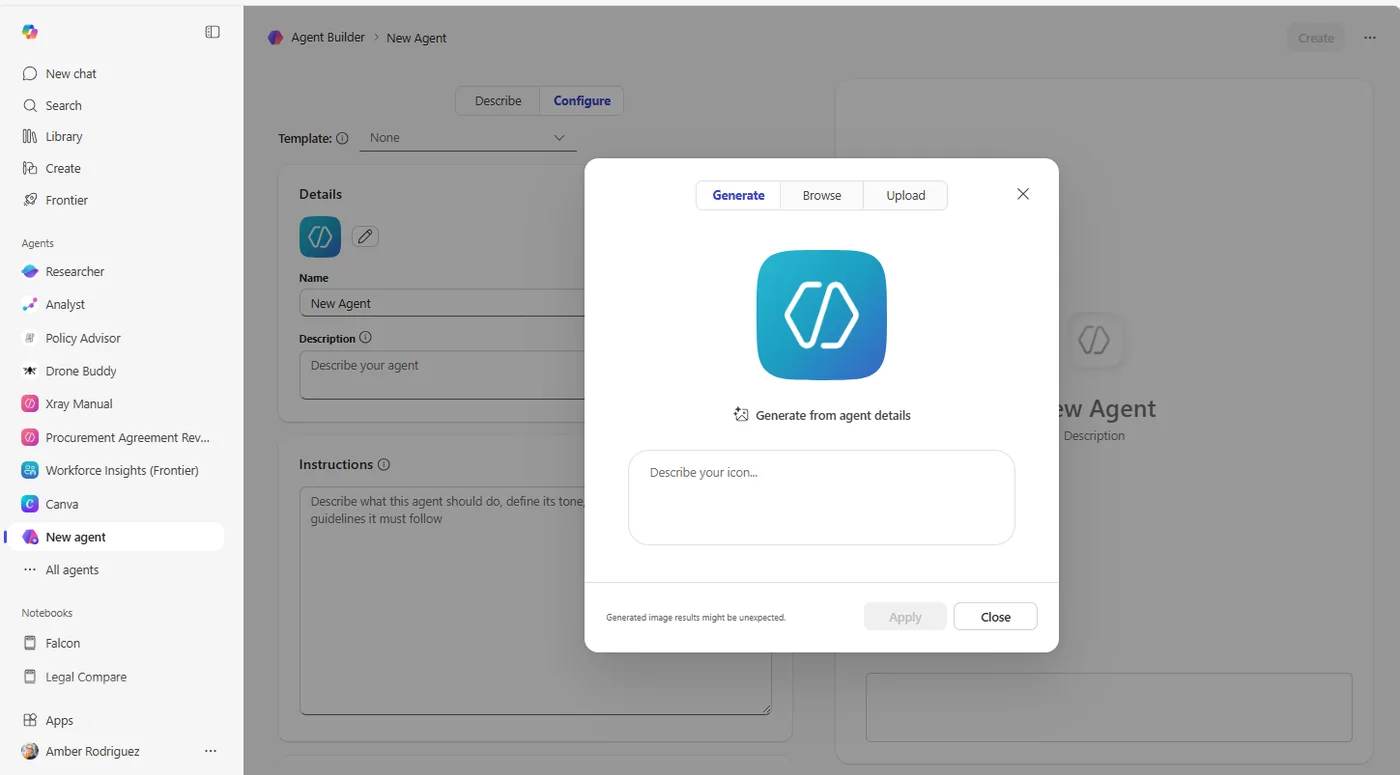
How to find it: In the agent creation or editing flow, describe the icon you want and generate it there.
16. Designer in Microsoft 365 Copilot
For: PowerPoint users
Designer is coming into Microsoft 365 Copilot, bringing slide layout and template suggestions through Copilot Suggestions.
💡 Why it matters: A good deck is not just about the words. Designer helps users who are not presentation specialists still produce something that looks more polished and intentional.
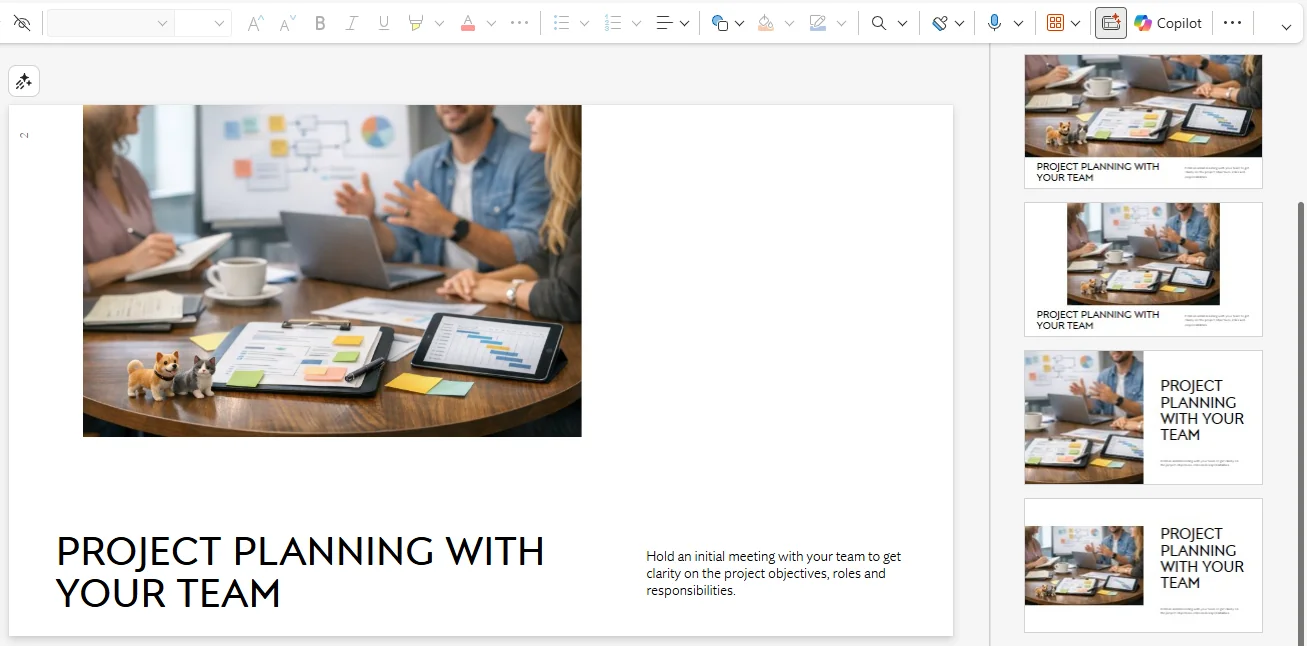
How to find it: In Microsoft 365 Copilot, look for Designer suggestions within Copilot Suggestions.
17. Facilitator in Teams
For: Teams meeting participants
Facilitator in Teams can help with task management and document creation during meetings, and the tasks it creates can sync to Planner.
💡 Why it matters: Meetings often end with vague good intentions. Facilitator helps turn that fog into tasks and documents before the momentum disappears.
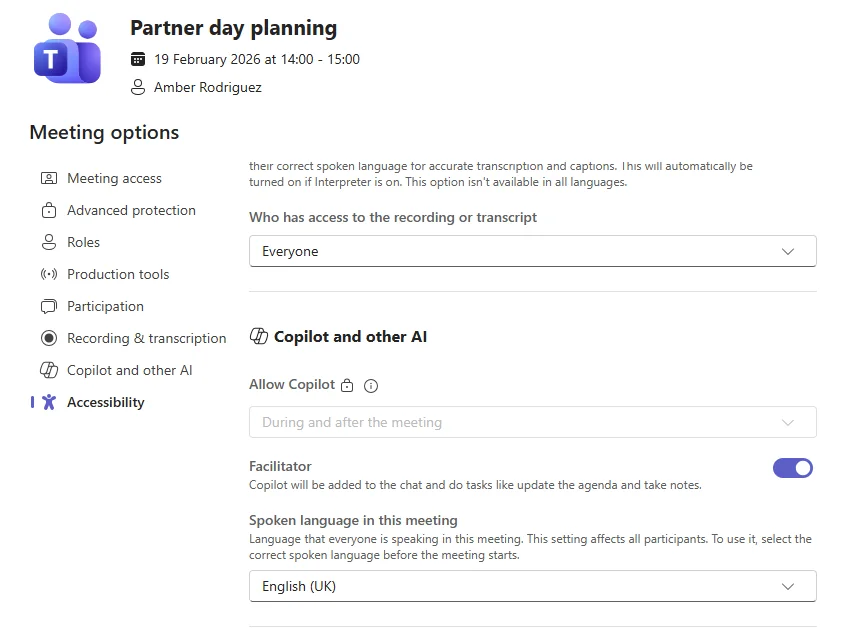
How to find it: In a Teams meeting, ask Facilitator to create tasks, assign actions, or create a document from the discussion.
18. Copilot Actions in SharePoint Document Libraries
For: SharePoint and Teams users
When you select an item in a SharePoint document library, a Copilot button now appears to offer contextual actions. Microsoft also calls out the same experience in Teams.
💡 Why it matters: This brings Copilot to the file-selection moment. Instead of opening each document first, you get useful actions right from the library where the work starts.
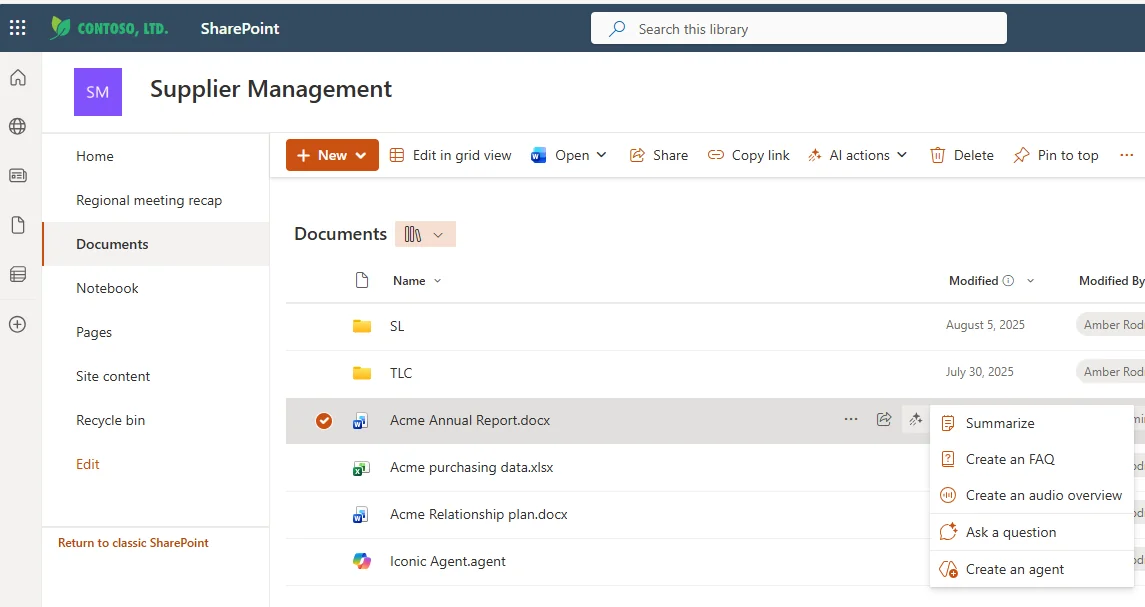
How to find it: Select an item in a SharePoint document library and look for the Copilot button.
19. Agents in OneDrive
For: Users with a Copilot licence
You can now build, use, and share agents in OneDrive using files stored there. Microsoft says this requires a Copilot licence and is available in OneDrive Web. (Agent Builder guide →)
💡 Why it matters: If your knowledge lives in files, building agents directly from OneDrive is a natural next step. It turns your file store into something closer to an interactive subject-matter expert.
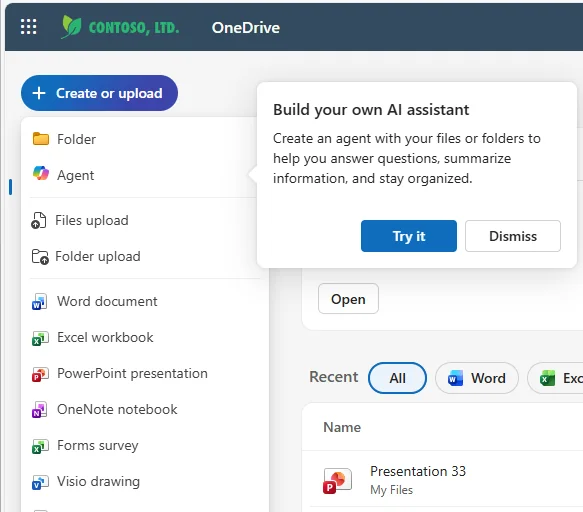
How to find it: Open OneDrive Web and look for the option to build, use, or share agents from your files.
Who gets it: Requires a Microsoft 365 Copilot licence.
20. Copilot Chat in Outlook Can Use Your Full Inbox and Calendar
For: Outlook users without a Copilot licence · Currently rolling out
Copilot Chat in Outlook can now expand beyond the message in front of you and reason over your full inbox and calendar — even if you do not have a paid Copilot licence.
💡 Why it matters: This is a big usability jump. Outlook starts feeling less like a place where Copilot answers one narrow question and more like a real assistant that understands your wider working day.
How to find it: Open Copilot Chat in Outlook and ask questions about your inbox or calendar.
21. Edit Scheduled Prompts
For: Scheduled Prompts users · Currently rolling out
You can now edit the schedule of an existing prompt instead of recreating it from scratch.
💡 Why it matters: Scheduling is only useful if it can bend with reality. The moment you can edit a schedule instead of deleting and rebuilding it, recurring prompts become much more practical.
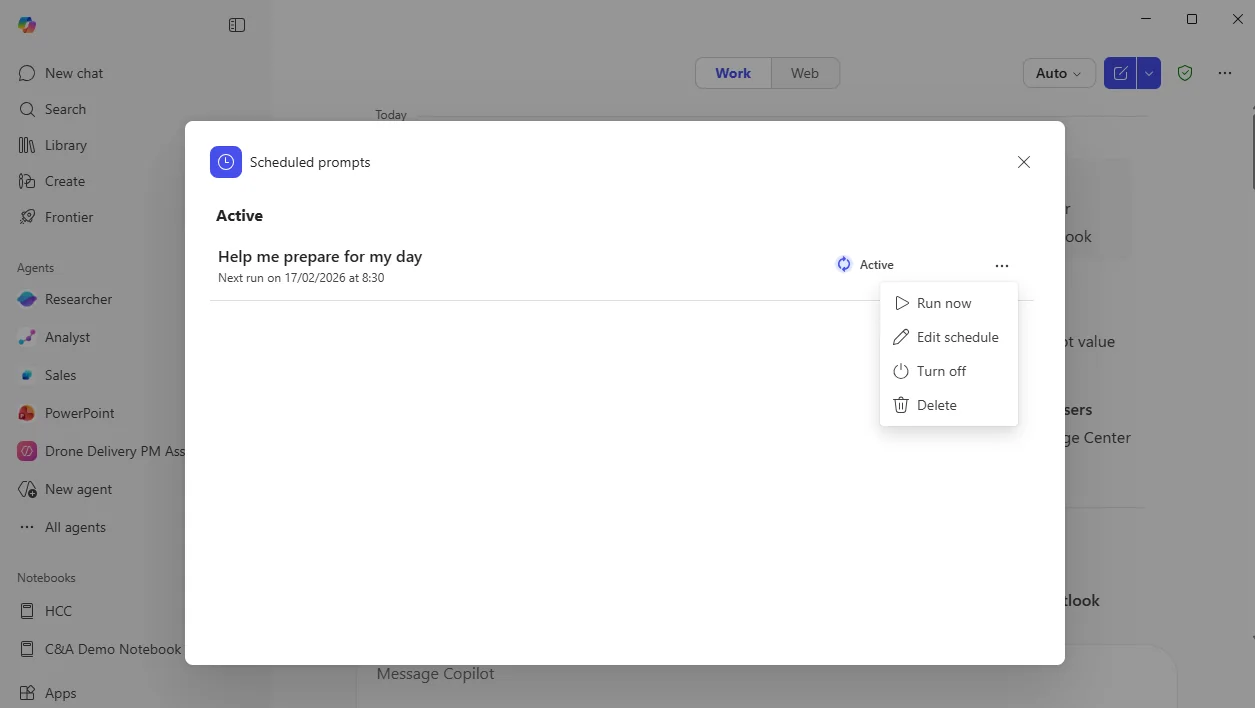
How to find it: Open an existing scheduled prompt and edit its schedule.
22. Scheduling with Copilot
For: Users with a Copilot licence · Rolling out in phases
Copilot can now help schedule meetings from chat, including finding times, booking rooms, drafting agendas, and sending invites.
💡 Why it matters: Meeting scheduling is classic admin work — five tiny chores stitched together. Copilot starts turning that chain into one request.
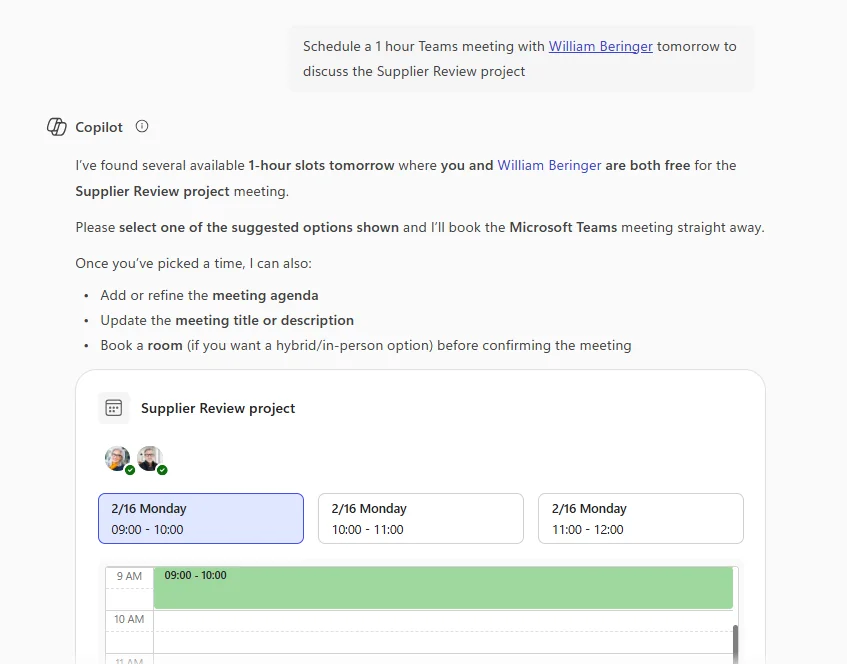
How to find it: In Copilot Chat, ask Copilot to schedule a meeting, find a time, book a room, or draft an agenda.
Who gets it: Requires a Microsoft 365 Copilot licence.
23. Agents in Classic Outlook
For: Classic Outlook users · Currently rolling out
Agents are now coming to Classic Outlook, where you can access them by @mentioning them.
💡 Why it matters: Many organisations still depend on Classic Outlook. Bringing agents there closes the awkward gap where the newest AI experiences existed only in the newer client.
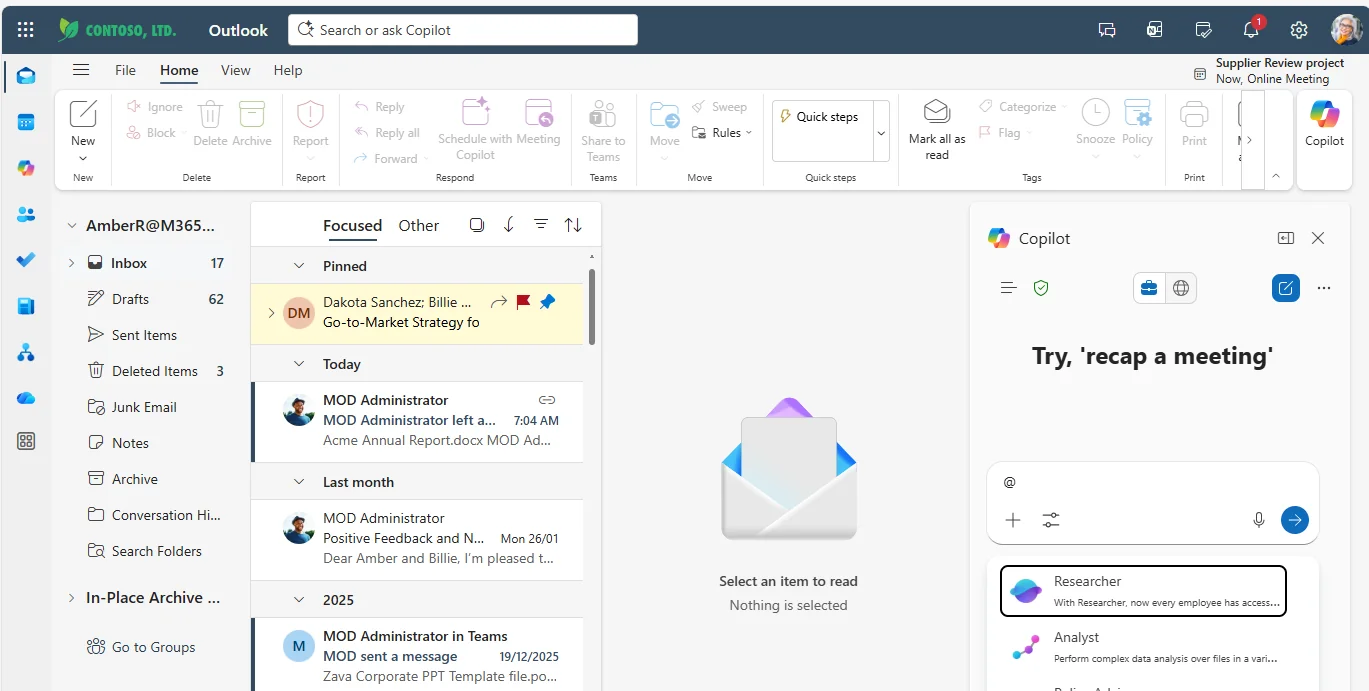
How to find it: In Classic Outlook, use @mention to call an agent.
24. Share with Summary for OneDrive Files
For: OneDrive users · Currently rolling out
When sharing a file from File Explorer or Activity Center, you can now include a Copilot-generated summary directly in the share flow.
💡 Why it matters: A file link without context is like handing someone a folder without saying why it matters. This adds the missing sentence for you before the file even gets opened.
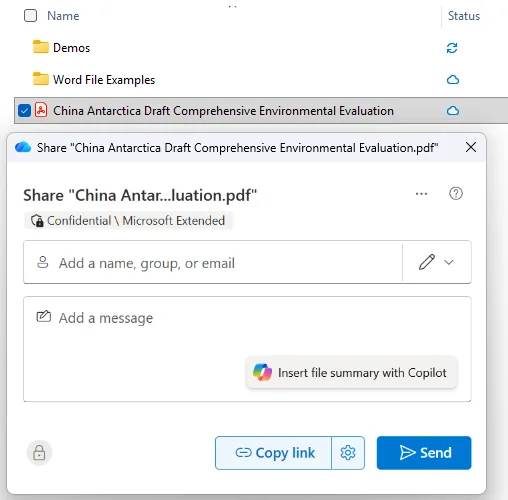
How to find it: Open the share dialog for a file in File Explorer or Activity Center and use the Copilot summary option.
25. Floating Copilot Icon in File Previewer
For: OneDrive users · Currently rolling out
A floating Copilot icon is being added to the bottom-right of the File Previewer, giving you contextual prompts and quicker access to Copilot.
💡 Why it matters: This is another friction remover. Instead of wondering what prompt to type, Copilot shows up next to the preview with help at the exact moment you need it.
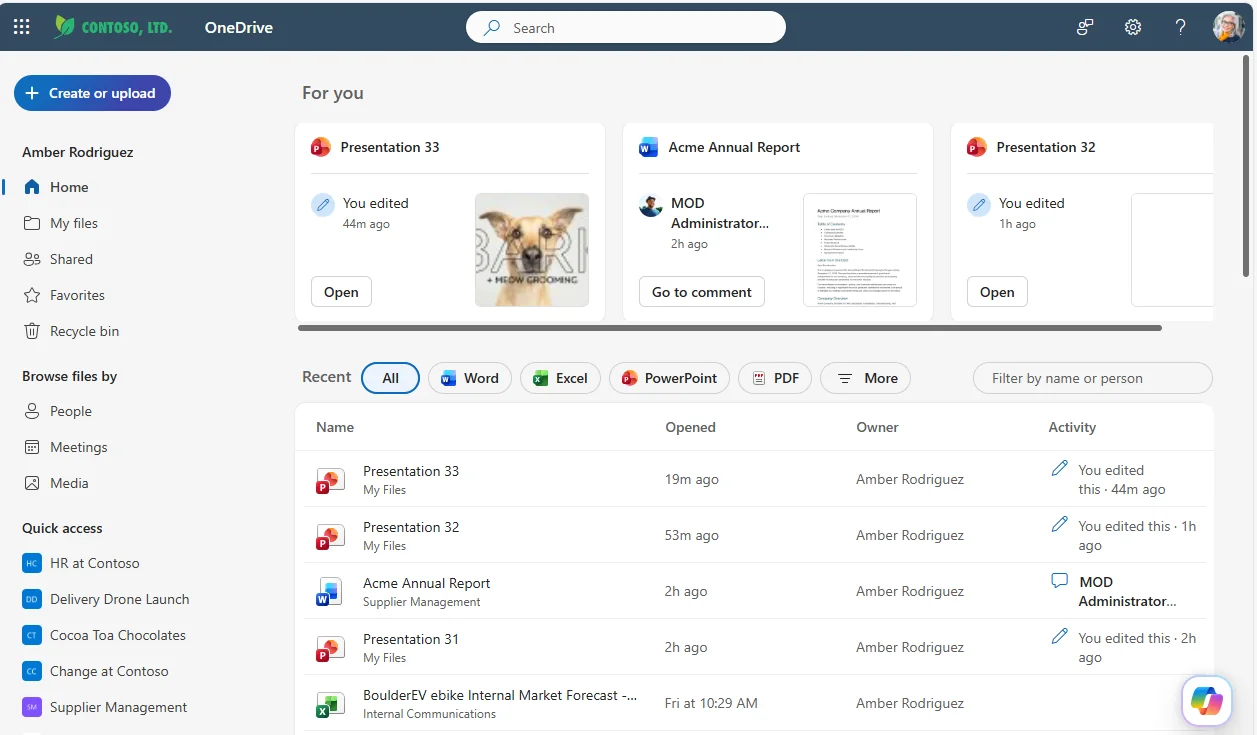
How to find it: Open a file in File Previewer and look in the bottom-right corner for the floating Copilot icon.
26. Voice Q&A During Read Aloud in Word
For: Word users · Currently rolling out · en-US only
While Read Aloud is playing in Word, you can now ask Copilot questions with your voice and get answers in the moment.
💡 Why it matters: This turns passive listening into an interactive study session. Instead of stopping the document and digging around manually, you can ask questions while the content is still fresh in your head.
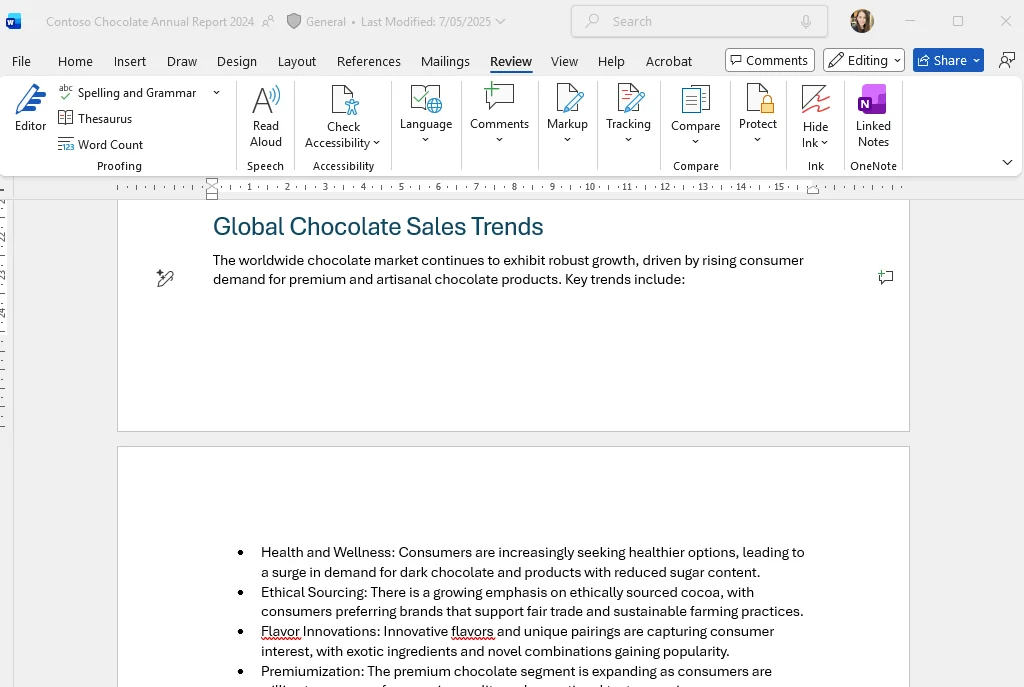
How to find it: Start Read Aloud in Word and ask a voice question while it is reading.
27. Filter Search as You Type in Copilot Search
For: All users · Currently rolling out
Copilot Search now lets you apply person and source filters as you type directly in the search box.
💡 Why it matters: Good search is often about narrowing faster, not starting over. Bringing filters into the typing experience cuts down the back-and-forth after results appear.
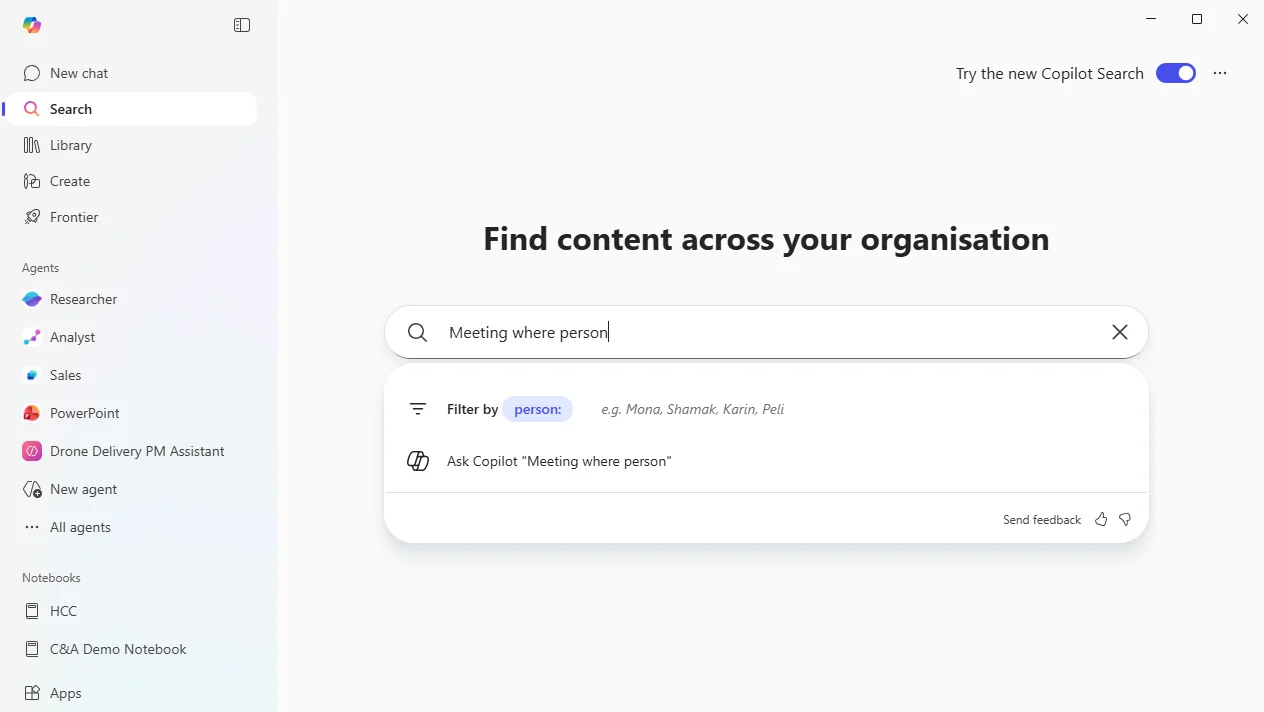
How to find it: Start typing in Copilot Search and look for person or source filter suggestions in the search box.
28. Copilot Search Matches on Department
For: All users · Currently rolling out
Copilot Search can now match on a person’s department, helping you find people based on organisational structure instead of only by name.
💡 Why it matters: Sometimes you do not know the person — you know the department. This makes people discovery feel more like asking an organisation chart question than searching a directory manually.
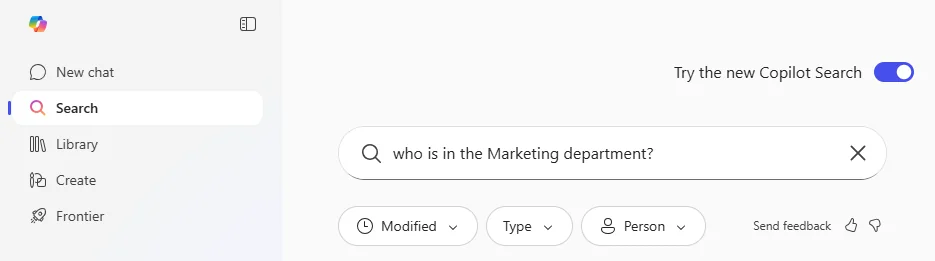
How to find it: Search in Copilot Search using a department name.
29. Copilot Search Discovers People
For: All users · Currently rolling out
Copilot Search is expanding its People discovery experience, including broader people search, skill matching, and a people carousel.
💡 Why it matters: This pushes Copilot Search from document finder towards expertise finder. That is powerful when the answer you need lives in a person, not in a file.
How to find it: Use broader people or skills queries in Copilot Search and look for People results.
30. Agent Mode in Excel Desktop Apps
For: Excel desktop users · Currently rolling out
Agent Mode in Excel desktop apps on Windows and Mac is also rolling out, and eligible users can choose between OpenAI and Anthropic models.
Not to be confused with Feature #1 — that update is about bringing Agent Mode to Copilot Chat users without a paid licence, while this one is about the desktop rollout and model choice.
💡 Why it matters: Model choice matters because different models can feel better at different tasks. For advanced Excel users, this is a bit like choosing the right specialist for the job instead of using one general helper for everything.
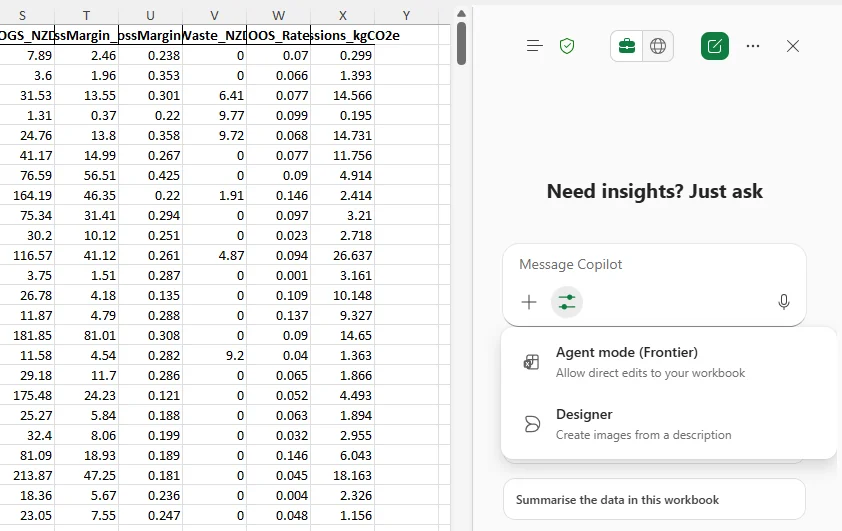
How to find it: Open Excel desktop on Windows or Mac and look for Agent Mode, including the model choice where your organisation supports it.
31. Scatter Image Effect
For: Users working with AI-generated or uploaded images · Currently rolling out
Microsoft is rolling out a scatter image effect for AI-generated and uploaded images, adding a more stylised visual treatment.
💡 Why it matters: Not every image needs to sit flat on a slide or page. Small visual treatments like this can make content feel more dynamic without sending users off to a separate design tool.
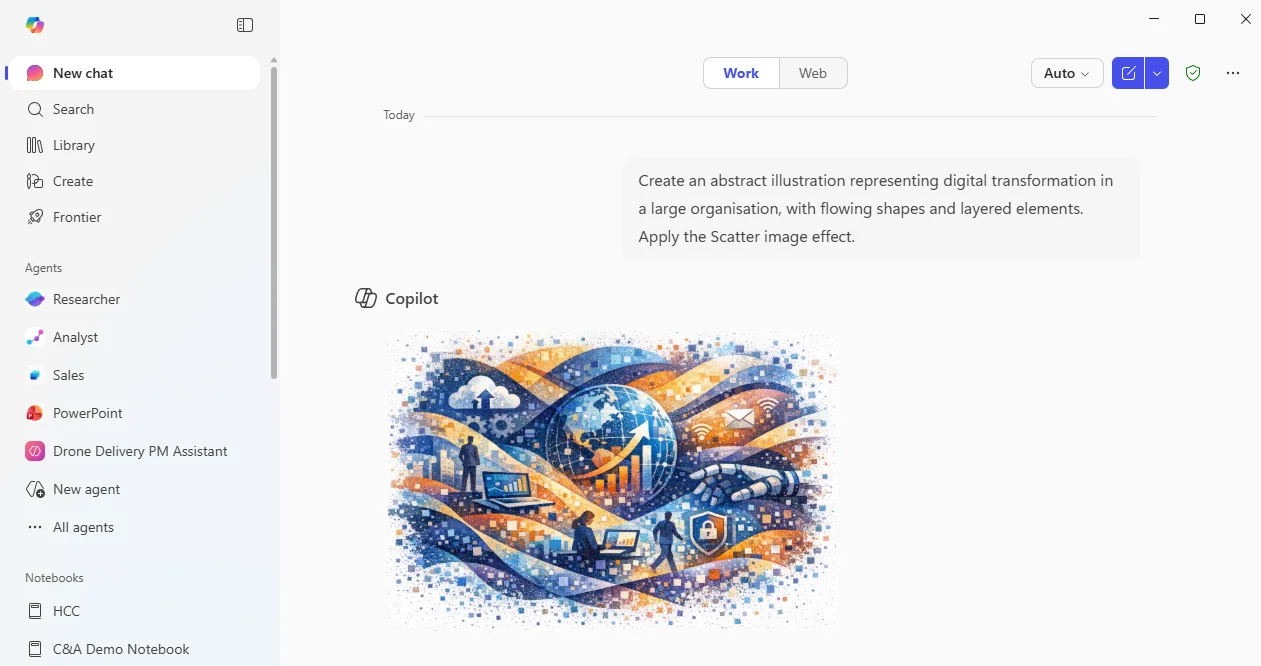
How to find it: When working with an AI-generated or uploaded image, look for the Scatter effect option.
32. Updated Copilot Notebooks Interface
For: Copilot Notebooks users · Currently rolling out
Copilot Notebooks is getting an updated interface with fixed navigation on the left, chat on the right, and an auto-generated overview.
💡 Why it matters: A notebook is only useful if you can find yourself again later. This layout is like walking back into a room and immediately seeing the whiteboard summary.
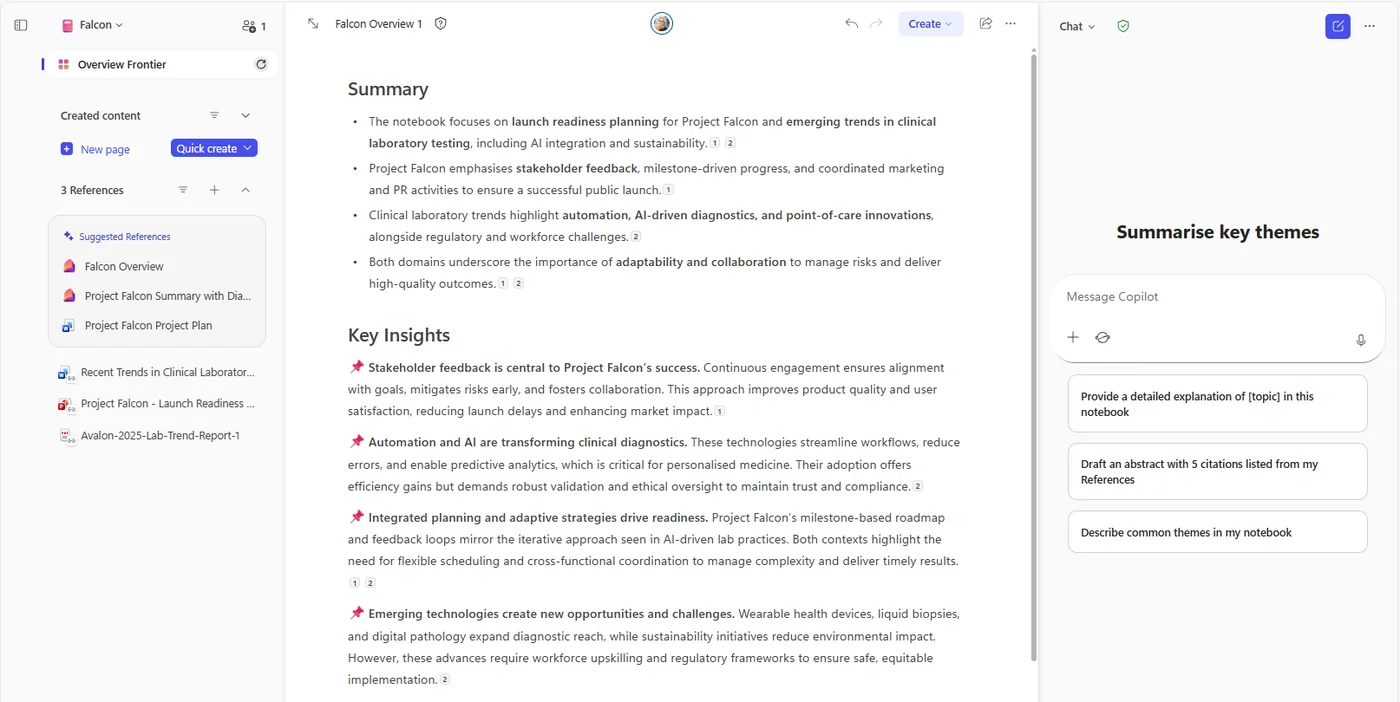
How to find it: Open Copilot Notebooks and look for the updated left-hand navigation, right-hand chat, and overview experience.
33. Edit Images in PowerPoint
For: PowerPoint users · Currently rolling out
You can now right-click an image in PowerPoint and use Copilot to improve resolution or remove the background.
💡 Why it matters: This removes one of the most annoying deck-building detours. No more jumping to another app just to clean up an image before returning to your slides.
How to find it: In PowerPoint, right-click an image and look for the Copilot image-editing options.
34. Meeting Recap Summarises Screen Content
For: Teams users · Currently rolling out
Meeting recap in Teams can now summarise content shared on screen, not just what people said aloud.
💡 Why it matters: Some of the most important meeting context lives on the shared screen, not in the spoken words. Bringing that into recap closes a big blind spot.
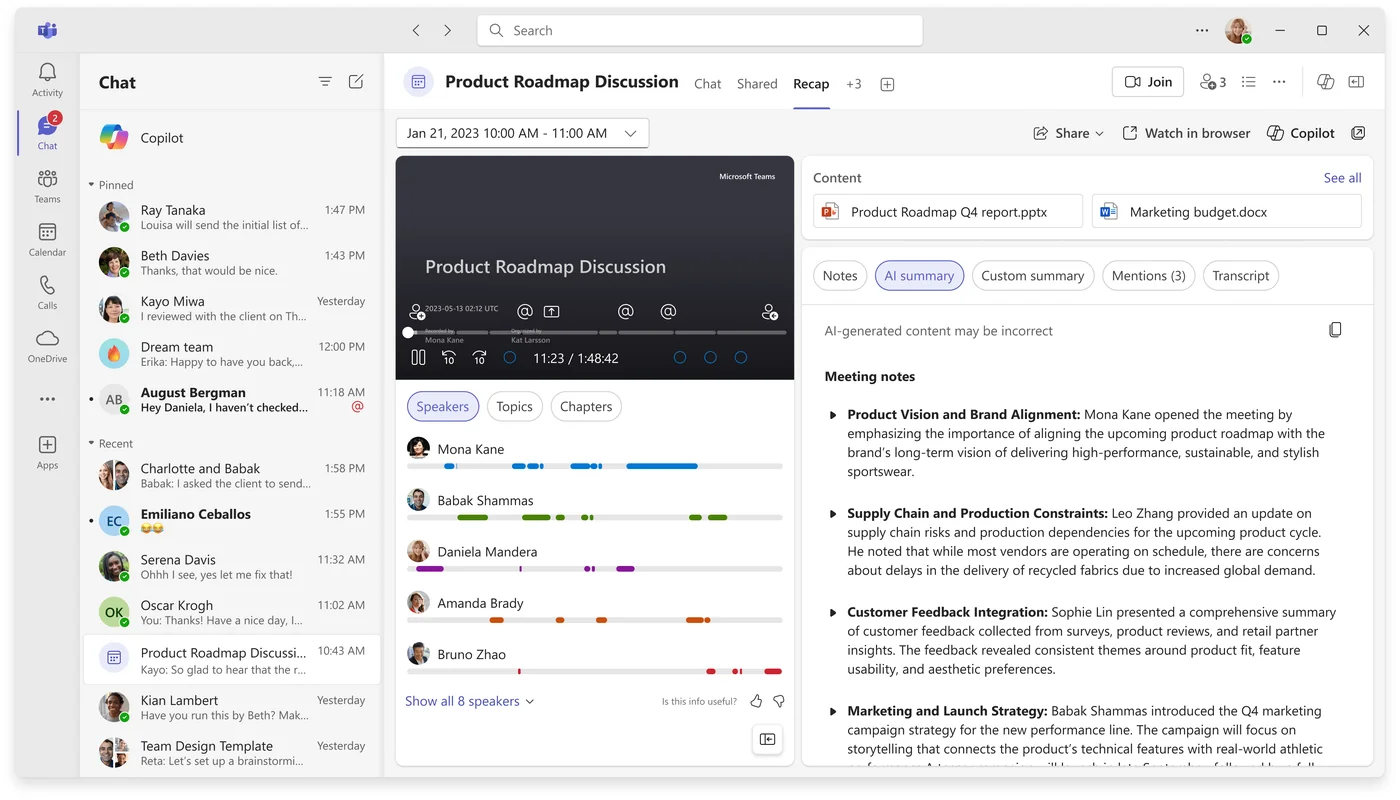
How to find it: After a Teams meeting with screen sharing, open Recap and look for the AI summary.
35. Calendar Search for Email Delegates
For: Calendar delegates · Currently rolling out
If you already have delegate access, Copilot Chat can now help you search for meetings on that calendar.
💡 Why it matters: Delegates spend too much time hunting through other people's calendars. This lets them ask instead of scroll, which is exactly the kind of admin friction Copilot should remove.
How to find it: If you already have delegate access, use Copilot Chat to search for meetings on that calendar.
36. Memory and Personalisation Updates
For: All users · Currently rolling out
Memory and Personalisation are being updated so Copilot can use chat history for more contextual responses.
💡 Why it matters: The best assistant is the one that does not make you repeat yourself. Chat history-based context helps Copilot feel less like a blank page every time you open it.
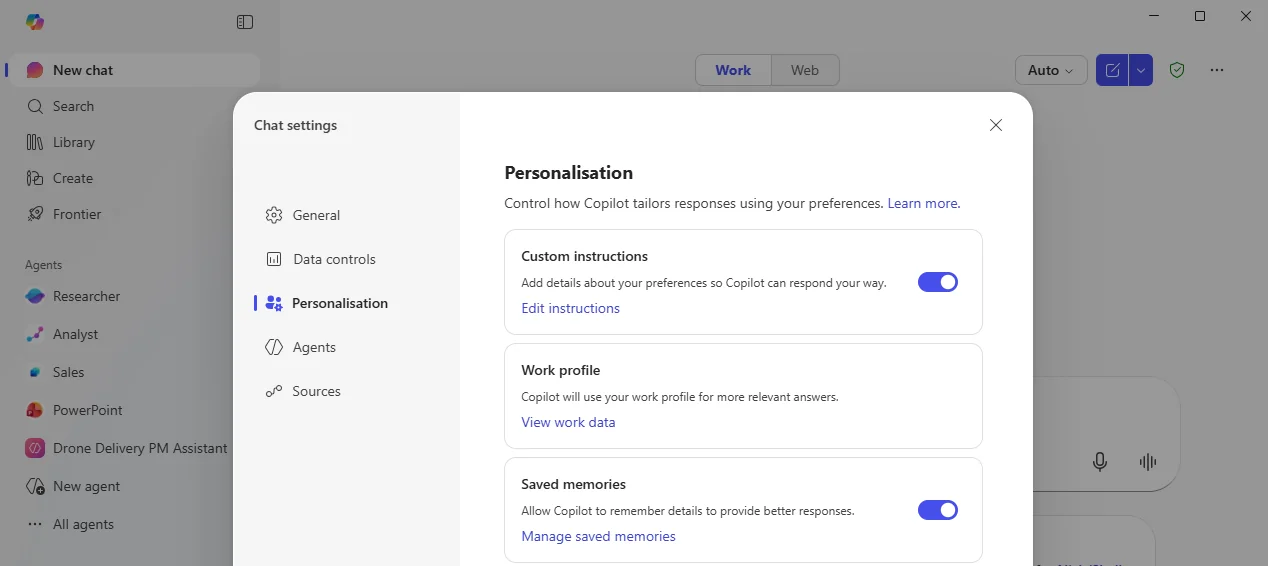
How to find it: Open Copilot Settings and review the Memory and Personalisation controls.
37. Formula Auto-completion in Excel
For: Excel users · Currently rolling out
Excel is rolling out AI-powered formula auto-completion when you type =, helping you continue formulas with less guesswork.
💡 Why it matters: This lowers the intimidation factor of Excel. The moment typing = starts helping you, formula building feels less like memorisation and more like guided completion.
How to find it: In Excel, type = in a cell and look for formula auto-completion suggestions.
New Copilot Connectors
For: All users (admin must deploy connectors)
This month brings eight new Copilot Connectors, making Copilot more useful across file storage, whiteboarding, product planning, engineering, and ServiceNow scenarios.
| # | Connector update | What it adds | Roadmap |
|---|---|---|---|
| 38 | Dropbox | Brings Dropbox content into Copilot | 513282 |
| 39 | Miro | Brings Miro boards and workshop content into Copilot | 515166 |
| 40 | ServiceNow Knowledge templates support | Adds support for ServiceNow Knowledge templates | 505436 |
| 41 | ServiceNow Tickets status update frequency | Adds control over ticket status update frequency | 505437 |
| 42 | Aha! | Brings product ideas and roadmap content into Copilot | 515159 |
| 43 | Shortcut | Brings Shortcut stories and engineering work into Copilot | 515178 |
| 44 | GitLab Merge Requests | Brings merge request context from GitLab Cloud and Server into Copilot | 515162 |
| 45 | Bitbucket Pull Requests | Brings pull request context from Bitbucket into Copilot | 515163 |
💡 Why it matters: Every connector removes one more reason to leave Copilot. If your organisation works across storage platforms, product tools, whiteboards, and engineering systems, these updates help Copilot meet people where the real work already happens.
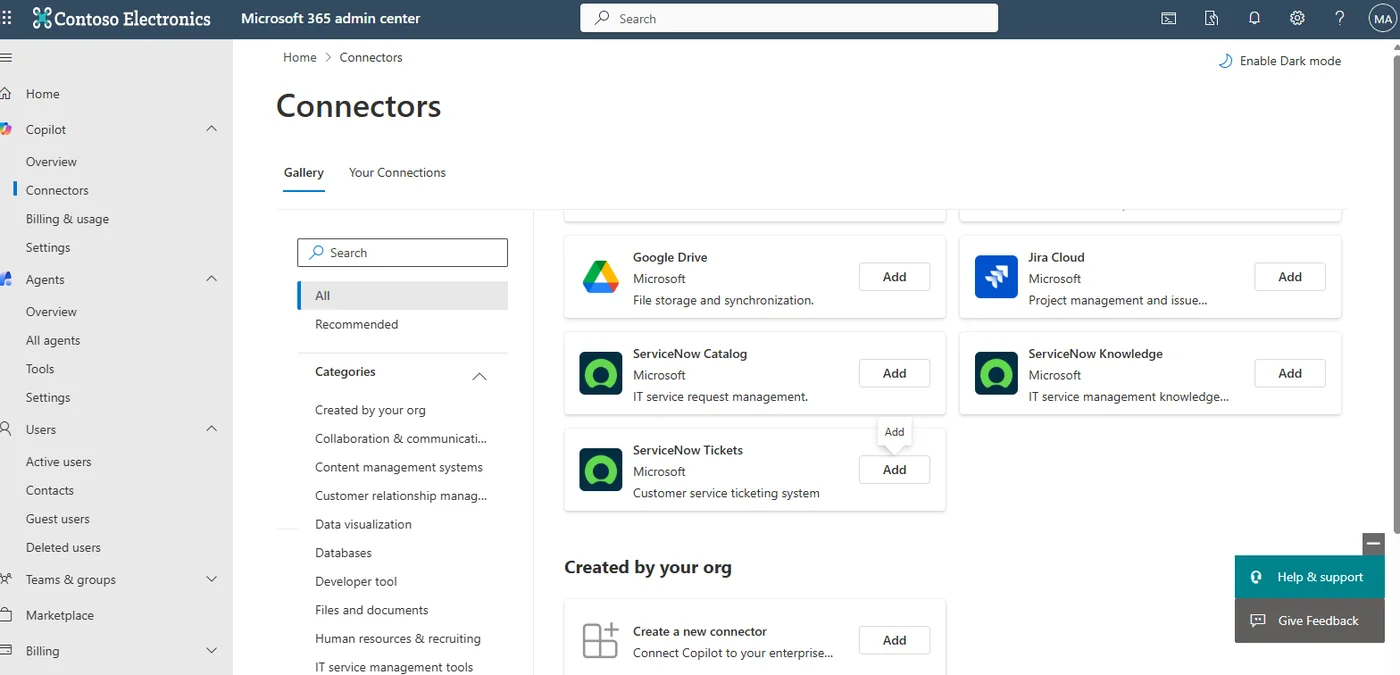
How to find it: Admins deploy connectors from the Microsoft 365 admin center → Settings → Copilot → Connectors. Once deployed, users can ask Copilot questions against the connected systems.
📚 Official Microsoft Resources
- Microsoft 365 Copilot overview
- Microsoft 365 roadmap
- Microsoft 365 Copilot adoption guide
- Copilot Pages
- Agent Mode in Excel
- What’s new in Microsoft 365
🔗 Related Content on This Site
- January 2026 Copilot Updates
- March 2026 Copilot Updates
- April 2026 Copilot Updates
- May 2026 Copilot Updates
- M365 Copilot Full Tutorial
- Master All 6 Copilot Agents
- Browse all AI tutorials
- Daily AI News
💡 Want More?
- 📺 Subscribe to A Guide to Cloud & AI on YouTube for new tutorials every week
- 📰 Check out the AI News page for the latest AI headlines
- ☕ Download free resources
- 📥 Monthly Copilot recaps as free PDF slide packs
Originally published on LinkedIn. This article accompanies a video tutorial on the A Guide to Cloud & AI YouTube channel.