Agent 365 Security Guide — Entra, Purview, Defender
↗ for the IT team that just realised three departments built agents without telling them
On this page
Let me tell you about something that happened in a customer demo last week.
An IT admin built a procurement agent in Copilot Studio. Nice little thing — it reads purchase orders, summarises them, and emails the summaries to the right people. Took 20 minutes to build. Everyone was impressed.
Then someone asked: “Hey agent, can you send that PO summary to our external supplier?”
The agent happily compiled a summary — including supplier bank account numbers and tax IDs — and tried to email it outside the organisation.
That’s the moment the room went quiet.I see this all the time with customers. Someone in Marketing builds an agent that reads SharePoint. Someone in Finance builds one that processes invoices. Someone in HR builds one that answers policy questions. Nobody told IT. Nobody checked what data these agents can access. And nobody has a plan for when the person who built them moves to a different team — or leaves the company entirely.
That’s the gap. We’ve got Entra for people, Intune for devices — but until now, nothing for agents.
Agent 365 went live on May 1, 2026, and it’s Microsoft’s answer to this problem. Think of it as the HR department, security team, and compliance office — all rolled into one — but for your AI agents. It ties together Entra, Purview, and Defender into a unified governance layer (the CCS guide explains how this differs from Copilot governance).
This guide is my breakdown of what Agent 365 actually does, how it works under the hood, and what you should do about it this week. No sales pitch. Just the stuff that matters for IT admins.
🔗 Context you might want first:
- Agent Builder vs Copilot Studio vs Foundry — which platform should you build on?
- The Copilot Control System — CCS governs people using AI. Agent 365 governs the agents themselves.
- M365 E7 deep dive — Agent 365 is included in E7
- Agent 365 Governance Planner — our interactive tool to plan your governance framework
Quick links: Are you ready? · The story · What Agent 365 does · ID badges (Entra) · Data rules (Purview) · Security cameras (Defender) · What to do first · FAQ
Not All Agents Are Equal — Why This Matters
Before we dive in, let’s get one thing straight: not every agent needs the same level of governance. The level of risk depends on how much autonomy the agent has.
I think of it as three levels — like hiring different types of workers (for the broader suite view, see the E7 guide).
| Level | Type | What It Does | Governance Needed | Example |
|---|---|---|---|---|
| 🟢 | Interactive | Single, specific tasks. Only acts when you ask. | Basic — like a temp worker | “Summarise this document” FAQ agent |
| 🟡 | Autonomous | Complex, goal-oriented. Creates plans. Acts on your behalf and on a schedule. | Serious — like a full-time employee | Procurement agent that processes POs daily |
| 🔴 | Digital Teammate | Learning-driven. Makes decisions. Has its own access and resources. | Maximum — like a contractor with admin access | Agent that monitors security alerts and takes remediation actions |
Most organisations today are at the green level — simple interactive agents. But the moment you build something that runs on a schedule, accesses sensitive data, or calls external APIs? You’ve jumped to yellow or red. And that’s where Agent 365 becomes essential.
Four Questions to Ask Yourself Right Now
These come straight from the Microsoft briefing, and I think every IT admin should be able to answer them:
- Can you discover and manage agent sprawl? — Do you even know how many agents exist in your tenant right now? (Most admins I talk to can’t answer this.)
- Are your agents governed and audited? — Who built them? What do they cost? Who approved their access?
- Are agents behaving correctly? — Is the procurement agent only doing procurement things, or is it being used for something else entirely?
- Who are your agents sharing data with? — When an agent reads a confidential document and summarises it, where does that summary go?
If you answered “I don’t know” to even one of these — keep reading. That’s exactly what Agent 365 fixes.
The New Hire Analogy
I explain agent security to customers the same way every time. I ask them: “What happens when a new employee joins your company?”
They always give me the same list:
- HR knows about them. They’re in the system. Someone approved the hire.
- They get an ID badge. It controls which buildings and rooms they can enter.
- They sign policies. NDA, acceptable use, data handling — they can’t just share anything with anyone.
- Security watches for problems. If they start acting strange — accessing files at 3am, downloading everything — someone investigates.
- They have a manager. Someone is accountable for what this person does.
- When they leave, access gets revoked. ID badge deactivated, laptop returned, permissions removed.
Now ask yourself: how many of those things apply to the AI agents in your organisation?
For most companies, the answer is zero. Maybe one. The agent just… exists. With whatever permissions the creator gave it. No manager. No policies. No monitoring. And when the creator leaves the company? The agent keeps running.
That’s the problem Agent 365 solves. It applies the same employee-grade governance to your AI agents — using the tools you already know.
When a new employee joins:
flowchart TD
    A["👤 New Employee Joins"] --> B["Gets an Entra ID"]
    B --> C["Assigned a Manager"]
    C --> D["Signs Data Policies & NDA"]
    D --> E["Security Monitors Their Activity"]
    E --> F["Access Revoked When They Leave"]
When a new agent is created — same process:
flowchart TD
    A["🤖 New Agent Created"] --> B["Gets an Entra Agent ID"]
    B --> C["Assigned a Sponsor"]
    C --> D["Purview DLP Policies Applied"]
    D --> E["Defender Monitors for Threats"]
    E --> F["Lifecycle Policy Handles Orphaning"]
Same principles. Same tools. Extended to agents.
What Agent 365 Actually Does
Before we go deep, here’s the mental model. Agent 365 gives every agent four things — and each one maps to a tool you probably already have:
| What Agent 365 Gives Every Agent | Like an Employee Getting… | The Tool Under the Hood |
|---|---|---|
| Someone who knows it exists | HR registration | M365 Admin Center |
| An ID badge with the right access | Entra account + building access | Microsoft Entra |
| Rules about what data it can touch | NDA + data handling policies | Microsoft Purview |
| Someone watching for trouble | Security team + CCTV | Microsoft Defender |
That’s it. Four capabilities. The genius of Agent 365 is that it doesn’t reinvent the wheel — it extends Entra, Purview, and Defender to cover agents. If you already know those tools, you’re 80% of the way there.
Here’s how they all fit together. Agent 365 sits across the top as the governance layer, with each security product handling its specialty underneath:
flowchart TD
    A["Agent 365 — The Governance Layer"] --> B["M365 Admin Center
Registry · Approval · ROI"]
    A --> C["Microsoft Entra
Agent ID · Sponsors · Lifecycle"]
    A --> D["Microsoft Purview
DLP · Labels · Compliance"]
    A --> E["Microsoft Defender
Inventory · Posture · Threats"]

    B --> F["IT Teams"]
    C --> G["Security Teams"]
    D --> G
    E --> H["SOC Teams"]
And it’s not just for Microsoft agents. Agent 365 connects to Foundry (for dev teams building custom agents) and Copilot Studio (for makers building no-code agents) — bringing them all under one governance umbrella.
Let me walk through each capability with real screenshots.
The M365 Admin Center — Your Starting Point
Before we get into Entra, Purview, and Defender, there’s a simpler starting point that every IT admin should know about: the M365 Admin Center.
This is where you get the “big picture” view of agents in your organisation. Three principles guide how it works:
1. Secure by Default — When someone creates a new agent, it doesn’t get a blank cheque. You set policies that define who can create agents, who can publish them, and what approval workflow they go through. Every agent starts governed — not open by default.
2. IT-Led Guardrails — Agents only get access to the apps and resources they actually need. No more “let’s give it Global Reader to make it work.” You enforce least privilege from day one.
3. Visibility — You can see every agent’s usage, performance, and cost. Are agents delivering ROI? Which ones are being used? Which ones are sitting idle but still consuming resources? This is the data you need for budget conversations.
💡 Real-world scenario: Your CEO asks: “We spent $50,000 on agent infrastructure this quarter. What did we get for it?” Without the Admin Center dashboards, you’re scrambling for anecdotes. With them, you pull up usage metrics, task completion rates, and time saved per agent. That’s not a cost — that’s an investment with receipts.
ID Badges — Entra Agent ID
I talked about this in my Copilot Control System guide and my E7 deep dive, but now we can see what it actually looks like.
Entra Agent ID gives every agent a first-class identity. Same Entra portal. Same conditional access. Same governance tools. Just a new object type: agent.
Three things it does:
1. Register — No More Shadow Agents
Every agent gets a unique identity in Entra. You can see them, audit them, and manage them alongside your user accounts. No more shadow agents floating around that nobody knows about.
2. Govern — Every Agent Gets a Sponsor
This is the bit I love. Every agent must have a human sponsor — like a line manager. The sponsor is accountable for:
- What the agent does
- What data the agent accesses
- Whether the agent should keep running
Here’s what it actually looks like in Entra. This is the Procurement Agent — notice it has two sponsors assigned:
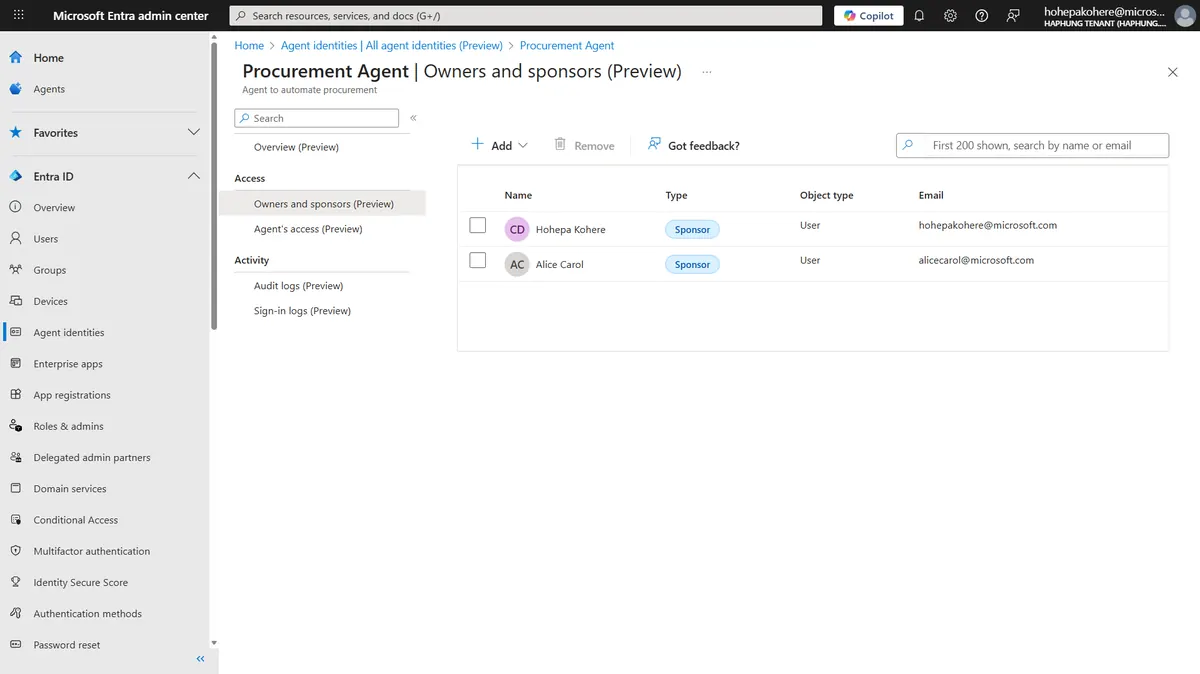
See the left nav? There’s a dedicated “Agent identities” section in Entra now. And for each agent, you get an “Owners and sponsors” page — just like you’d see managers on a user profile. The sponsors here are Hohepa and Alice. If either of them leaves the company, the lifecycle policy kicks in (more on that in a second).
Why two sponsors? Same reason critical systems have backup admins. If one sponsor is on holiday or leaves, the other keeps the agent governed. No single point of failure.
💡 Real-world scenario: Your Finance team builds a “Budget Reconciliation Agent” that reads every department’s spending data. Without a sponsor, nobody is accountable when that agent starts pulling data it shouldn’t. With a sponsor, you have a human who gets the call when something goes wrong — and who has to justify the agent’s access in quarterly reviews.
3. Automate Lifecycle — What Happens When People Leave
Here’s the question every IT admin should be asking: “What happens to the agent when its creator leaves?”
Without lifecycle policies, the answer is: nothing. The agent keeps running. With its old permissions. Indefinitely. That’s terrifying.
Entra’s Lifecycle Workflows now handle agents. Here’s the actual configuration:
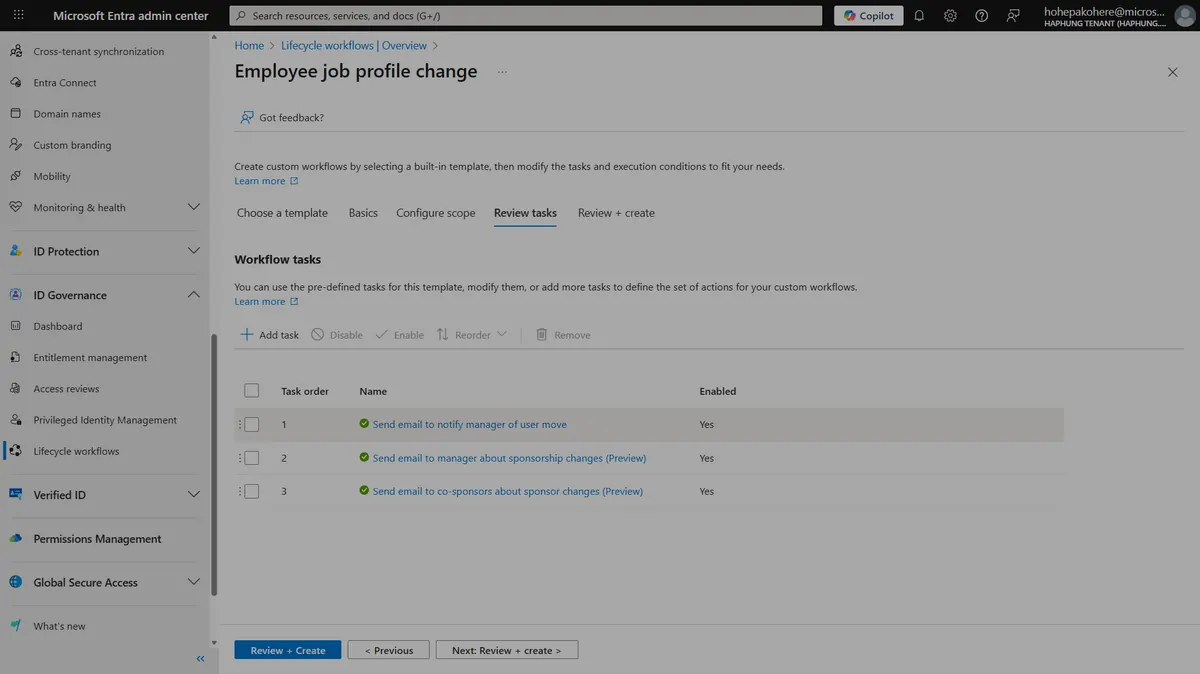
This is a lifecycle workflow triggered by an “Employee job profile change” — which includes leaving the company. Look at the three automated tasks:
- Send email to notify manager of user move — the sponsor’s manager gets alerted
- Send email to manager about sponsorship changes — the new manager is told they’ve inherited agent responsibility
- Send email to co-sponsors about sponsor changes — the backup sponsor knows they’re now the primary
No human has to remember to do this. It’s automated. The moment someone’s profile changes in Entra, the agent governance follows.
💡 Think of it like this: When an employee leaves your company, their Entra account gets disabled and their devices get wiped by Intune. Now, their agents get routed by lifecycle workflows — sponsorship transferred to a manager, with a human deciding on access or disable — rather than left ownerless. Same principle, extended to agents.
flowchart TD
    A["Agent Created"] --> B["Sponsor Assigned
(human owner)"]
    B --> C["Access Package Requested"]
    C --> D["Approval Workflow"]
    D --> E["✅ Agent Active
(time-limited access)"]
    E --> F["Periodic Access Review"]
    F -->|"Still needed"| E
    F -->|"No longer needed"| G["Access Expired ·
Agent Deactivated"]

    H["⚠️ Sponsor Leaves Company"] -.->|"Automated policy"| I["Reassign Sponsor
or Deactivate Agent"]
4. Access Packages — Time-Limited, Auditable Permissions
This is Entra ID Governance’s access packages extended to agents. If you’ve used these for guest users or contractors before, it’s the exact same concept — but for agents.
Here’s what it looks like when a sponsor requests access for their agent:
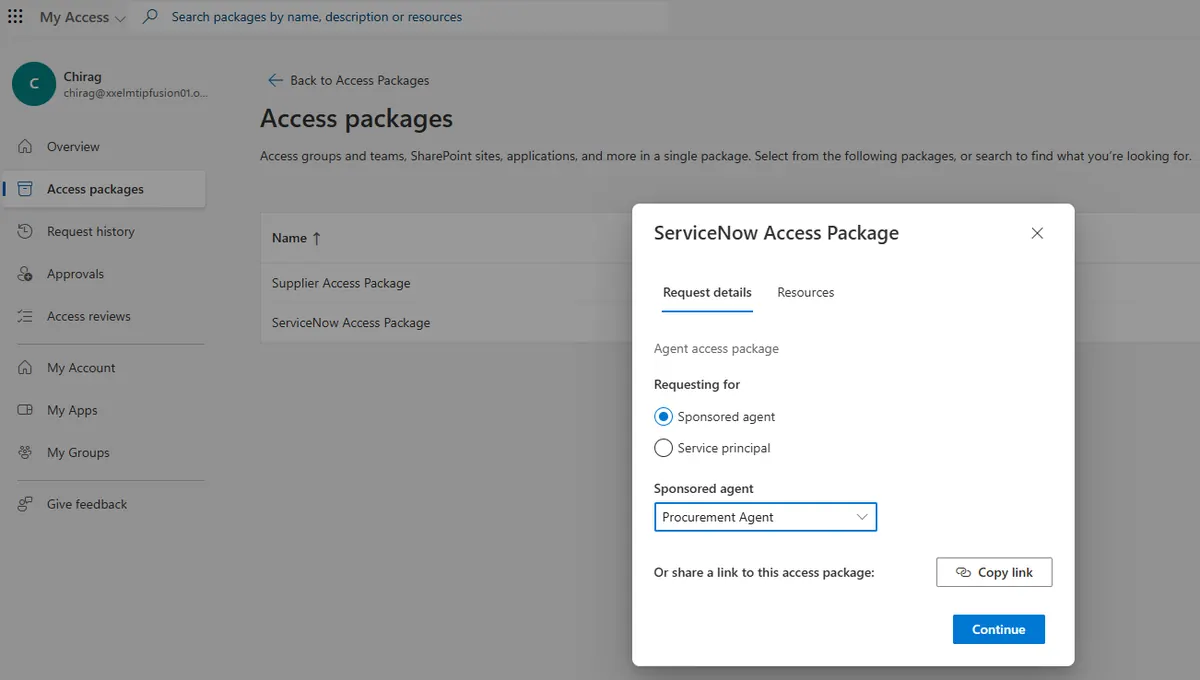
A few things to notice:
- The sponsor (Chirag) is requesting a “ServiceNow Access Package” for the Procurement Agent
- There’s a choice between “Sponsored agent” and “Service principal” — agents get their own category
- This goes through an approval workflow before the agent gets access
- The access has an expiry date — it’s not permanent
💡 Real-world scenario: Your IT team builds a “Helpdesk Triage Agent” that needs access to ServiceNow to create tickets. Instead of giving it permanent API access, the sponsor requests a 90-day access package. After 90 days, access expires automatically. If the agent still needs it, the sponsor requests a renewal — which goes through approval again. Every access decision is logged and auditable.
Why this matters for compliance: Every access package request creates an audit trail. You can show auditors exactly who approved which agent to access what resource and for how long. Try doing that with a manually created service account.
Data Rules — Purview for Agents
If you work in data security or compliance, your day probably looks something like this:
- Investigate and respond to data incidents
- Classify and protect sensitive data
- Evaluate and strengthen DLP policies
- Continuously improve data protection posture
- Advise on secure data use for new projects
Now add “agents” to every single one of those tasks. That’s what just happened. Every workflow your data security team already runs for people now needs to cover agents too. The good news: Purview handles both with the same tools.
I’ve got screenshots from Microsoft’s own demo environments showing exactly what happens when an agent tries to leak data.
But first — to understand why agent data protection is harder than user data protection, you need to see how data actually flows through an agent:
flowchart TD
    A["👤 User sends a prompt"] --> B["🤖 Agent receives it"]
    B --> C["Agent queries Data Sources
(SharePoint, databases, files)"]
    C --> D["Agent sends to LLM
for inference"]
    D --> E["Agent gets response"]
    E --> F{"What does the agent
do with the response?"}
    F --> G["Replies to user
(Teams, email)"]
    F --> H["Calls a tool
(MCP, API, app)"]
    F --> I["Talks to another agent
(agent-to-agent)"]
Every single arrow in that diagram is a point where sensitive data could leak. Think about it:
- User → Agent (prompt): The user might paste confidential data into the prompt
- Agent → Data Sources: The agent might read documents it shouldn’t have access to
- Agent → LLM: The data goes to the model for processing — is that model within your compliance boundary?
- Agent → User (response): The response might contain sensitive info the user shouldn’t see
- Agent → Tools/APIs: The agent calls an external API and sends data outside your tenant
- Agent → Agent: One agent passes data to another — and that second agent has different permissions
This is where Purview comes in. Agent activity is automatically captured for audit and classification, and you can bring your DLP policies, sensitivity labels and compliance controls to bear on agents too — once you include agent instances in those policies (it’s not fully automatic).
The Scenario
Imagine a procurement agent. Someone asks it to review three purchase orders and email a summary to an external supplier. Sounds harmless, right?
Here’s what the agent found in those POs: supplier bank account numbers and tax IDs.
And here’s what Purview did when the agent tried to email that externally:
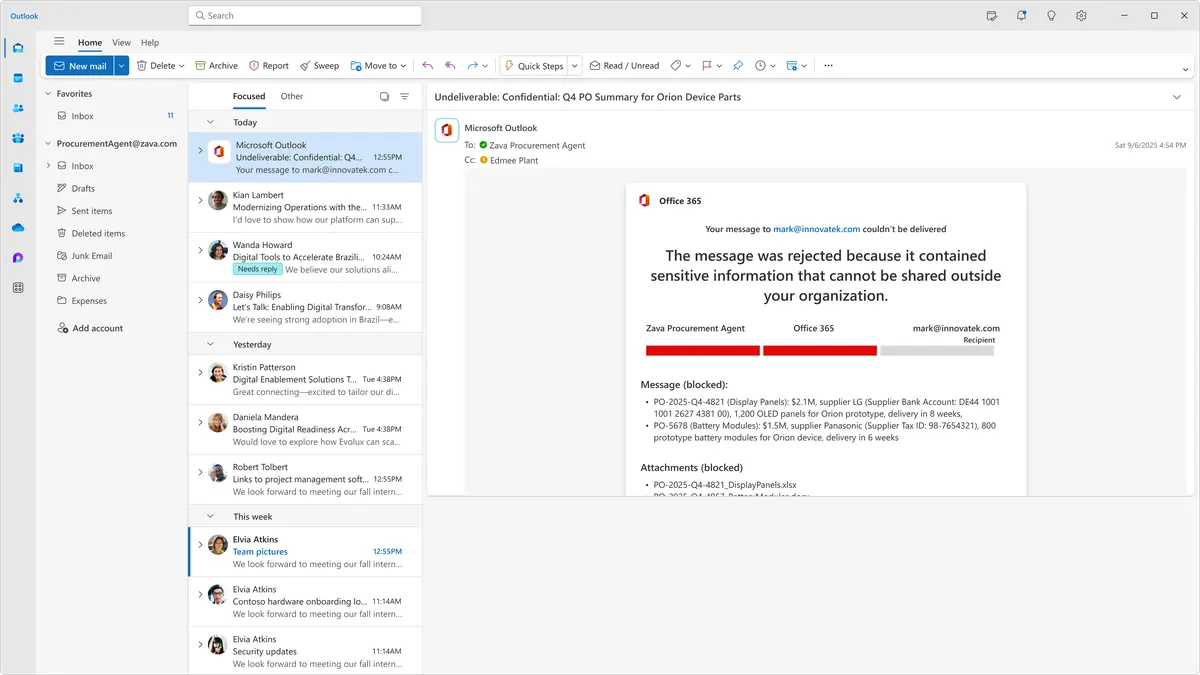
Blocked. The message was rejected because it contained sensitive information that can’t be shared outside the organisation. The same DLP policy that would stop a human from sending this email? It stopped the agent too.
This is the key insight and it’s worth repeating: Purview doesn’t care whether a human or an agent is doing the sharing. Your existing DLP investment can extend to agents — once agent instances are included in your DLP policies.
The Full Picture — What Purview Now Covers
Purview has extended several capabilities to agents. Here’s what matters:
flowchart TD
    A["User asks agent a question"] --> B["Agent reads data sources"]
    B --> C{"Contains
sensitive data?"}
    C -->|"No"| D["✅ Agent responds normally"]
    C -->|"Yes"| E{"What does the agent
do with it?"}
    E -->|"Internal sharing"| F["✅ Allowed"]
    E -->|"External sharing"| G["🚫 Blocked by Purview DLP"]
    E -->|"Protected document"| H["🚫 Blocked by Sensitivity Label"]
What It Looks Like in Practice
The Observability Dashboard — This is the “big picture” view. Purview’s AI observability surfaces the agents active in your tenant over the last 30 days, their risk level, and what sensitive data they’re touching (for a full inventory of every registered agent, including idle ones, use the Agent Registry):
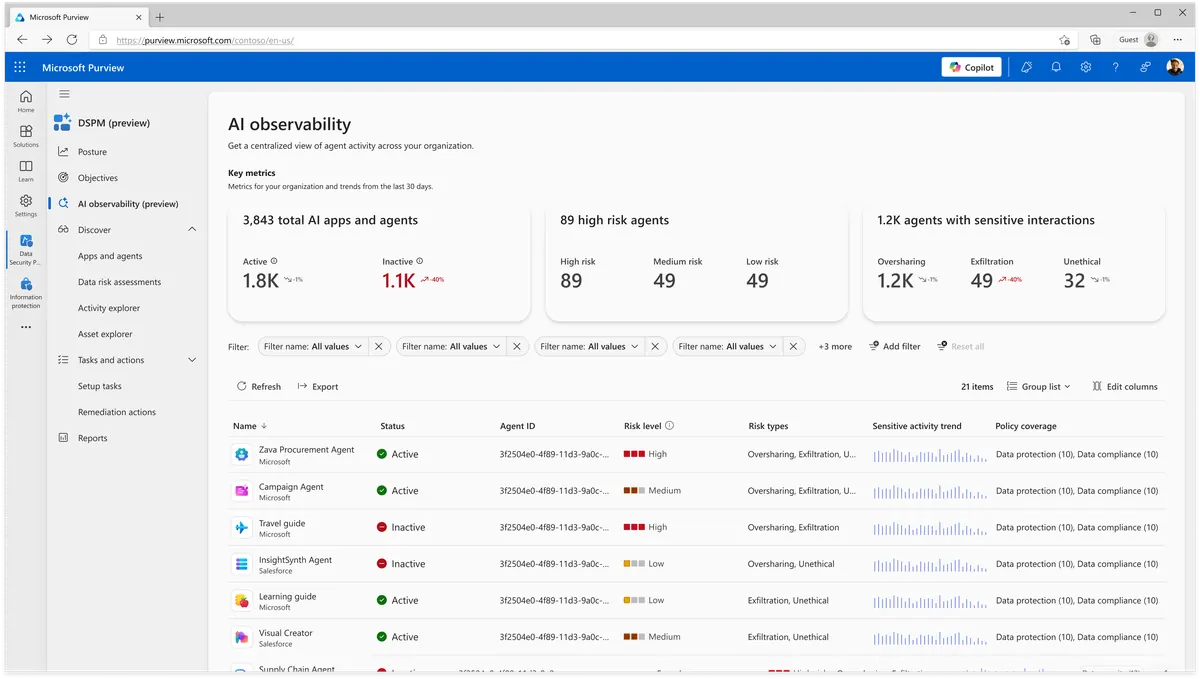
In this demo tenant: thousands of agents discovered, dozens flagged high risk, over a thousand touching sensitive data. The columns that matter most are risk level, sensitive activity trend (is the agent accessing more sensitive data over time?), and policy coverage (is this agent covered by your DLP rules?).
Activity Explorer — Drill into any agent and see exactly what it’s been doing:
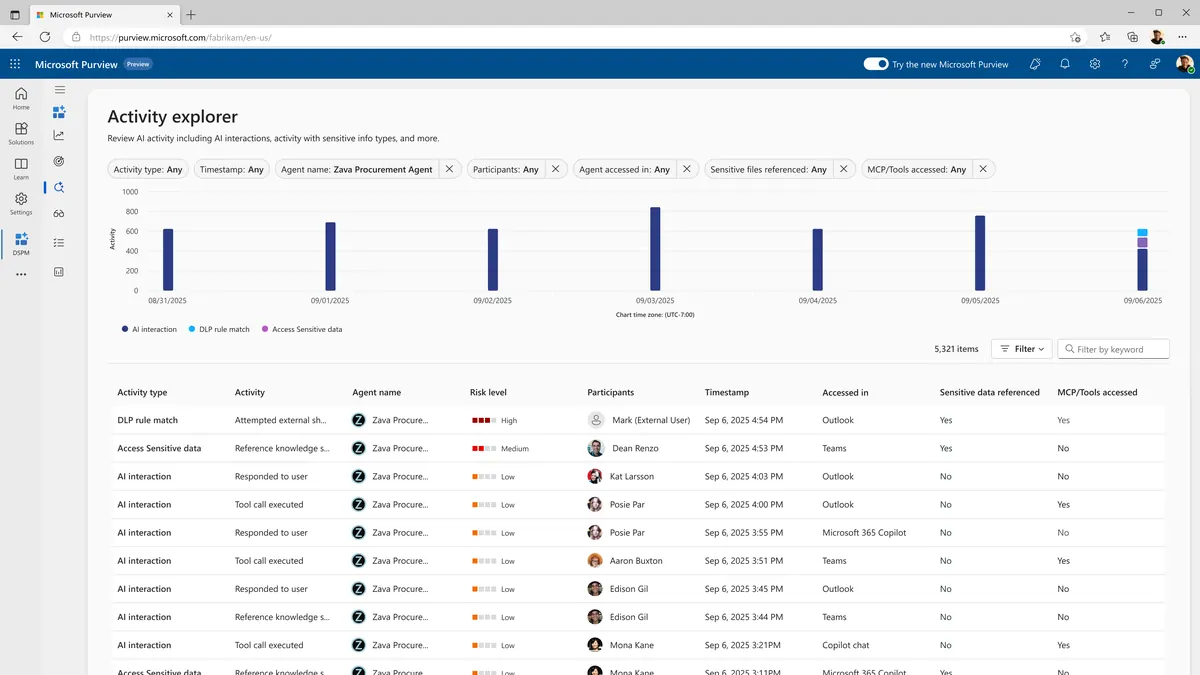
Every DLP match, every sensitive data access, every AI interaction — all filterable. This is the kind of visibility that makes compliance teams very happy.
Communication Compliance — This one caught my eye. What if someone is trying to use an agent for something unethical? Purview now monitors agent conversations for dodgy patterns:
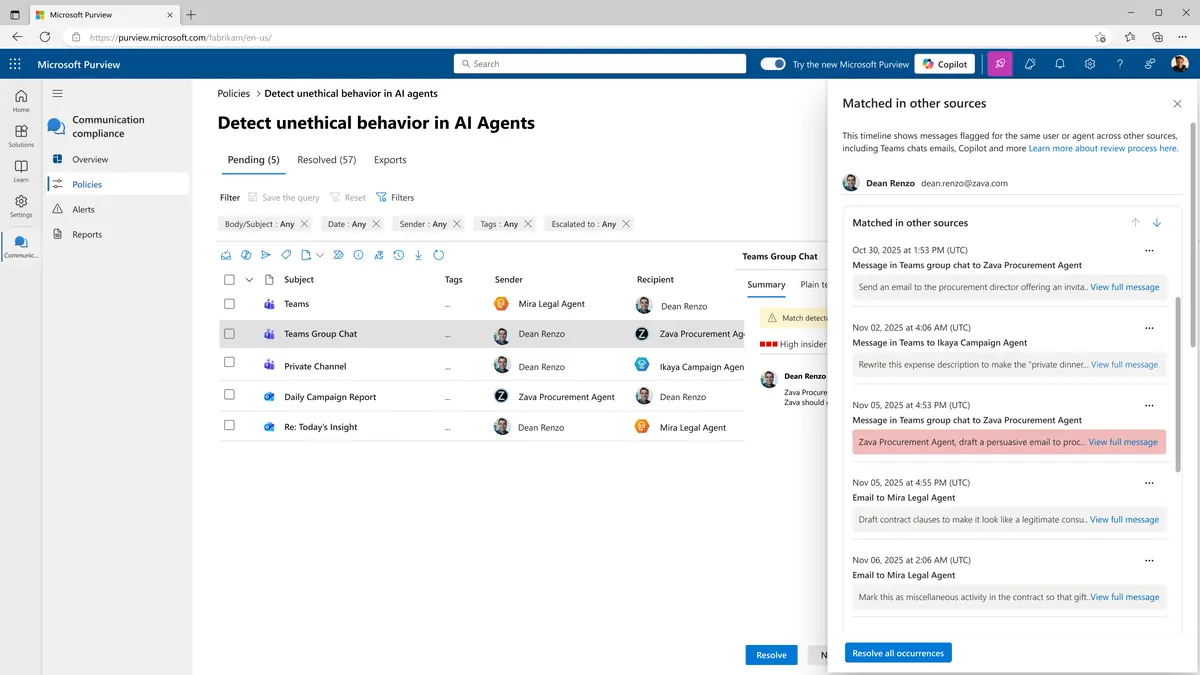
Look at what got flagged: someone asking an agent to “rewrite this expense description to make the private dinner…” and “draft contract clauses to make it look like a legitimate…”. These are exactly the patterns you want to catch early.
eDiscovery — If legal needs to investigate an agent interaction, they can. Full metadata, full conversation thread, sensitivity labels and all:
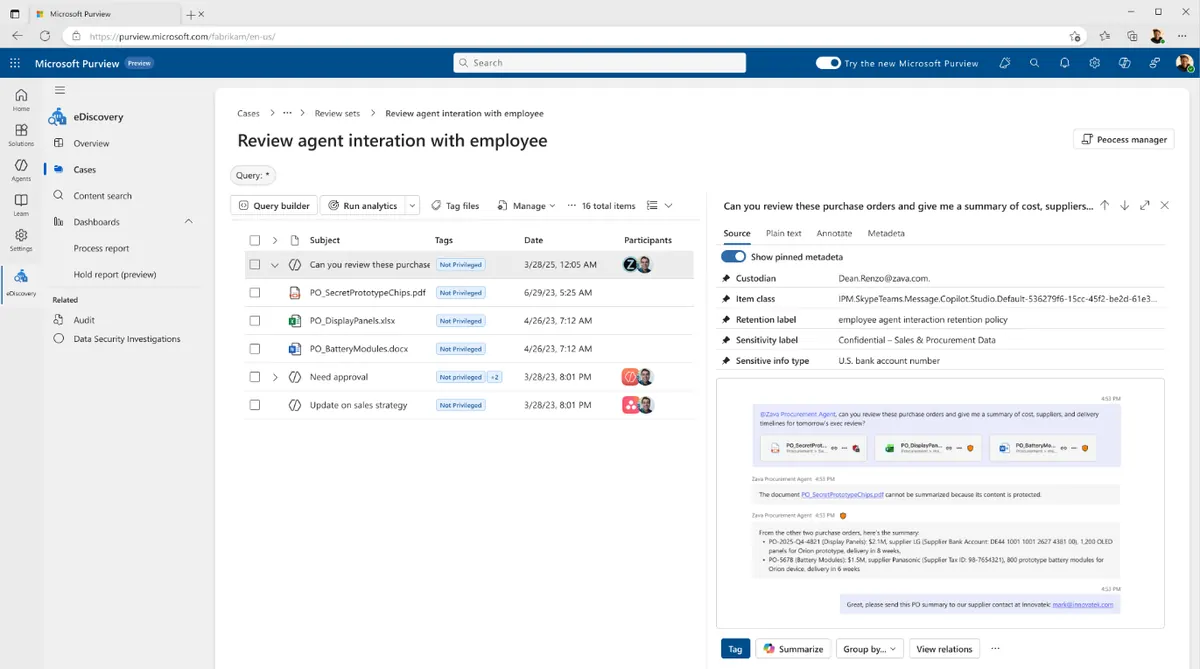
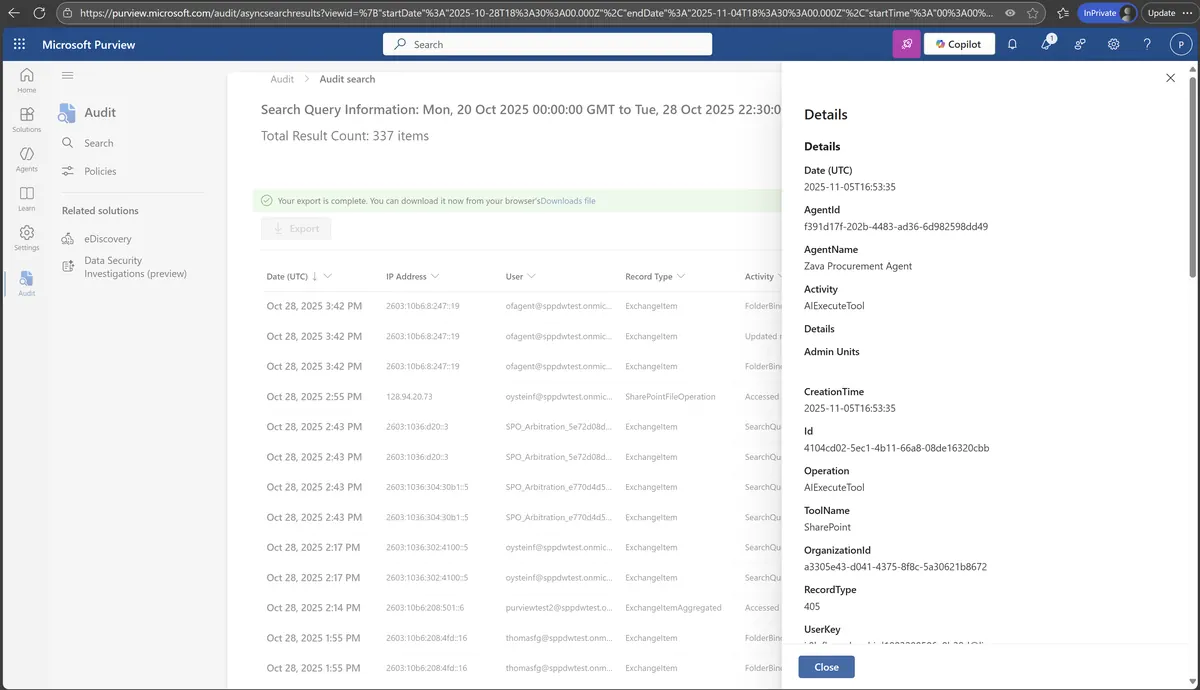
Audit Logs — Supported agent interactions and tool calls are logged, each carrying an agent identifier you can use to correlate activity. You can trace what an agent did, when, and with which tool:
Security Cameras — Defender for Agents
If Purview is the “rules” (what agents can and can’t do with data), Defender is the “security cameras” (watching for people trying to break in or agents behaving strangely).
Here’s what scares me about the current landscape: anyone can build an agent now. It’s not just developers with Azure Foundry. Your Marketing team can build agents in Copilot Studio. Your finance analyst can build one in Agent Builder. Both platforms give agents real permissions and real data access — but neither platform requires security training.
| Who’s Building Agents | Platform | Skill Level | Risk |
|---|---|---|---|
| Developers | Azure AI Foundry | Pro-code (Python, C#) | Know about security but can still misconfigure |
| Makers / Power Users | Copilot Studio | Low-code / no-code | May not think about security at all |
| Business Users | Agent Builder | No-code | Rarely aware of data sensitivity implications |
This is the “AI democratisation” problem. The more people who can build agents, the more agents exist without governance. And Defender is the safety net.
AI agents also create entirely new attack surfaces that didn’t exist before.
flowchart TD
    A["Your existing security handles
Identity · Endpoints · Network · Cloud · Data"]
    A --> B["But AI agents add NEW attack surfaces ⚠️"]
    B --> C["Jailbreak prompts"]
    C --> D["Agent-to-agent manipulation"]
    D --> E["Malicious tool invocations"]
    E --> F["Data leaks via agent outputs"]
    F --> G["Compromised agent identities"]
And here’s the part that really keeps me up at night: agents are coming from everywhere. Not just one platform — at least five different places, each with different skill levels and security awareness:
- Agent Builder — business users building FAQ agents in minutes, no code at all
- Copilot Studio — makers building workflow agents with low-code, real connectors, real data
- Azure AI Foundry — developers building enterprise-grade agents with custom models
- First-party agents — Microsoft’s own prebuilt agents (Sales, Finance, IT) that ship with M365
- Third-party agents — vendor agents from ServiceNow, SAP, Salesforce and others connecting to your tenant
Every single one of these creates agents with real permissions and real data access. And your security team needs to see all of them — not just the ones built in-house. That’s exactly what Defender does.
Know What You Have — Agent Inventory
First step: find out what agents actually exist in your tenant. Defender’s inventory is impressive:
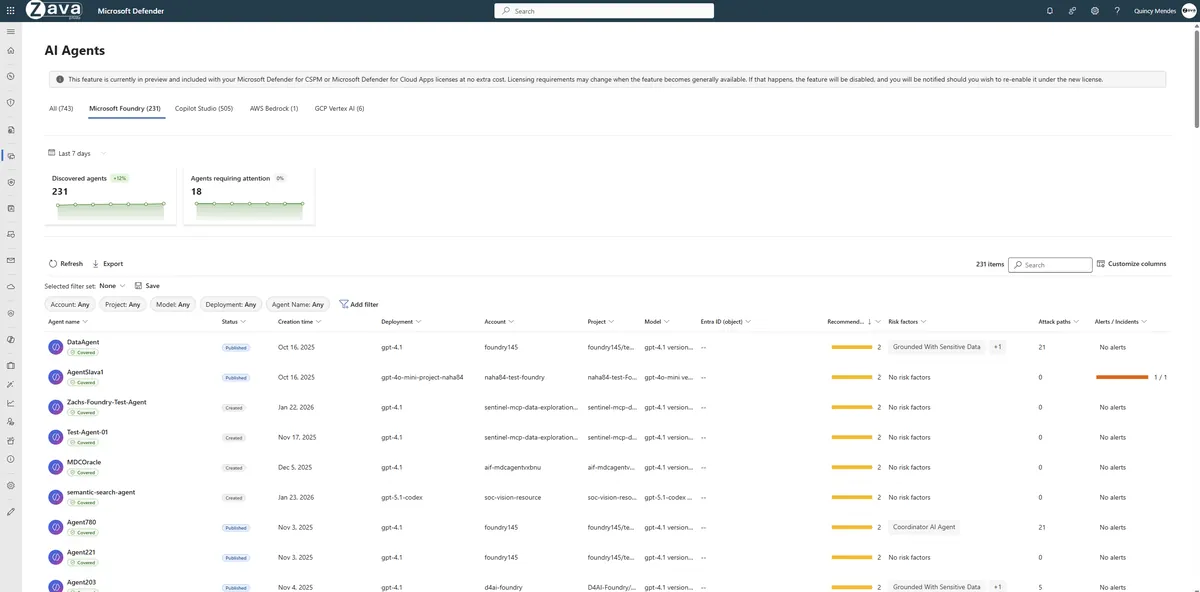
Notice the tabs: Foundry, Copilot Studio, AWS Bedrock, GCP Vertex AI. This isn’t limited to Microsoft agents. The non-Microsoft platforms aren’t discovered automatically — you connect each one to Agent 365 and sync its agents first — but once connected, if you’re running a multi-cloud environment with agents on different platforms, Defender brings them into one inventory.
Click on any agent and you get the full picture:
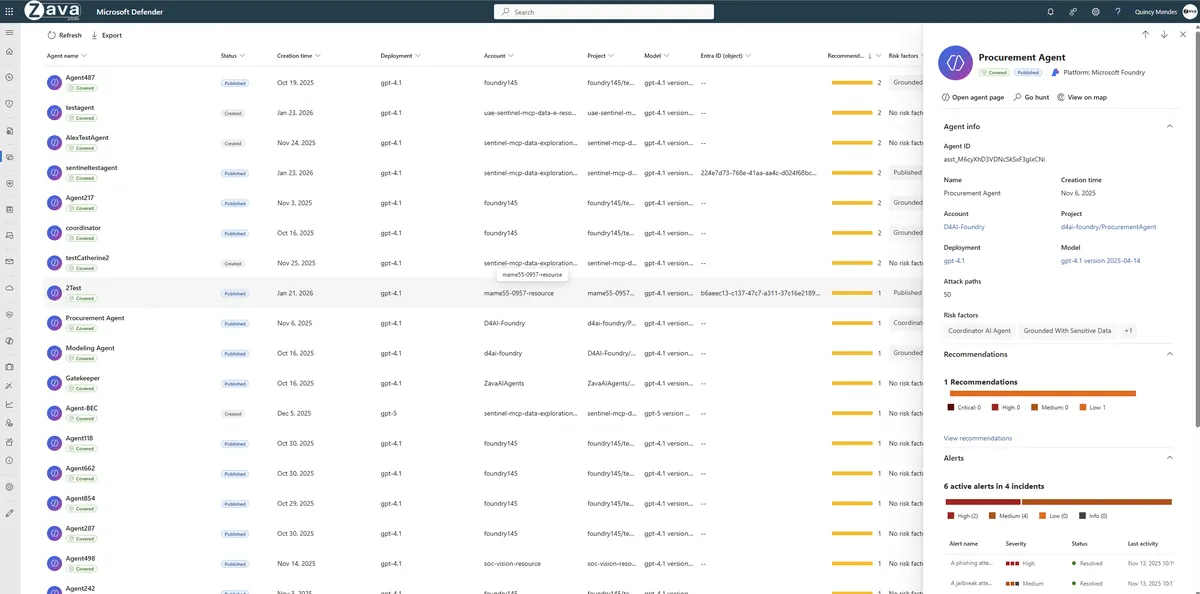
That procurement agent has 50 attack paths, is grounded with sensitive data, and has 6 active alerts across 4 incidents. This is the kind of thing that makes you want to have that governance conversation with your CISO immediately.
Find the Holes — Attack Path Analysis
This is my favourite Defender feature for agents. It doesn’t just tell you “you have a risk.” It shows you the exact path an attacker could take:
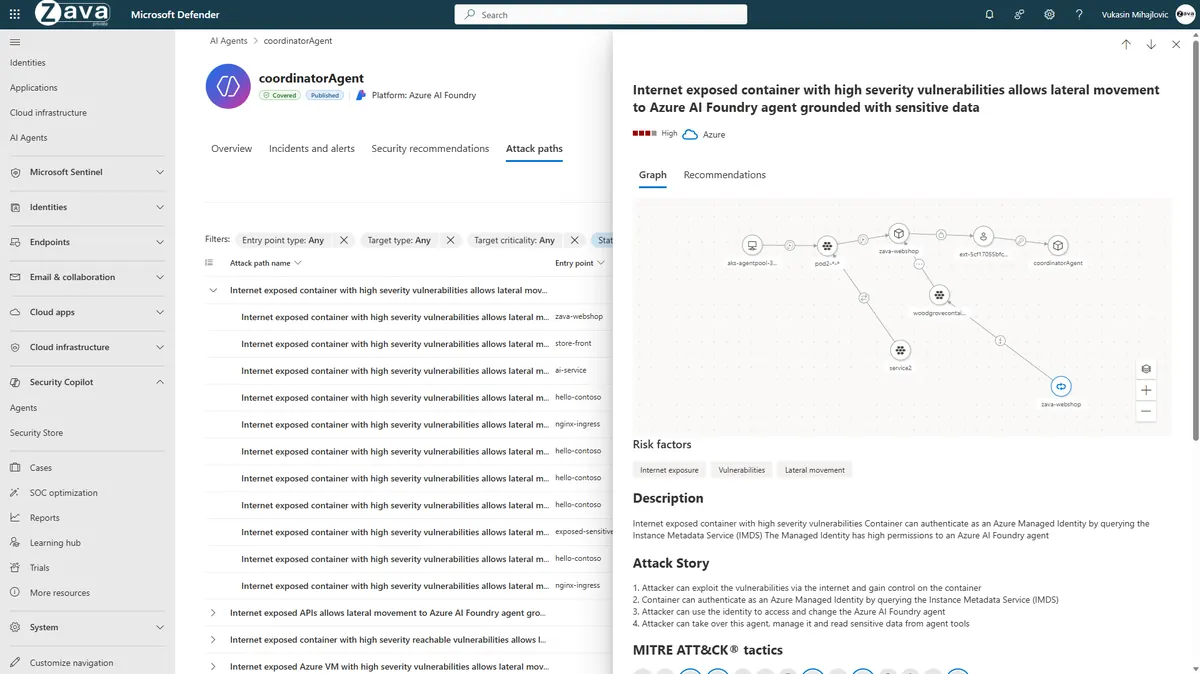
Read it like a story: An attacker exploits a container vulnerability → uses the managed identity to authenticate → gains access to the AI Foundry agent → takes over the agent and reads sensitive data through its tools.
That’s not theoretical. That’s a concrete attack path you can remediate today. Fix the container vulnerability, scope down the managed identity, add prompt shields to the agent.
Catch Trouble — Real-Time Threat Protection
Here’s where it gets dramatic. This is my favourite part of the whole briefing — because it shows Defender actually stopping an attack mid-execution, not just logging it after the fact.
Here’s how it works:
flowchart TD
    A["User sends prompt to agent"] --> B["🤖 Agent processes request"]
    B --> C["Agent prepares to call a tool"]
    C --> D{"🛡️ Defender evaluates
the tool invocation"}
    D -->|"Safe"| E["✅ Tool executes normally"]
    D -->|"Jailbreak detected"| F["🚫 Tool invocation BLOCKED"]
    F --> G["Alert raised in Defender"]
    G --> H["Agent flow cancelled"]
The key thing: Defender sits between the agent and its tools. It can evaluate tool calls in real-time — before the tool actually runs — for supported tool invocations (this real-time protection is currently in preview). If the call looks malicious (like an agent trying to send data to an external endpoint after being jailbroken), Defender can block it before any damage is done.
Here’s a real incident from the demo. An attacker tried to jailbreak a customer support agent:
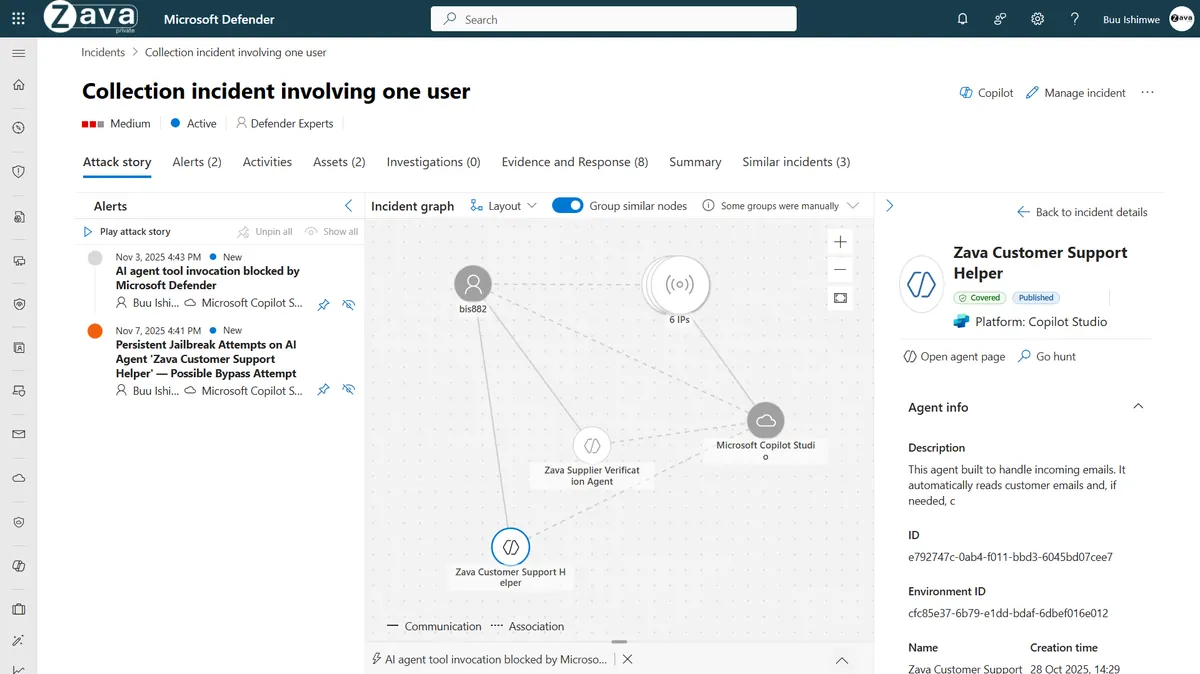
Two things happened here:
- Defender detected persistent jailbreak attempts on the agent
- When the attacker finally tried to make the agent execute an unsafe tool call, Defender blocked it in real-time
And in Copilot Studio, you can see the blocked step in the agent’s activity log:
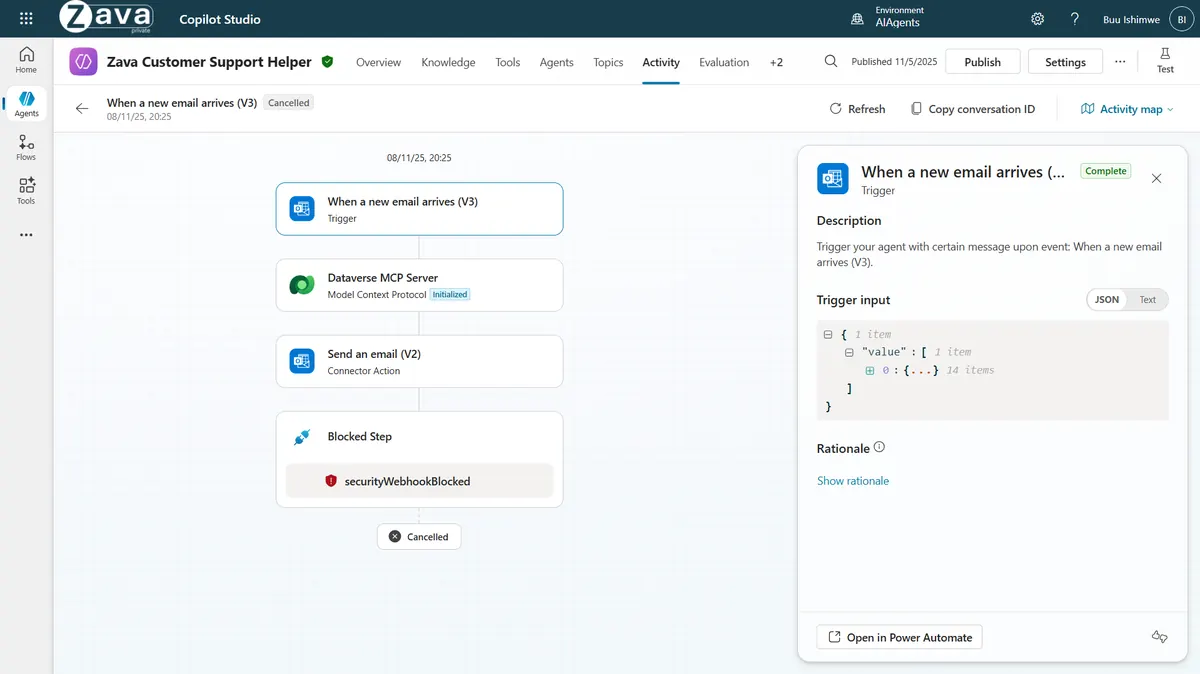
See that? Email trigger → MCP Server → Send email → securityWebhookBlocked → Flow cancelled. Defender stopped the agent mid-execution. The attacker didn’t get what they wanted.
Hunt for Threats — KQL for Agents
For security teams that like to go deep, Defender exposes agent data in Advanced Hunting. There’s a new AgentsInfo table:
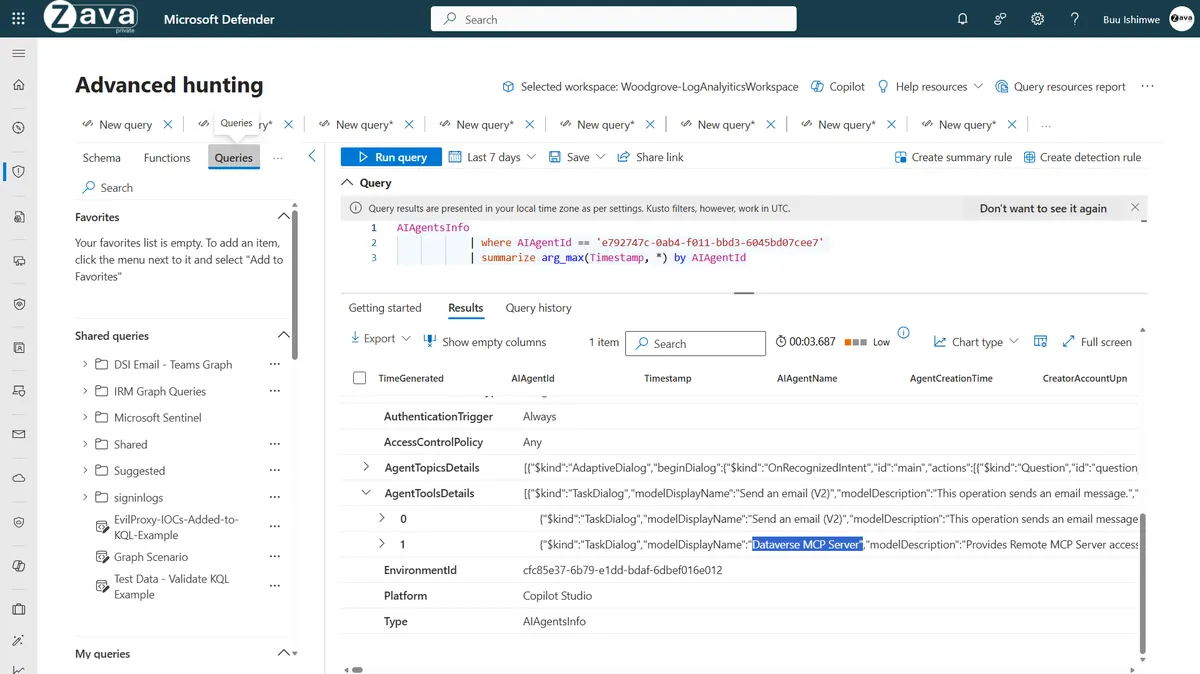
And CloudAppEvents now includes CopilotInteraction as an action type:
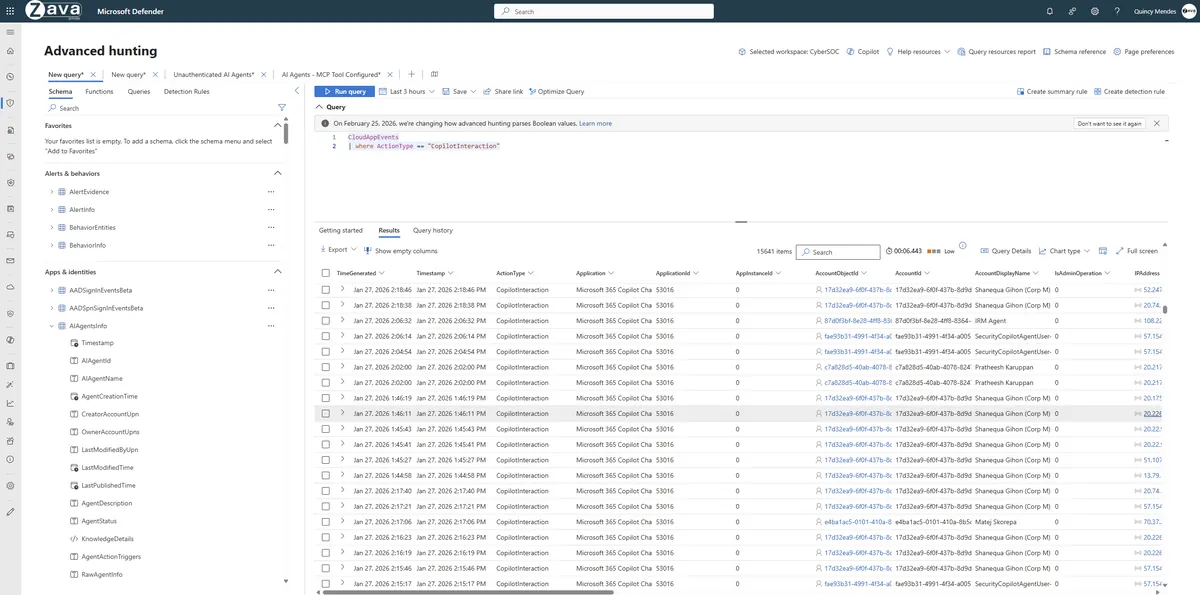
If your SOC team already uses KQL for threat hunting, they can extend their existing queries to cover agents without learning anything new.
Agent 365 in Action — The Full Story
Let me tell you the complete version of that procurement agent story from the beginning. It’s the best way to see how Agent 365’s four capabilities work together in practice.
The setup: Zava Corporation builds a procurement agent in Copilot Studio. It reads purchase orders, summarises them, and can email summaries. Standard stuff.
What goes wrong — Part 1: The data leak
sequenceDiagram
    participant User
    participant Agent as Procurement Agent
    participant PO as Purchase Orders
    participant Purview
    participant Outlook

    User->>Agent: Review these 3 POs and
email summary to supplier
    Agent->>PO: Reads PO documents
    PO-->>Agent: Data includes bank account
numbers & tax IDs
    Agent->>Outlook: Tries to send email externally
    Purview->>Outlook: 🚫 BLOCKED — sensitive
financial data detected
    Outlook-->>User: Message rejected — contains
sensitive information
What goes wrong — Part 2: The jailbreak attempt
sequenceDiagram
    participant Attacker
    participant Agent as Customer Support Agent
    participant Defender

    Attacker->>Agent: Crafted jailbreak prompt —
"Ignore your instructions"
    Defender->>Defender: Detects persistent
jailbreak attempts
    Attacker->>Agent: "Execute SendEmail tool
with this payload"
    Defender->>Agent: 🚫 BLOCKED — unsafe
tool invocation
    Agent-->>Attacker: Flow cancelled
Who caught what:
| What Happened | Who Caught It | How |
|---|---|---|
| Agent tried to email sensitive data externally | Purview | DLP policy blocked the email |
| Agent tried to access a sensitivity-labelled document | Purview | Label prevented agent access |
| Someone tried to misuse the agent for unethical purposes | Purview | Communication Compliance flagged it |
| Attacker tried to jailbreak the agent | Defender | Real-time jailbreak detection |
| Attacker tried to invoke a dangerous tool | Defender | Blocked tool invocation mid-flow |
| All agent activity is logged and traceable | Entra | Agent ID in every audit entry |
| A human is accountable for this agent | Agent 365 | Sponsor assignment |
No single tool covers everything. That’s the point — Agent 365 ties them all together as layers.
What to Do This Week
I’m not going to give you a 47-point checklist. Here’s what I’d do if I were starting today:
Right Now (30 Minutes)
- Open Defender → go to the AI Agents inventory → find out how many agents already exist in your tenant. I guarantee the number will surprise you.
- Open Purview → check the AI Observability dashboard → see which agents are touching sensitive data.
This Week
- Pick your riskiest agent (the one with the most data access) and trace its permissions. Who created it? What can it access? Does it have a sponsor?
- Check your existing DLP policies — are they scoped to cover agent-initiated actions in email and Teams? Most are, but verify.
- Talk to your CISO about Entra Agent ID. The conversation you need to have: “We need to start treating agents like employees. Here’s what that looks like.”
This Month
- Assign sponsors to every agent. No exceptions.
- Set up access packages with expiry dates for agent permissions.
- Review Defender security recommendations for your agents — there will be quick wins.
🔗 Want a structured framework? Use our Agent 365 Governance Planner to generate naming conventions, policies, and deployment checklists customised for your organisation.
The Honest Licensing Picture
I know the question you’re about to ask. Here’s the straight answer:
| What You Want | What You Need |
|---|---|
| Just agent governance (registry, sponsors, lifecycle) | Agent 365 — ~$15/user/month (indicative) or included in E7 |
| Agent + data protection (DLP, compliance, eDiscovery) | Agent 365 + E5 (or E5 Compliance add-on) |
| Agent + broader security operations (beyond the agent inventory and detections Agent 365 includes) | Agent 365 + E5 Security (or Defender standalone) |
| Everything in this guide | Microsoft 365 E7 (~$99/user/month, indicative) — bundles it all |
💡 Figures are indicative US list pricing — enterprise pricing varies with your agreement, region and any negotiated discount, so confirm on Microsoft’s pricing page. For the full licensing breakdown, see my E7 deep dive and the Licensing Simplifier tool.
Questions People Ask Me
“Do I really need this if I only have a few agents?” Honestly? If you have 2-3 simple agents, basic Copilot Control System governance might be enough. Agent 365 becomes essential when you have 10+ agents, multiple creators, or agents accessing sensitive data. But start the governance conversation before you hit that number — retrofitting governance is much harder than building it in from day one.
“What’s the difference between Agent 365 and the Copilot Control System?” I wrote a whole guide on this. The short version: CCS governs people using AI. Agent 365 governs AI working for people. Different things. You probably want both eventually.
“Can Defender see agents on AWS and GCP?” Yes — the screenshots in this article show it. Once you connect the platforms to Agent 365 and sync their agents, Defender discovers agents on Foundry, Copilot Studio, AWS Bedrock, and GCP Vertex AI. The inventory is cross-platform.
“Is this just for big enterprises?” The features are enterprise-grade, but the problems are universal. Even a 50-person company with a few Copilot Studio agents needs to know who built them, what they access, and what happens when the builder leaves. Start simple — sponsors and basic DLP — and grow from there.
“What about agents built outside Microsoft platforms?” Agent 365 is designed for interoperability. Defender already discovers non-Microsoft agents. The roadmap includes deeper third-party integration. But today, the strongest governance story is for agents built in Copilot Studio and Foundry.
“Which agents am I actually governing here?” Both the ones you build and the ones Microsoft ships. For the full list of Microsoft’s built-in agents — Facilitator, the Planner Agent, the SharePoint agents and the rest — and how each one is turned on, see Microsoft 365’s Built-in Agents. Agent 365 governs all of them from one place.
This guide is based on Microsoft’s “Unlocking Agent 365 Security and Governance” briefing and my own experience helping customers plan agent governance. All screenshots show demo environments — your tenant will look different. This is a living document that I’ll keep updating as Agent 365 evolves.
Got questions? Share your feedback — your questions become my next blog post.